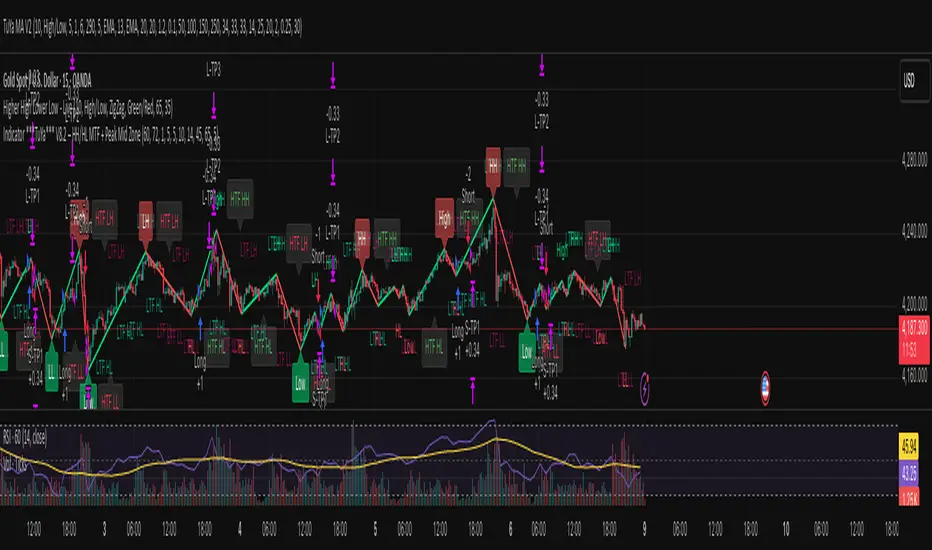
Ryan Bot Signals ProRyan EMA Trend Screener Pro โ Smart Auto Signals + TP/SL Engine + MTF Dashboard
Ryan EMA Trend Screener Pro is an advanced trading system that combines
โ EMA Ribbon Trend Confirmation
โ Auto BUY/SELL Signals
โ ATR-based TP & SL engine
โ Multi-Timeframe Trend Dashboard
โ Real-Time Screener
into one clean, powerful tool.
Key Features
๐น Smart EMA Crossover Signals
Automatically detects momentum shifts using fast vs slow EMA cloud.
๐น Auto TP/SL System
โ Up to 4 Take-Profit levels
โ ATR-based dynamic Stop Loss
โ Entry, SL & TP lines with labels
โ Trade zones highlighted using boxes
๐น MTF Trend Dashboard
Trend status from 5m, 15m, 30m, 1h, Daily
Shows combined trend strength (Bullish / Bearish).
๐น Built-in Screener
Scan multiple symbols directly on your chart.
Displays trend direction & recent signals.
๐น Fully Customizable
Modify EMA lengths, ATR settings, TP count, dashboard position & screener layout.
How to Use
Follow BUY/SELL labels created by EMA2/EMA8 crossover.
Use TP/SL lines to plan exits.
Check dashboard to confirm higher-timeframe trend.
Optional: add your favourite chart structure (S/R, Fibs, Liquidity).
Disclaimer
This tool does not guarantee profits. Use proper risk management.
Cari skrip untuk "bot"
GraalSTRATEGY DESCRIPTION โ โGRAALโ
GRAAL is an advanced algorithmic crypto-trading strategy designed for trend and semi-trend market conditions. It combines ATR-based trend/flat detection, dynamic Stop-Loss and multi-level Take-Profit, break-even (BE) logic, an optional trailing stop, and a โlock-on-trendโ mechanism to hold positions until the market structure truly reverses.
The strategy is optimized for Binance, OKX and Bybit (USDT-M and USDC-M futures), but can also be used on spot as an indicator.
Core Logic
Trend Detection โ dynamic trend zones built using ATR and local high/low structure.
Entry Logic โ positions are opened only after trend confirmation and a momentum-based local trigger.
Exit Logic:
fixed TP levels (TP1/TP2/TP3),
dynamic ATR-based SL,
break-even move after TP1 or TP2,
optional trailing stop.
Lock-on-Trend โ positions remain open until an opposite trend signal appears.
Noise Protection โ flat filter disables entries during low-volatility conditions.
Key Advantages
Sophisticated and reliable risk-management system.
Minimal false entries due to robust trend filtering.
Optional trailing logic to maximize profit during strong directional moves.
Works well on BTC, ETH and major altcoins.
Easily adaptable for various timeframes (1mโ4h).
Supports full automation via OKX / WunderTrading / 3Commas JSON alerts.
Recommended Use Cases
Crypto futures (USDT-M / USDC-M).
Intraday trading (5mโ15mโ1h).
Swing trading (4hโ1D).
Fully automated signal-bot execution.
Important Notes
This is an algorithmic strategy, not financial advice.
Strategy Tester performance may differ from real execution due to liquidity, slippage and fees.
Always backtest and optimize parameters for your specific market and asset.
Recommended Settings: LONG only, no TP, no SL, Flat Policy: Hold, TP3 Mode: Trend, Trailing Stop 1.2%, Fixed size 100 USD, Leverage 10ร, ATR=14, HH/LL=36.
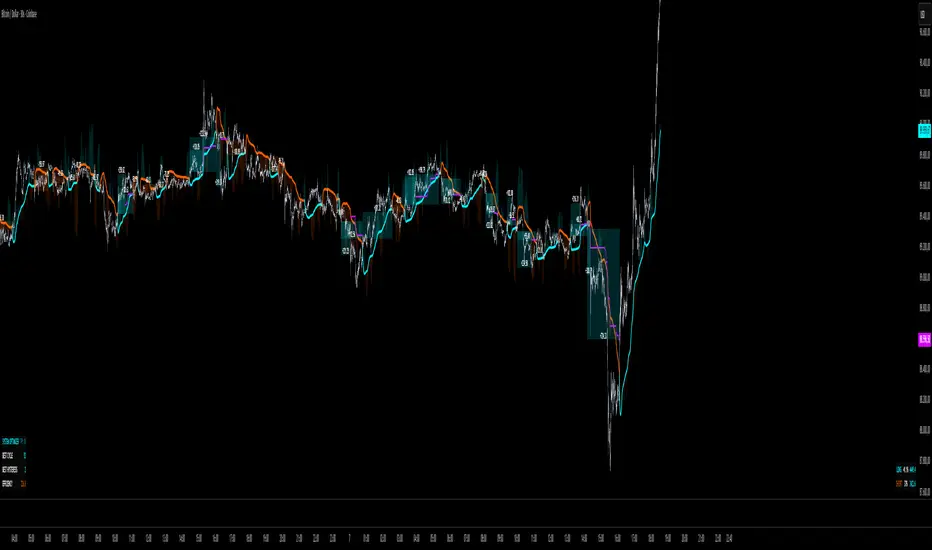
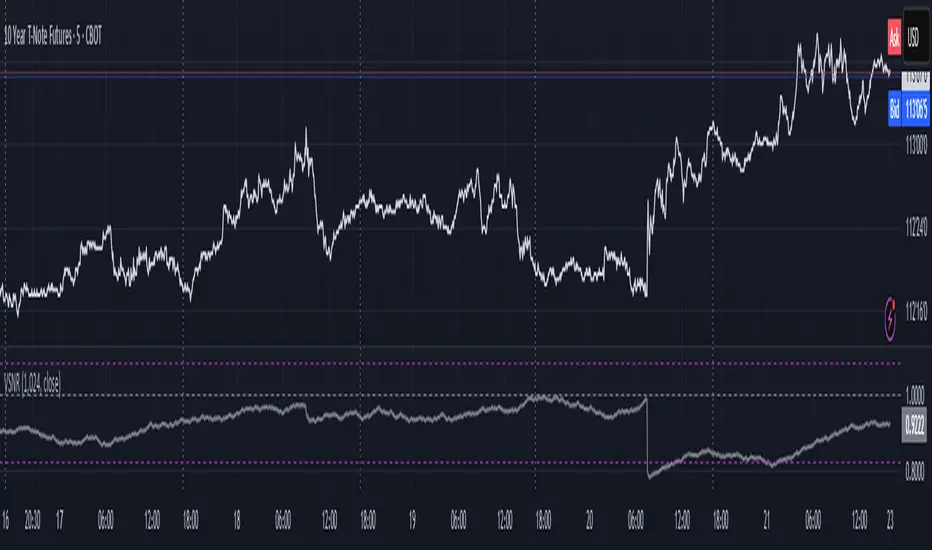
Volatility Signal-to-Noise Ratio๐๐ป this is VSNR: the most effective and simple volatility regime detector & automatic volatility threshold scaler that somehow no1 ever talks about.
This is simply an inverse of the coefficient of variation of absolute returns, but properly constructed taking into account temporal information, and made online via recursive math with algocomplexity O(1) both in expanding and moving windows modes.
How do the available alternatives differ (while someโre just worse)?
Mainstream quant stat tests like Durbin-Watson, Dickey-Fuller etc: default implementations are ALL not time aware. They measure different kinds of regime, which is less (if at all) relevant for actual trading context. Mix of different math, high algocomplexity.
The closest one is MMI by financialhacker, but his approach is also not time aware, and has a higher algocomplexity anyways. Best alternative to mine, but pls modify it to use a time-weighted median.
Fractal dimension & its derivatives by John Ehlers: again not time aware, very low info gain, relies on bar sizes (high and lows), which donโt always exist unlike changes between datapoints. But itโs a geometric tool in essence, so this is fundamental. Let it watch your back if you already use it.
Hurst exponent: much higher algocomplexity, mix of parametric and non-parametric math inside. An invention, not a math entity. Again, not time aware. Also measures different kinds of regime.
How to set it up:
Given my other tools, I choose length so that it will match the amount of data that your trading method or study uses multiplied by ~ 4-5. E.g if you use some kind of bands to trade volatility and you calculate them over moving window 64, put VSNR on 256.
However it depends mathematically on many things, so for your methods you may instead need multipliers of 1 or ~ 16.
Additionally if you wanna use all data to estimate SNR, put 0 into length input.
How to use for regime detection:
First we define:
MR bias: mean reversion bias meaning volatility shorts would work better, fading levels would work better
Momo bias: momentum bias meaning volatility longs would work better, trading breakouts of levels would work better.
The study plots 3 horizontal thresholds for VSNR, just check its location:
Above upper level: significant Momo bias
Above 1 : Momo bias
Below 1 : MR bias
Below lower level: significant MR bias
Take a look at the screenshots, 2 completely different volatility regimes are spotted by VSNR, while an ADF does not show different regime:
^^ CBOT:ZN1!
^^ INDEX:BTCUSD
How to use as automatic volatility threshold scaler
Copy the code from the script, and use VSNR as a multiplier for your volatility threshold.
E.g you use a regression channel and fade/push upper and lower thresholds which are RMSEs multiples. Inside the code, multiply RMSE by VSNR, now youโre adaptive.
^^ The same logic as when MM bots widen spreads with vola goes wild.
How it works:
Returns follow Laplace distro -> logically abs returns follow exponential distro , cuz laplace = double exponential.
Exponential distro has a natural coefficient of variation = 1 -> signal to noise ratio defined as mean/stdev = 1 as well. The same can be said for Student t distro with parameter v = 4. So 1 is our main threshold.
We can add additional thresholds by discovering SNRs of Student t with v = 3 and v = 5 (+- 1 from baseline v = 4). These have lighter & heavier tails each favoring mean reversion or momentum more. I computed the SNR values you see in the code with mpmath python module, with precision 256 decimals, so you can trust it I put it on my momma.
Then I use exponential smoothing with properly defined alphas (one matches cumulative WMA and another minimizes error with WMA in moving window mode) to estimate SNR of abs returns.
โฆ
Lightweight huh?
โ
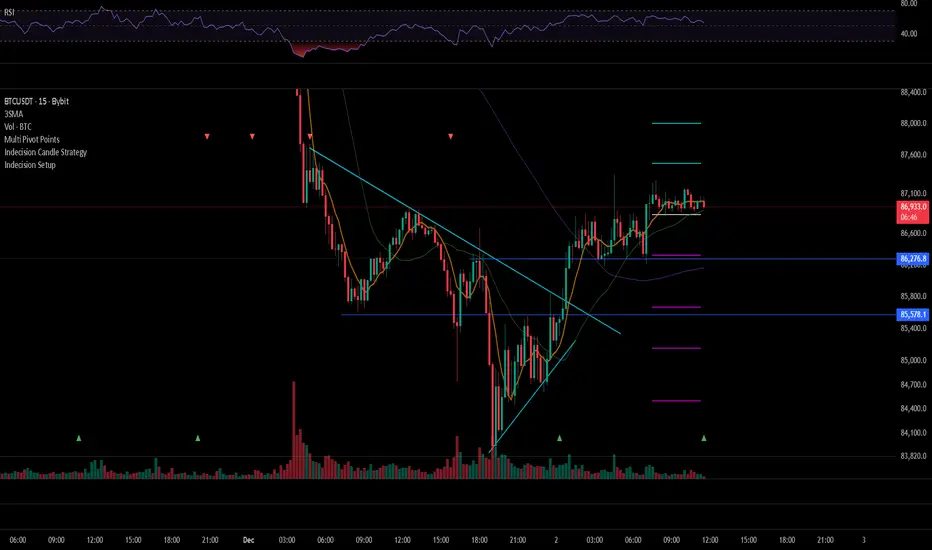
Reversal iJung v2Reversal iJung v2 User Guide
1. Concept
Reversal iJung v2 is a trend-filtered reversal entry tool with:
Trend filter using EMA 20/50/200 (+ EMA cluster)
Candle pattern confirmation (Engulfing / Pin bar)
โBody over EMA20โ logic for valid signals
Retrace-based Pending Entry (Limit style)
Auto Lot, RR-based exits, dashboard, and webhook alerts to Telegram
Objective: pick high-quality reversals in line with the major trend, enter with better RR via retrace, and manage risk clearly.
2. Core Components
2.1 EMA Trend Filter & Cluster
EMA20 / EMA50 / EMA200 define:
Bull trend: 20 > 50 > 200
Bear trend: 20 < 50 < 200
useTrendFilter:
On: only trade in trend direction
Off: ignore trend
EMA Cluster Mode
"Off": no cluster filter
"2 EMA (Fast/Mid)": EMA20 & EMA50 must stay within Max EMA Distance (x ATR)
"3 EMA (Fast/Mid/Slow)": EMA20/50/200 all clustered
This helps avoid messy conditions where EMAs are too wide or choppy.
2.2 MACD Weakness Filter
Long: accept only if selling pressure weakens:
macdLine < 0 and macdHist > macdHist
Short: accept only if buying pressure weakens:
macdLine > 0 and macdHist < macdHist
useMacdFilter = On/Off
2.3 Entry Logic & Retrace Mode
Patterns
Bull/Bear Engulfing
Bull/Bear Pin bar (with adjustable body/wick percentages)
Optional: โAny candle that closes over EMA20โ as a signal
Body over EMA20
Long: candle body crosses EMA20 and closes above it
Short: body crosses EMA20 and closes below it
Entry Mode
"Close": entry at bar close
"Retrace":
Long: use close โ low distance
Short: use high โ close distance
EntryRetrace % controls how deep to place Limit entry
SL = swing low/high ยฑ slBufferPts * mintick
TP1 / TP2 set by RR (1:rr1, 1:rr2)
2.4 Exit Logic
Normal exits:
Hit TP1, TP2, or SL
Track RR1 / RR2 statistics and total RR
EMA Exit:
Long exit when price closes below EMA20 with a bearish candle
Short exit when price closes above EMA20 with a bullish candle
Reason code: LONG_EMA_EXIT / SHORT_EMA_EXIT
2.5 Pending & Expiry
Only one side active at a time (no hedge).
minBarsBetweenSignals: lockout between signals to avoid spam.
pendingExpireBars: if price hasnโt touched entry within X bars, cancel pending and send *_PENDING_EXPIRED alert.
2.6 Auto Lot
Estimate lot size from:
Account Balance
Risk % per trade
Value per point per 1 lot
Then:
Lot โ (Balance ร Risk%) / (|Entry โ SL| ร valuePerPointPerLot)
A label Lotโ... is shown near the entry line.
2.7 Dashboard
Modes: Normal, Compact, Mini
Mini mode shows:
Trend / Lot / Entry / SL / TP1 / TP2 / R1/R2 win%
Position options:
Top Right, Top Left, Bottom Right, Bottom Left
3. Alerts & Webhook
The script uses alert() with a JSON payload when useWebhook is enabled.
Key reasons:
ENTRY_SIGNAL โ new pending (for placing Limit orders)
ENTRY_FILLED โ order filled
LONG_SL, SHORT_SL, LONG_TP2, SHORT_TP2
LONG_EMA_EXIT, SHORT_EMA_EXIT
LONG_PENDING_EXPIRED, SHORT_PENDING_EXPIRED
Your Google Apps Script parses this JSON, builds a nice human-readable message, and forwards it to Telegram.
4. Telegram Flow (Short English Summary)
Create Telegram bot via BotFather โ get BOT_TOKEN.
Get CHAT_ID of your group/channel.
Create Google Apps Script project, paste the provided code, set token + chat id.
Deploy as Web App (Anyone).
Use that Web App URL as Webhook URL in TradingView alert.
In TradingView:
Condition: Reversal iJung v2 โ Any alert() function call
Leave message empty (the script generates JSON)
Enable Webhook + paste URL
Now youโll receive:
Yellow (ENTRY_SIGNAL): to pre-place Limit orders
Green/Red (ENTRY_FILLED): when position is live
Exit / Cancel / EMA Exit notifications with full price details
CCI Trading SystemCCI Trading System is a private, invite-only indicator designed to identify high-quality market turning points and reduce noise during volatile conditions.
It focuses on detecting key price zones, momentum shifts, and providing fully automated trade-management visuals for a clean and efficient trading experience.
Key Features
Clear BUY/SELL signals when market conditions align
Automatic drawing of Entry, Take-Profit, and Stop-Loss levels
Two flexible TP modes for different trading styles
Daily performance statistics (win-rate, total trades, TP/SL count)
Webhook support for automated trading with bots or external platforms
Non-repainting signals confirmed at bar close
Optional advanced filtering for more conservative entries
Best For
Intraday and short-term trading
Traders who want clean, simplified execution
Automated systems using Webhook integration
STEVEN Ichimoku BUY & SELLIchimoku Cloud + Advanced Buy/Sell Signals
This indicator enhances the traditional Ichimoku Cloud system by adding highly refined BUY and SELL signals based on priceโTenkan interactions, cloud positioning, and multi-step validation rules. It is designed to help traders identify high-probability trend continuation entries while filtering out signals that occur near the Kumo, where market structure is typically uncertain.
โ
BUY Signal Logic
A BUY signal is triggered only when all of the following conditions are met:
Price is above the Kumo Cloud, confirming a bullish environment.
Tenkan (Conversion Line) is above the Kumo, reinforcing bullish momentum.
Price makes a bullish cross above the Tenkan within the last 6 bars.
The entry candle opens below the Tenkan and closes above it, ensuring a clean upside break.
The candle must NOT touch the Kumo.
If the candle touches the Kumo, the indicator waits for the next clean candle that closes above Tenkan without touching the Kumo, then triggers the BUY signal.
The BUY signal appears as a small green triangle below the price bar.
โ
SELL Signal Logic
A SELL signal is triggered under the mirror conditions:
Price is below the Kumo Cloud, confirming a bearish environment.
Tenkan is below the Kumo, supporting bearish momentum.
Price makes a bearish cross below the Tenkan within the last 6 bars.
The entry candle opens above the Tenkan and closes below it.
The candle must NOT touch the Kumo.
If the candle touches the Kumo, the indicator waits for the next clean candle that closes below Tenkan without touching the Kumo, then triggers the SELL signal.
The SELL signal appears as a small red triangle above the price bar.
๐ฏ Purpose of the Indicator
This version of Ichimoku aims to:
Filter weak signals near the Kumo (high-noise zones).
Identify clean pullback continuations within trending markets.
Provide easy-to-read visual markers and alert conditions for automated setups.
Improve decision-making by ensuring both price and Tenkan confirm trend strength before triggering entries.
๐ Alerts Included
The indicator includes two built-in alerts:
BUY Signal โ Ichimoku Long Entry
SELL Signal โ Ichimoku Short Entry
These alerts can be used directly for automation, bot integration, or manual trading.
๐ Recommended Use
Best used in trending markets.
Works across timeframes (Scalp, Swing, Intraday, or Daily).
Ideal as a primary strategy or confirmation tool.
Fibo Tarayฤฑcฤฑ + Mirror + Bot
KEY FEATURES:
1. Fibonacci Levels: Plots 23.6%, 38.2%, 50%, 61.8%, 78.6%, 88.6%, 100%, 127.2%, 141.4%, 161.8% levels
2. Mirror Fibonacci: Shows reverse extensions of main levels
3. Auto Trading System: Executes automatic trades at specified Fibonacci levels
4. Multi-Symbol Scanner: Scans 120+ crypto and stock symbols
5. Visual Alerts: Colored background and labels when price approaches Fibonacci levels
HOW IT WORKS:
1. Finds swing high/low points over 144 bars
2. Calculates Fibonacci levels between these points
3. Generates buy/sell signals when price approaches these levels
4. User can select which levels to trade
5. Scanner shows Fibonacci signals across multiple symbols
High Volume Bars (Advanced)High Volume Bars (Advanced)
High Volume Bars (Advanced) is a Pine Script v6 indicator for TradingView that highlights bars with unusually high volume, with several ways to define โunusualโ:
Classic: volume > moving average + N ร standard deviation
Change-based: large change in volume vs previous bar
Z-score: statistically extreme volume values
Robust mode (optional): median + MAD, less sensitive to outliers
It can:
Recolor candles when volume is high
Optionally highlight the background
Optionally plot volume bands (center ยฑ spread ร multiplier)
โธป
1. How it works
At each bar the script:
Picks the volume source:
If Use Volume Change vs Previous Bar? is off โ uses raw volume
If on โ uses abs(volume - volume )
Computes baseline statistics over the chosen source:
Lookback bars
Moving average (SMA or EMA)
Standard deviation
Optionally replaces mean/std with robust stats:
Center = median (50th percentile)
Spread = MAD (median absolute deviation, scaled to approx ฯ)
Builds bands:
upper = center + spread * multiplier
lower = max(center - spread * multiplier, 0)
Flags a bar as โhigh volumeโ if:
It passes the mode logic:
Classic abs: volume > upper
Change mode: abs(volume - volume ) > upper
Z-score mode: z-score โฅ multiplier
AND the relative filter (optional): volume > average_volume * Min Volume vs Avg
AND it is past the first Skip First N Bars from the start of the chart
Colors the bar and (optionally) the background accordingly.
โธป
2. Inputs
2.1. Statistics
Lookback (len)
Number of bars used to compute the baseline stats (mean / median, std / MAD).
Typical values: 50โ200.
StdDev / Z-Score Multiplier (mult)
How far from the baseline a bar must be to count as โhigh volumeโ.
In classic mode: volume > mean + mult ร std
In z-score mode: z โฅ mult
Typical values: 1.0โ2.5.
Use EMA Instead of SMA? (smooth_with_ema)
Off โ uses SMA (slower but smoother).
On โ uses EMA (reacts faster to recent changes).
Use Robust Stats (Median & MAD)? (use_robust)
Off โ mean + standard deviation
On โ median + MAD (less sensitive to a few insane spikes)
Useful for assets with occasional volume blow-ups.
โธป
2.2. Detection Mode
These inputs control how โunusualโ is defined.
โข Use Volume Change vs Previous Bar? (mode_change)
โข Off (default) โ uses absolute volume.
โข On โ uses abs(volume - volume ).
You then detect jumps in volume rather than absolute size.
Note: This is ignored if Z-Score mode is switched on (see below).
โข Use Z-Score on Volume? (Overrides change) (mode_zscore)
โข Off โ high volume when raw value exceeds the upper band.
โข On โ computes z-score = (value โ center) / spread and flags a bar as high when z โฅ multiplier.
Z-score mode can be combined with robust stats for more stable thresholds.
โข Min Volume vs Avg (Filter) (min_rel_mult)
An extra filter to ignore tiny-volume bars that are statistically โweirdโ but not meaningful.
โข 0.0 โ no filter (all stats-based candidates allowed).
โข 1.0 โ high-volume bar must also be at least equal to average volume.
โข 1.5 โ bar must be โฅ 1.5 ร average volume.
โข Skip First N Bars (from start of chart) (skip_open_bars)
Skips the first N bars of the chart when evaluating high-volume conditions.
This is mostly a safety / cosmetic option to avoid weird behavior on very early bars or backfill.
โธป
2.3. Visuals
โข Show Volume Bands? (show_bands)
โข If on, plots:
โข Upper band (upper)
โข Lower band (lower)
โข Center line (vol_center)
These are plotted on the same pane as the script (usually the price chart).
โข Also Highlight Background? (use_bg)
โข If on, fills the background on high-volume bars with High-Vol Background.
โข High-Vol Bar Transparency (0โ100) (bar_transp)
Controls the opacity of the high-volume bar colors (up / down).
โข 0 โ fully opaque
โข 100 โ fully transparent (no visible effect)
โข Up Color (upColor) / Down Color (dnColor)
โข Regular bar colors (non high-volume) for up and down bars.
โข Up High-Vol Base Color (upHighVolBase) / Down High-Vol Base Color (dnHighVolBase)
Base colors used for high-volume up/down bars. Transparency is applied on top of these via bar_transp.
โข High-Vol Background (bgHighVolColor)
Background color used when Also Highlight Background? is enabled.
โธป
3. What gets colored and how
โข Bar color (barcolor)
โข Up bar:
โข High volume โ Up High-Vol Color
โข Normal volume โ Up Color
โข Down bar:
โข High volume โ Down High-Vol Color
โข Normal volume โ Down Color
โข Flat bar โ neutral gray
โข Background color (bgcolor)
โข If Also Highlight Background? is on, high-volume bars get High-Vol Background.
โข Otherwise, background is unchanged.
โธป
4. Alerts
The indicator exposes three alert conditions:
โข High Volume Bar
Triggers whenever is_high is true (up or down).
โข High Volume Up Bar
Triggers only when is_high is true and the bar closed up (close > open).
โข High Volume Down Bar
Triggers only when is_high is true and the bar closed down (close < open).
You can use these in TradingViewโs โCreate Alertโ dialog to:
โข Get notified of potential breakout / exhaustion bars.
โข Trigger webhook events for bots / custom infra.
โธป
5. Recommended presets
5.1. โClassicโ high-volume detector (closest to original)
โข Lookback: 150โ200
โข StdDev / Z-Score Multiplier: 1.0โ1.5
โข Use EMA Instead of SMA?: off
โข Use Robust Stats?: off
โข Use Volume Change vs Previous Bar?: off
โข Use Z-Score on Volume?: off
โข Min Volume vs Avg (Filter): 0.0โ1.0
Behavior: Flags bars whose volume is notably above the recent average (plus a bit of noise filtering), same spirit as your initial implementation.
โธป
5.2. Volatility-aware (Z-score) mode
โข Lookback: 100โ200
โข StdDev / Z-Score Multiplier: 1.5โ2.0
โข Use EMA Instead of SMA?: on
โข Use Robust Stats?: on (if asset has huge spikes)
โข Use Volume Change vs Previous Bar?: off (ignored anyway in z-score mode)
โข Use Z-Score on Volume?: on
โข Min Volume vs Avg (Filter): 0.5โ1.0
Behavior: Flags bars that are โstatistically extremeโ relative to recent volume behavior, not just absolutely large. Good for assets where baseline volume drifts over time.
โธป
5.3. โWake-up barโ (volume acceleration)
โข Lookback: 50โ100
โข StdDev / Z-Score Multiplier: 1.0โ1.5
โข Use EMA Instead of SMA?: on
โข Use Robust Stats?: optional
โข Use Volume Change vs Previous Bar?: on
โข Use Z-Score on Volume?: off
โข Min Volume vs Avg (Filter): 0.5โ1.0
Behavior: Emphasis on sudden increases in volume rather than absolute size โ useful to catch โfirst active barโ after a quiet period.
โธป
6. Limitations / notes
โข Time-of-day effects
The script currently treats the entire chart as one continuous โsessionโ. On 24/7 markets (crypto) this is fine. For regular-session assets (equities, futures), volume naturally spikes at open/close; you may want to:
โข Use a shorter Lookback, or
โข Add a session-aware filter in a future iteration.
โข Illiquid symbols
On very low-liquidity symbols, robust stats (Use Robust Stats) and a non-zero Min Volume vs Avg can help avoid โeverything looks extremeโ problems.
โข Overlay behavior
overlay = true means:
โข Bars are recolored on the price pane.
โข Volume bands are also drawn on the price pane if enabled.
If you want a dedicated panel for the bands, duplicate the logic in a separate script with overlay = false.
Market Breadth Decision HelperMarket Breadth Decision Helper (NYSE/NASDAQ VOLD, ADD, TICK)
Combines NYSE VOLD, NASDAQ VOLD (VOLDQ), NYSE/NASDAQ ADD, and TICK into a single intraday dashboard for tactical bias and risk management.
Tiered pressure scale (sign shows direction, abs(tier) shows intensity): 0 = Neutral, 1 = Mild, 2 = Strong, 3 = Severe, 4 = Panic. On-chart legend makes this explicit.
Table view highlights value, tier, bull/bear point contributions, and notes (PANIC, OVERRIDE, DIVERGENCE). VOLD and ADD panic trigger โstand downโ; VOLD ยฑ2 triggers bull/bear overrides; NYSE vs NASDAQ ADD divergence triggers โscalp only.โ
Bull/bear points: VOLD 2 pts, ADD NYSE 2 pts, ADD NASDAQ 1 pt, TICK 1 pt. โฅ3 pts on a side lifts that sideโs multiplier to 1.5. Bias flips Bullish/Bearish only if a side leads and has โฅ2 pts; otherwise Neutral.
Breadth modes: PANIC_NO_TRADE โ DIVERGENCE_SCALP_ONLY โ VOLD_OVERRIDE_BULL/BEAR โ NORMAL/NO_EDGE.
Intraday context: tracks current session day_high / day_low for the chart symbol.
JSON/Alert export (optional) sends raw values plus *_tier and *_tier_desc labels (NEUTRAL/MILD/STRONG/SEVERE/PANIC) with sign/magnitude hints, so agents/bots never have to guess what โ1 vs 2 vs 3 vs 4โ mean.
Customizable bands for VOLD/ADD/TICK, table styling, label placement, and dashboard bias input to align with higher-timeframe context.
Best use
Quick read on internal participation and pressure magnitude.
Guardrails: respect PANIC and overrides; treat divergence as โscalp only.โ
Pair with your strategy entries; let breadth govern when to press, scale back, or stand down.
Symbols (defaults)
VOLD (NYSE volume diff), VOLDQ (NASDAQ volume diff), ADD (NYSE), ADDQ (NASDAQ), TICK (NYSE). Adjust in Inputs as needed.
Alerts
Panic, divergence, strong bullish/bearish breadth. Enable JSON export to feed algo/agent workflows.
Cirrus Cloud v3.3 Jelly + Recovery TradesCirrus Cloud v3.3 is a trend-following pullback system built for precision entries, clean structure, and controlled risk.
This version includes Normal Pullback Recovery Trades, giving you a second chance to neutralize Trend Flip losses by opening a recovery position the moment the next valid pullback occurs.
๐ท Core Features
1. Cirrus Cloud Trend Engine
Dual smooth range filters
Stable trend color flips
Automatic cloud thickness filter
No repainting
Works on all timeframes and assets
2. Pullback Entry Modes
Extreme Pullback โ deeper retests into the cloud
Normal Pullback โ touch-and-reclaim logic
Direct Trend Change โ immediate flips
3. Clean Exit Logic
TP in points
SL modes:
User Defined
Trend Flip
Cloud Breach
Labels for TP/SL plotted directly on chart
JSON alerts for fully automated execution
๐ท Recovery Trade System (New)
A Trend Flip SL in Normal Pullback mode activates the recovery system:
Original trade stops out due to a Trend Flip
The system waits for the next Normal Pullback signal
At that moment, it opens two trades simultaneously:
A normal trade
A recovery trade (coloured fuchsia on chart)
Recovery trade uses its own TP value and standard SL rules
Recovery TP/SL are marked in yellow X-marks
This allows you to:
Reduce or completely offset Trend Flip losses
Use different order sizes on your execution side
Maintain clean directional logic without martingale
๐ท Visuals & Alerts
Cloud and ribbon retain original Cirrus styling
BUY/SELL labels in green/red
Recovery BUY/SELL labels in fuchsia
Recovery TP/SL X-marks in yellow
One persistent Mode label updates dynamically
JSON blocks for:
BUY / SELL
TP / SL
R BUY / R SELL
R TP / R SL
Perfect for automated traders using bots, webhooks, or API execution.
๐ท Best For
Pullback-based trading
Trend systems seeking stability
Automated execution setups
Users who want second-chance entries without martingale
XAUUSD, BTC, Indices, FX, and synthetic markets
EMA Cross Strategy v5 (30 lots) (15 min candle only)- safe flip๐ EMA Cross Strategy v5 (30 Lots) (15 min candle only)โ Safe Flip Edition
Fully Automated | Fast | Reliable | Battle-tested
Welcome to a clean, powerful, and automation-friendly EMA crossover system.
This strategy is built for traders who want consistent trend-based entries without the risk of unwanted pyramiding or doubled positions.
๐ฅ How It Works
This strategy uses a fast EMA (10) crossing a slow EMA (20) to detect trend shifts:
Bullish Crossover โ LONG (30 lots)
Bearish Crossover โ SHORT (30 lots)
Every opposite signal safely flips the position by first closing the current trade, then opening a fresh position of exactly 30 lots.
No doubling.
No runaway position size.
No surprises.
Just clean, mechanical trend-following.
๐ Why This Strategy Stands Out
Unlike basic EMA crossbots, this version:
โ Prevents unintended pyramiding
โ Never over-allocates capital
โ Works perfectly with webhook-based automation
โ Produces stable, systematic entries
โ Executes directional flips with precision
๐ Backtest Highlights (1-Year)
(Backtests will vary by instrument/timeframe)
1,500+ trades executed
Profit factor above 1.27
Strong trend performance
Balanced long/short behavior
No margin calls
Consistent trade execution
This strategy thrives in trending markets and maintains strict discipline even in choppy conditions.
โ๏ธ Automation Ready
Designed for automated execution via webhook and API setups on supported platforms.
Just connect, run, and let the bot follow the rules without hesitation.
No emotions.
No overtrading.
No fear or greed.
Pure logic.
BTC EMA 5-9 Flip Strategy AutobotThis strategy is designed for fast and accurate trend-following trades on Bitcoin.
It uses a crossover between EMA 5 and EMA 9 to detect instant trend reversals and automatically flips between Long and Short positions.
How the strategy works
EMA 5 crossing above EMA 9 โ Long
EMA 5 crossing below EMA 9 โ Short
Automatically closes the opposite trade during a flip
Executes trades only on candle close
Prevents double entries with internal position-state logic
Fully compatible with automated trading via webhooks (Delta Exchange)
Why this strategy works
EMA 5โ9 is extremely responsive for BTCโs volatility
Captures trend reversals early
Works best on 15-minute timeframe
Clean, simple logic without over-filtering reduces missed opportunities
Performs well in both uptrends and downtrends
Automation Ready
This strategy includes alert conditions and webhook-ready JSON for automated execution.
This is a fast-reacting BTC bot designed for intraday and swing crypto trend trading.
Moving Average Band StrategyOverview
The Moving Average Band Strategy is a fully customizable breakout and trend-continuation system designed for traders who need both simplicity and control.
The strategy creates adaptive bands around a user-selected moving average and executes trades when price breaks out of these bands, with advanced risk-management settings including optional Risk:Reward targets.
This script is suitable for intraday, swing, and positional traders across all markets โ equities, futures, crypto, and forex.
Key Features
โ Six Moving Average Types
Choose the MA that best matches your trading style:
SMA
EMA
WMA
HMA
VWMA
RMA
โ Dynamic Bands
Upper Band built from MA of highs
Lower Band built from MA of lows
Adjustable band offset (%)
Color-coded band fill indicating price position
โ Configurable Strategy Preferences
Toggle Long and/or Short trades
Toggle Risk:Reward Take-Profit
Adjustable Risk:Reward Ratio
Default position sizing: % of equity (configurable via strategy settings)
Entry Conditions
Long Entry
A long trade triggers when:
Price crosses above the Upper Band
Long trades are enabled
No existing long position is active
Short Entry
A short trade triggers when:
Price crosses below the Lower Band
Short trades are enabled
No existing short position is active
Clear entry markers and price labels appear on the chart.
Risk Management
This strategy includes a complete set of risk-controls:
Stop-Loss (Fixed at Entry)
Long SL: Lower Band
Short SL: Upper Band
These levels remain constant for the entire trade.
Optional Risk:Reward Take-Profit
Enabled/disabled using a toggle switch.
When enabled:
Long TP = Entry + (Risk ร Risk:Reward Ratio)
Short TP = Entry โ (Risk ร Risk:Reward Ratio)
When disabled:
Exits are handled by reverse crossover signals.
Exit Conditions
Long Exit
Stop-Loss Hit (touch-based)
Take-Profit Hit (if enabled)
Reverse Band Crossover (if TP disabled)
Short Exit
Stop-Loss Hit (touch-based)
Take-Profit Hit (if enabled)
Reverse Band Crossover (if TP disabled)
Exit markers and price labels are plotted automatically.
Visual Tools
To improve clarity:
Upper & Lower Band (blue, adjustable width)
Middle Line
Dynamic band fill (green/red/yellow)
SL & TP line plotting when in position
Entry/Exit markers
Price labels for all executed trades
These are built to help users visually follow the strategy logic.
Alerts Included
Every trading event is covered:
Long Entry
Short Entry
Long SL / TP / Cross Exit
Short SL / TP / Cross Exit
Combined Alert for webhook/automation (JSON-formatted)
Perfect for algo trading, Discord bots, or automation platforms.
Best For
This strategy performs best in:
Trending markets
Breakout environments
High-momentum instruments
Clean intraday swings
Works seamlessly on:
Stocks
Index futures
Commodities
Crypto
Forex
โ ๏ธ Important Disclaimer
This script is for educational purposes only.
Trading involves risk. Backtest results are not indicative of future performance.
Always validate settings and use proper position sizing.
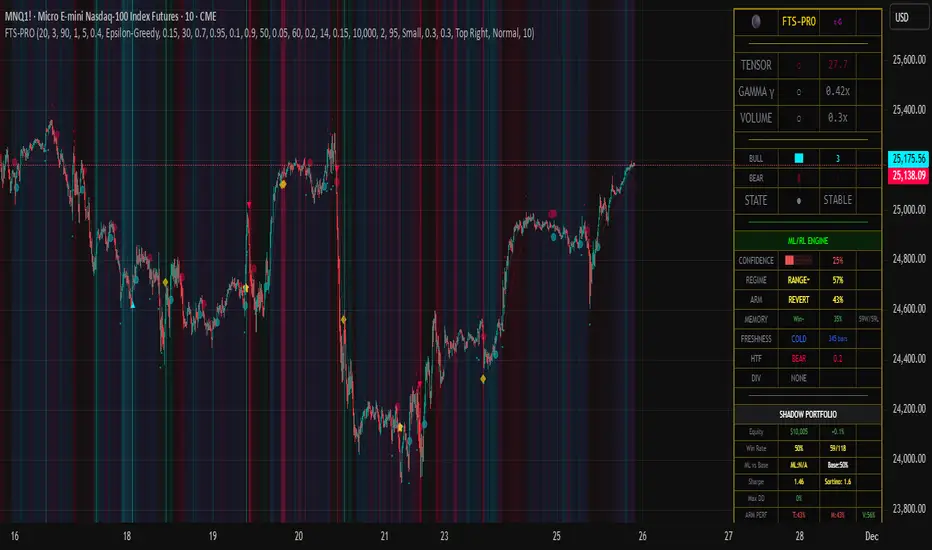
51**51 ALGO** is an advanced trading indicator that combines **4 technical analysis methods** (Stochastic RSI, Price Zone, EMA, Heikin Ashi) to generate **precise buy/sell signals** with **automatic risk management**.
โจ **Features**
* ๐ฏ **Accumulated Signals**: Stacks signals in the same direction (1x to 10x+) for greater reliability
- ๐ **SRSI Filter**: Blocks strong signals in neutral zones to avoid false starts
* ๐ฆ **Order Blocks**: Detects institutional zones and automatically generates reversal signals
- ๐ก๏ธ **Dynamic Stop Loss**: Trailing SL (x3โx5) or 2-candle SL (x1โx2, x6+) + Hard SL capped at **-40%**
* ๐ฏ **Smart Take Profit**: Closes on opposite signal or contact with Order Block
- ๐ **Webhooks**: Automatically sends entry/exit signals to a trading bot
๐ **Real-Time Statistics**
Window showing performance over **2000 candles** (configurable):
* Win/Loss ratio
- Average gain (**leverage x20**)
* Simulated capital (starting at **$100**)
- Best and worst trades with **date/time**
๐ก Designed for **fully automated trading with maximum safety**: each signal can only be triggered **once**.
Qullamagi EMA Breakout Autotrade (Crypto Futures L+S)Title: Qullamagi EMA Breakout โ Crypto Autotrade
Overview
A crypto-focused, Qullamagi-style EMA breakout strategy built for autotrading on futures and perpetual swaps.
It combines a 5-MA trend stack (EMA 10/20, SMA 50/100/200), volatility contraction boxes, volume spikes and an optional higher-timeframe 200-MA filter. The script supports both long and short trades, partial take profit, trailing MA exits and percent-of-equity position sizing for automated crypto futures trading.
Key Features (Crypto)
Qullamagi MA Breakout Engine โ trades only when price is aligned with a strong EMA/SMA trend and breaks out of a tight consolidation range. Longs use: Close > EMA10 > EMA20 > SMA50 > SMA100 > SMA200. Shorts are the mirror condition with all MAs sloping in the trend direction.
Strict vs Loose Modes โ Strict (Daily) is designed for cleaner swing trades on 1Hโ4H (full MA stack, box+ATR and volume filters, optional HTF filter). Loose (Intraday) focuses on 10/20/50 alignment with relaxed filters for more frequent 15mโ30m signals.
Volatility & Volume Filters for Crypto โ ATR-based box height limit to detect volatility contraction, wide-candle filter to avoid chasing exhausted breakouts, and a volume spike condition requiring current volume to exceed an SMA of volume.
Higher-Timeframe Trend Filter (Optional) โ uses a 200-period SMA on a higher timeframe (default: 1D). Longs only when HTF close is above the HTF 200-SMA, shorts only when it is below, helping avoid trading against dominant crypto trends.
Autotrade-Oriented Trade Management โ position size as % of equity, initial stop anchored to a chosen MA (EMA10 / EMA20 / SMA50) with optional buffer, partial take profit at a configurable R-multiple, trailing MA exit for the remainder, and an optional cooldown after a full exit.
Markets & Timeframes
Best suited for BTC, ETH and major altcoin futures/perpetuals (Binance, Bybit, OKX, etc.).
Strict preset: 1Hโ4H charts for classic Qullamagi-style trend structure and fewer fake breakouts.
Loose preset: 15mโ30m charts for higher trade frequency and more active intraday trading.
Always retune ATR length, box length, volume multiplier and position size for each symbol and exchange.
Strategy Logic (Quick Summary)
Long (Strict): MA stack in bullish alignment with all MAs sloping up โ tight volatility box (ATR-based) โ volume spike above SMA(volume) ร multiplier โ breakout above box high (close or intrabar) โ optional HTF close above 200-SMA.
Short: Mirror logic: bearish MA stack, tight box, volume spike and breakdown below box low with optional HTF downtrend.
Best Practices for Crypto
Backtest on each symbol and timeframe you plan to autotrade, including commissions and slippage.
Start on higher timeframes (1H/4H) to learn the behavior, then move to 15mโ30m if you want more signals.
Use the higher-timeframe filter when markets are strongly trending to reduce counter-trend trades.
Keep position-size percentage conservative until you fully understand the drawdowns.
Forward-test / paper trade before connecting to live futures accounts.
Webhook / Autotrade Integration
Designed to work with TradingView webhooks and external crypto trading bots.
Alert messages include structured fields such as: EVENT=ENTRY / SCALE_OUT / EXIT, SIDE=LONG / SHORT, STRATEGY=Qullamagi_MA.
Map each EVENT + SIDE combination to your bot logic (open long/short, partial close, full close, etc.) on your preferred exchange.
Important Notes & Disclaimer
Crypto markets are highly volatile and can change regime quickly. Backtest and forward-test thoroughly before using real capital. Higher timeframes generally produce cleaner MA structures and fewer fake breakouts.
This strategy is for educational and informational purposes only and does not constitute financial advice. Trading leveraged crypto products involves substantial risk of loss. Always do your own research, manage risk carefully, and never trade with money you cannot afford to lose.
NQ Scalping WMAThis indicator plots two Weighted Moving Averages (WMAs) derived from the high and close to visualize short-term momentum extremes on NQ (Nasdaq futures). I built it for myself for scalping reversals on the 1-minute timeframe.
The area between the upper WMA (โTop-Sourceโ) and lower WMA (โBot-Sourceโ) is filled with contextual color: green when price is above the top WMA, red when price is below the bottom WMA, and neutral gray otherwise. This makes it easy to spot overextensions, potential snap-back zones, and quick mean-reversion opportunities. Inputs include WMA length, line color, and separate sources for top/bottom WMAs, allowing fast tuning for changing intraday volatility.
The original code I used to make this is from PlayBit EMA by FFriZz
Trapper Absolute PriceActionThe Trapper Absolute PriceAction (TAPA) indicator is a custom, momentum-based oscillator designed to help traders visually read shifts in bullish and bearish price strength โ with no reliance on volume or external data.
TAPA calculates and smooths both bullish and bearish momentum using multiple methods (RSI, Stochastic, or ADX) and compares their relative strength in real time. The result is a clean dual-line oscillator with color-coded histograms that highlight which side of the market currently has control.
It was built to give traders a sniper-level precision tool for detecting early momentum shifts before they appear clearly on price charts, allowing confirmation or invalidation of setups faster than with lagging indicators.
How It Works
Momentum Strength Calculation
The script measures directional price movement across the chosen mode (RSI, Stochastic, or ADX).
These values are smoothed twice using a selectable moving average type (WMA, EMA, SMA, ALMA, HMA, etc.).
Bullish & Bearish Curves
The green line represents smoothed bullish momentum (SmthBulls).
The orange/red line represents smoothed bearish momentum (SmthBears).
Histogram Strength Visualization
The distance between the two curves forms a color-coded histogram.
Green/Lime bars indicate growing bullish control, while Orange/Red bars show bearish dominance.
A gray neutral zone reflects indecision or range-bound conditions.
Signal Triggers
BUY ๐ appears when the green line crosses up through the orange โ signaling a bullish momentum flip.
SELL ๐ป appears when the green line crosses down through the orange โ signaling bearish control.
Alerts can be enabled directly in TradingView through the BUY (๐) or SELL (๐ป) alert conditions for automated notifications or integrations.
How to Use
1. Confirm Early Momentum Shifts
When a crossover appears, check that the histogram color supports the move (green shades for bullish, red/orange for bearish).
Avoid signals when both lines are tangled and the histogram alternates gray, that usually indicates consolidation or low volatility.
2. Validate with Higher-Timeframe Structure
TAPA is most powerful when aligned with trend structure from higher timeframes.
Example: A bullish crossover on the 1-hour timeframe, while the daily TAPA shows the green line already rising, can confirm momentum alignment before entry.
3. Combine with Support/Resistance
Mark your key support and resistance zones (manual or using your โTrapper S&R PROโ indicator).
Look for a TAPA bullish crossover occurring at a major support zone, thatโs often the start of a reversal move.
4. Multi-Mode Analysis
Experiment with โIndicator Methodโ in the inputs:
RSI Mode - smoother and responsive for swing trading.
Stochastic Mode - better for short-term entries and exits.
ADX Mode - captures trending momentum on strong breakouts.
Examples
Bullish Example:
Price forms a higher low on the chart while TAPAโs green line crosses up through orange with a lime/green histogram. Thatโs a strong early signal that momentum is reversing before price confirms on structure.
Bearish Example:
Price rallies into resistance, then TAPA shows a red histogram and a bearish cross (green dropping under orange). Thatโs typically a high-probability short signal once structure breaks.
What Makes TAPA Different
No Volume Dependency: Focuses purely on price behavior, not volume spikes or anomalies.
Multi-Mode Engine: Switch between RSI, Stochastic, or ADX-style momentum math instantly.
Customizable Visuals: Editable histogram color layers (weak/strong bull/bear, neutral) and line color control.
Sniper Labeling System: Clean, minimal BUY/SELL cues at each verified crossover.
Alert-Ready: Built-in conditions allow for TradingView alerts, webhooks, or bot automation.
Modernized Core: Rebuilt in Pine v6 with optimized performance and compliance to TradingView standards.
TAPA is designed to filter out the noise and show what truly drives a move โ the shift in control between buyers and sellers.
Best Pairing Indicators
To get maximum clarity and confluence:
Trapper Support & Resistance PRO
Helps identify key zones where momentum flips from TAPA have the most impact. A bullish crossover at a defined support level often marks an early trend reversal.
Trapper Volume Trigger
While TAPA doesnโt use volume internally, pairing it with a volume-based trigger confirms that momentum shifts have institutional participation.
Simple Moving Averages (5, 20, or 50)
Overlay short and mid-term SMAs on your chart to confirm directional bias. A bullish TAPA cross that aligns with SMA-5 crossing above SMA-20 increases reliability.
Disclaimer
This indicator is provided for educational and analytical purposes only.
It does not constitute financial advice or a recommendation to buy or sell any security.
Always conduct your own due diligence and practice proper risk management before trading any strategy.
ยฉ 2025 RAMS-offthecharts | โRead โข Analyze โข Mark โข Snipe.โ
TAPA is part of the RAMS ecosystem of tactical market tools, designed for traders who focus on precision, discipline, and momentum awareness.
Current Session H/L โ EvolvingTrack the current session high and low as it's formed. Lines are projected back to previous sessions and forward in time. Bot projections are adjustable.
Relative Performance Binary FilterDescription:
This indicator monitors the relative performance of 30 selected crypto assets and generates a binary signal for each: 1 if the assetโs price has increased above a user-defined threshold over a specified lookback period, 0 otherwise. The script produces a JSON-formatted output suitable for webhooks, allowing you to send the signals to external applications like Google Sheets.
Key Features:
Configurable lookback period, price source, and performance threshold.
Supports confirmed or real-time bar data.
Monitors 30 crypto assets simultaneously.
Produces a one-line JSON output with batch grouping for easy webhook integration.
Includes an optional visual sum plot showing how many assets are above the threshold at any time.
Use Cases:
Automate performance tracking across multiple crypto assets.
Feed binary signals into external dashboards, trading bots, or Google Sheets.
Quickly identify which assets are outperforming a set threshold.
Multi EMA + Indicators + Mini-Dashboard + Reversals v6๐ Multi EMA + Indicators + Mini-Dashboard + Reversals v6
๐งฉ Overview
This indicator is a multi-EMA setup that combines trend, momentum, and reversal analysis in a single visual framework.
It integrates four exponential moving averages (EMAs), key oscillators (RSI, MACD, Stochastic, CCI), volatility filtering (ATR), and a dynamic mini-dashboard that summarizes all signals in real time.
Its purpose is to help traders visually confirm trend alignment, filter valid entries, and identify possible trend continuation or reversal points.
It can display buy/sell arrows, detect reversal candles, and issue alerts when trading conditions are met.
โ๏ธ Core Components
1. Moving Averages (EMA Setup)
EMA1 (fast) and EMA2 (medium) define the short-term trend and trigger bias.
When the price is above both EMAs โ bullish bias.
When below โ bearish bias.
EMA3 and EMA4 act as trend filters. Their slopes (up or down) confirm overall momentum and help validate signals.
Each EMA has customizable lengths, sources, and colors for up/down trends.
This โEMA stackโ is the foundation of the setup โ a structured trend-following framework that adapts to market speed and volatility.
2. Momentum and Confirmation Filters
Each indicator can be individually enabled or disabled for flexibility.
RSI: confirms direction (above/below 50).
MACD: detects momentum crossover (MACD > Signal for bullish confirmation).
Stochastic: identifies trend continuation (K > D for longs, K < D for shorts).
CCI: adds trend bias above/below a threshold.
ATR Filter: filters out small, low-volatility candles to reduce noise.
You can activate only the filters that fit your trading plan โ for instance, trend traders often use RSI and MACD, while scalpers may rely on Stochastic and ATR.
3. Reversal Detection
The indicator includes an optional Reversal Section that independently detects potential turning points.
It combines multiple configurable criteria:
Candlestick patterns (Bullish Hammer, Shooting Star).
Large Candle filter โ detects unusually large bars (relative to close).
Price-to-EMA distance โ identifies overextended moves that might revert.
RSI Divergence โ detects potential momentum shifts.
RSI Overbought/Oversold zones (70/30 by default).
Doji Candles โ sign of indecision.
A bullish or bearish reversal signal appears when enough selected criteria are met.
All sub-modules can be toggled on/off individually, giving you full control over sensitivity.
4. Signal Logic
Buy and sell signals are triggered when EMA alignment and the chosen confirmations agree:
Buy Signal
โ Price above EMA1 & EMA2
โ Confirmations (RSI/MACD/Stoch/CCI/ATR) pass
โ Trend filters (EMA3/EMA4) point upward
Sell Signal
โ Price below EMA1 & EMA2
โ Confirmations align bearishly
โ Trend filters (EMA3/EMA4) slope downward
Reversal signals can appear independently, even against the current EMA trend, depending on your settings.
5. Visual Dashboard
A mini-dashboard appears near the chart showing:
Current trade bias (LONG / SHORT / NEUTRAL)
EMA3 and EMA4 trend directions (โ / โ)
Quick visual bars (๐ฉ / ๐ฅ) for each filter: RSI, MACD, Stoch, ATR, CCI, EMA filters
Reversal criteria status (Doji, RSI divergence, candle size, etc.)
This panel gives you a compact overview of all indicator states at a glance.
The color of the panel changes dynamically โ green for bullish, red for bearish, gray for neutral.
6. Alerts
Built-in alerts allow automation or notifications:
Buy Alert
Sell Alert
Reversal Buy
Reversal Sell
You can connect these alerts to TradingView notifications or external bots for semi-automated execution.
๐ก How to Use
โ
Trend-Following Setup
Focus on trades in the direction of EMA1 & EMA2.
Confirm with EMA3 & EMA4 trending in the same direction.
Use RSI/MACD/Stoch filters to ensure momentum supports the trade.
Avoid entries when ATR filter indicates low volatility.
๐ Reversal Setup
Enable the Reversal section for potential tops/bottoms.
Look for reversal buy signals near support zones or after strong downtrends.
Use RSI divergence or Doji + Hammer signals as confirmation.
Combine with key chart areas (supply/demand or previous swing levels).
โ๏ธ Combination Approach
Trade continuation signals when all EMAs are aligned and filters are green.
Trade reversals only when at a key area (support/resistance) and confirmed by reversal conditions.
Always check higher-timeframe bias before entering a trade.
๐งญ Practical Tips
Use different EMA sets for different timeframes:
9/21/50/100 for swing or trend trades.
5/13/34/89 for intraday scalping.
Turn off filters you donโt use to reduce lag.
Always validate signals with price structure, not just indicator alignment.
Practice in replay mode before live trading.
๐บ๏ธ Key Chart Confluence (Highly Recommended)
Although the indicator provides structured signals, its best use is in confluence with:
Support and resistance levels
Supply/demand zones
Trendlines and channels
Liquidity pools
Volume clusters
Signals aligned with strong key areas on the chart tend to have greater reliability than isolated indicator triggers.
I use EMA 1 - 20 Open ; EMA 2 - 20 Close ; EMA 3 - 50 ; EMA 4 - 200 or 100 , but that's me...
โ ๏ธ Important Disclaimer
This indicator is a technical tool, not a guarantee of results.
Trading involves risk, and no signal is ever 100% accurate.
Every trader should develop a personal strategy, use proper risk management, and adapt settings to their instrument and timeframe.
Always combine indicator signals with key chart areas, higher-timeframe context, and your own analysis before taking a trade.
ZynAlgo TrendlinePurpose
ZynAlgo Trendline V2.0 is a trend-following indicator designed to help traders visually identify market direction, momentum alignment, and dynamic risk zones.
It combines multiple moving averages, multi-timeframe analysis, and slope validation to show when a market is trending, ranging, or reversing.
How It Works โ Conceptual Breakdown
๐น 1. Trendline Framework (Three-Layer MA System)
The indicator plots three moving-average layers:
Type 1 Line โ Fast MA for early trend detection
Type 2 Line โ Medium MA as a stability filter
Trendline (200-period) โ Long-term structural baseline
When all three are properly stacked and sloped, a directional bias is confirmed:
Bullish โ Type 1 > Type 2 > Trendline
Bearish โ Type 1 < Type 2 < Trendline
Sideways โ Misaligned or flat
Users can select from SMA, EMA, WMA, RMA, SWMA, ALMA, VWAP, fully adjustable to match their style.
๐น 2. Touch-and-Confirm Entry Logic
Entries are visualized only when:
Price touches the selected confirmation line (Trendline, Type 1 or Type 2), and
The direction is re-confirmed within a given number of candles (confirmation window).
You can choose between:
Fixed Mode โ confirmation only on the exact N-th candle after touch.
Interval Mode โ confirmation allowed anytime within N candles after touch.
This method ensures signals only appear when structure and timing both align โ reducing false momentum entries.
๐น 3. Multi-Timeframe Trend Filter (MTF Filter)
The indicator checks trend direction across up to 8 higher timeframes (5 min โ Daily).
A signal is valid only if a chosen minimum number of those timeframes confirm the same direction.
This feature creates cross-timeframe confluence, helping users avoid counter-trend setups.
๐น 4. Slope-Based Market Filter
To prevent entries in sideways or choppy markets, the system verifies:
Each MAโs slope is above a user-defined threshold.
MAs are sufficiently spaced apart (using percentage-of-price separation).
When conditions are met, candles are color-coded:
๐ฉ Uptrendโ๐ฅ Downtrendโโฌ Sideways/No-trade zone.
This gives immediate visual feedback about current market structure.
๐น 5. Dynamic Risk Management System
Choose among three Stop-Loss modes:
Structure-Based โ Swing high/low referencing market structure.
MA-Based โ Uses the selected moving-average line as a dynamic stop.
ATR-Based โ Volatility-adaptive stop (default).
Each entry automatically projects up to three Take-Profit (TP1-TP3) levels using user-defined Risk-to-Reward ratios.
Lines and labels are plotted for Entry, SL, and each TP with optional persistence control (โkeep old linesโ setting).
๐น 6. Anti-Martingale / Cooldown Logic
A built-in cooldown timer ensures only one trade setup per cycle โ new signals pause until the prior trade has reached either TP or SL.
This mechanism prevents overlapping trades and unwanted martingale-style stacking.
๐น 7. Compact On-Chart Dashboard
A small table (top-right corner) summarizes:
Current position (LONG / SHORT / FLAT)
SL mode in use
Confirmation source
Touch/confirmation mode
Cooldown state and remaining bars
This helps monitor settings without opening the menu.
๐น 8. Smart Alerts (Telegram / Discord / Both)
When a new BUY โ or SELL โ confirmation occurs, the script can send structured alerts containing:
Symbol
Entry price
TP1 โ TP3 values
Stop Loss
Timestamp
You can select the preferred platform (Telegram / Discord / Both).
These alerts are optional and serve as notifications, not trade instructions.
Usage Guide
Trendline Length: Period of the main long-term moving average (default = 200). Higher = smoother, slower trendline.
Trendline Type / Type 1 / Type 2 Type: Choose from SMA, EMA, WMA, RMA, SWMA, ALMA, VWAP depending on your preference for responsiveness or smoothness.
Confirmation Source: Which MA must be touched by price to start a confirmation window (Trendline = conservative, Type 1 = frequent, Type 2 = balanced).
Confirmation Window: Number of bars allowed for price to confirm direction after touch.
Stop Loss Mode: Select ATR-based, structure-based, or MA-based stop visualization.
R:R Ratios (TP1-TP3) Adjust distances for visual target levels based on risk-to-reward multiples.
Enable MTF Filter: Require trend alignment across higher timeframes before showing a signal.
Enable Slope Filter: Prevents signals when MAs are flat or overlapping (sideways market).
Enable Candle Coloring: Colors candles by trend state for quick visual confirmation.
How to Use
Apply the indicator to a clean chart with no other overlays for clarity.
Check candle color:
Green โ Uptrend; Red โ Downtrend; Gray โ Sideways.
Wait for a โBUY โโ or โSELL โโ label to appear after a valid touch + confirmation sequence.
Observe drawn lines: Entry = blue, SL = red, TP = green.
Use displayed levels as visual references only. You may combine them with your own entry rules or strategy.
Optional: enable the dashboard (top-right) to monitor trend filter states and settings in real time.
โ False-Signal Reduction
Combining slope validation with multi-timeframe agreement filters out low-probability entries โ useful for traders who prefer quality over quantity.
๐งฉ Professional Execution Layer
Integrated Stop Loss / Take Profit projection, cooldown logic, and anti-martingale control give it a disciplined, rule-based behavior โ a hallmark of algorithmic consistency.
๐ก Automation-Ready Alerts
The built-in Telegram / Discord alert module (JSON-formatted payloads) allows direct bot integration for remote monitoring โ no additional coding required.
Unlike public MA crossover scripts, ZynAlgo Trendline includes proprietary logic for slope-weighted alignment, MTF aggregation, and confirmation-window entry detection.
๐ถ RISK DISCLAIMER
Trading is risky & most day traders lose money. All content, tools, scripts, articles, & education provided by ZynAlgo are purely for informational & educational purposes only. Past performance does not guarantee future results.
coinbot_mr_table์ด ์คํฌ๋ฆฝํธ๋ **"MA ๋ฆฌ๋ณธ(Moving Average Ribbon) ๊ธฐ๋ฐ ์๋๋งค๋งค ์ ๋ต"**์
๋๋ค.
์ด๋ฆ(coinbot_mr_table)์ ๋ชจ๋ ๊ธฐ๋ฅ์ด ์์ฝ๋์ด ์์ต๋๋ค.
coinbot: user_id, exchange, leverage ๋ฑ ์๋๋งค๋งค ๋ด๊ณผ ์ฐ๋ํ๊ธฐ ์ํ ์นํ
(Webhook) ์ ํธ ์ ์ก ๊ธฐ๋ฅ์ด ํฌํจ๋์ด ์์ต๋๋ค.
mr (MA Ribbon): 18๊ฐ(5~90)์ ์ด๋ํ๊ท ์ (EMA ๋๋ SMA)์ด 100 ์ดํ์ ์ ๊ธฐ์ค์ผ๋ก ์ ๋ฐฐ์ด/์ญ๋ฐฐ์ด๋๋์ง๋ฅผ ์์(LIME/RUBI)์ผ๋ก ๊ตฌ๋ถํ์ฌ ์ถ์ธ๋ฅผ ํ๋จํฉ๋๋ค.
table: ์ ๋ต์ ๋ฐฑํ
์คํ
์ฑ๊ณผ(์ด ์น๋ฅ , ์ผ์ผ ์์ต๋ฅ ๋ฑ)๋ฅผ ์ฐจํธ ์์ '๋์ ํต๊ณ'์ '์ผ์ผ ํต๊ณ' ํ
์ด๋ธ๋ก ์๊ฐํํด ์ค๋๋ค.
์ด ์คํฌ๋ฆฝํธ์ ๋งค๋งค ๋ก์ง๊ณผ ์๋๋งค๋งค ์ ํธ์ ๋ํ ์์ธํ ์ค๋ช
์ ํ๊ธ๊ณผ ์์ด๋ก ๊ฐ๊ฐ ์ ๊ณตํด ๋๋ฆฝ๋๋ค.
๐ฐ๐ท ํ๊ธ (Korean)
์ด ์คํฌ๋ฆฝํธ๋ **"MA ๋ฆฌ๋ณธ(Moving Average Ribbon)"**์ ํต์ฌ ์์ง์ผ๋ก ์ฌ์ฉํ๋ ์์ ์๋๋งค๋งค(Autotrade) ์ ๋ต ์ ํธ ์์ฑ๊ธฐ์
๋๋ค.
์ด ์งํ์ ๋ชฉ์ ์ ์ฐจํธ์์ ์ถ์ธ๋ฅผ ์๊ฐ์ ์ผ๋ก ๋ณด์ฌ์ฃผ๋ ๊ฒ์ ๋์ด, ๊ตฌ์ฒด์ ์ธ ๋งค๋งค ์ ํธ(์ง์
, ๋ถํ ์ต์ , ์์ )๊ฐ ๋ฐ์ํ ๋๋ง๋ค JSON ํ์์ ๋ช
๋ น์ด๋ฅผ ์๋๋งค๋งค ๋ด์ผ๋ก ์ ์กํ๋ ๊ฒ์
๋๋ค.
1. ๐ ๋งค๋งค ์ ๋ต: MA ๋ฆฌ๋ณธ ์ถ์ธ ์ถ์ข
์ด ์ ๋ต์ 18๊ฐ์ ๋จ๊ธฐ/์ค๊ธฐ ์ด๋ํ๊ท ์ (5~90)๊ณผ 1๊ฐ์ ์ฅ๊ธฐ ์ด๋ํ๊ท ์ (100)์ ์ฌ์ฉํ์ฌ ์ถ์ธ๋ฅผ ์ ์ํฉ๋๋ค.
100 ์ดํ์ : ์ฅ๊ธฐ ์ถ์ธ๋ฅผ ๊ฐ๋ฅด๋ ๊ธฐ์ค์ (๊ฐ/์ฝ์ ๋๋๋ ๋ถ์๋ น)์
๋๋ค.
18๊ฐ ๋ฆฌ๋ณธ: ์ด ๋ฆฌ๋ณธ๋ค์ด 100 ์ดํ์ ์์์ ๋ชจ๋ ์์น(LIME ์์)ํ๋ฉด '๊ฐ์ธ ์ถ์ธ', ์๋์์ ๋ชจ๋ ํ๋ฝ(RUBI ์์)ํ๋ฉด '์ฝ์ธ ์ถ์ธ'๋ก ํ๋จํฉ๋๋ค.
2. ๐ฆ ์ง์
๋ฐ ์ฒญ์ฐ ์ ํธ
์ด ์ ๋ต์ '์ ํ(Reversing)' ์ ๋ต์
๋๋ค. ์ฆ, ๋กฑ ์ ํธ๊ฐ ๋ฐ์ํ๋ฉด ์ ํฌ์ง์
์ ์ข
๋ฃํ๊ณ ๋กฑ์ผ๋ก ์ง์
ํ๋ฉฐ, ๊ทธ ๋ฐ๋๋ ๋ง์ฐฌ๊ฐ์ง์
๋๋ค. (ํญ์ ๋กฑ ๋๋ ์ ํฌ์ง์
์ ์ ์งํฉ๋๋ค.)
์ง์
์ ํธ (Long):
์ถ์ธ ํ์ : ๋ชจ๋ ๋ฆฌ๋ณธ์ด 100 ์ดํ์ ์์์ '๊ฐ์ธ(LIME)'๋ก ํต์ผ๋ ๋.
์ฌ์ง์
(๋ถํ๊ธฐ): ๊ฐ์ธ ์ถ์ธ ์ค, ๋ฆฌ๋ณธ์ด ์ผ์์ ์ผ๋ก ์กฐ์ (GREEN)์ ๋ณด์ด๋ค๊ฐ ๋ค์ '๊ฐ์ธ(LIME)'๋ก ๋ณต๊ทํ ๋.
์ง์
์ ํธ (Short):
์ถ์ธ ํ์ : ๋ชจ๋ ๋ฆฌ๋ณธ์ด 100 ์ดํ์ ์๋์์ '์ฝ์ธ(RUBI)'๋ก ํต์ผ๋ ๋.
์ฌ์ง์
(๋ฌผํ๊ธฐ): ์ฝ์ธ ์ถ์ธ ์ค, ๋ฆฌ๋ณธ์ด ์ผ์์ ์ผ๋ก ๋ฐ๋ฑ(MAROON)ํ๋ค๊ฐ ๋ค์ '์ฝ์ธ(RUBI)'๋ก ๋ณต๊ทํ ๋.
์ฒญ์ฐ ์ ํธ (์๋๋งค๋งค):
์ง์
(ENTRY): ๋กฑ/์ ์ ํธ ๋ฐ์ ์, ์ค์ ํ user_id, exchange, leverage ๋ฑ์ ํฌํจํ JSON ๋ฉ์์ง๋ฅผ ์ ์กํฉ๋๋ค.
์ต์ (TAKE_PROFIT): ๋กฑ/์ ํฌ์ง์
์ด ์ฌ์ฉ์๊ฐ ์ค์ ํ TP1, TP2, TP3 ๋ชฉํ๊ฐ์ ๋๋ฌํ๋ฉด, ์ค์ ๋ ๋ฌผ๋(qty_percent)๋งํผ ๋ถํ ์ต์ ํ๋ผ๋ JSON ๋ฉ์์ง๋ฅผ ์ ์กํฉ๋๋ค.
์์ (CLOSE): ํฌ์ง์
์ด ์ค์ ํ sl_percent์ ๋๋ฌํ๋ฉด, ํฌ์ง์
์ ์ฆ์ ์ข
๋ฃํ๋ผ๋ JSON ๋ฉ์์ง๋ฅผ ์ ์กํฉ๋๋ค.
3. ๐ ํต์ฌ ๊ธฐ๋ฅ: ํต๊ณ ํ
์ด๋ธ
์ด ์คํฌ๋ฆฝํธ๋ ๋ฐฑํ
์คํ
์ฑ๊ณผ๋ฅผ ๋ ๊ฐ์ ํ
์ด๋ธ๋ก ์์ฝํ์ฌ ์ฐจํธ์ ์ค์๊ฐ์ผ๋ก ํ์ํฉ๋๋ค.
๋์ ํต๊ณ (Total Stats): ์ ์ฒด ๊ธฐ๊ฐ์ ์ด ์ง์
ํ์, ์น/ํจ, ์น๋ฅ (Winrate), ์ด์์ต๋ฅ (Total Profit) ๋ฑ์ ๋ณด์ฌ์ค๋๋ค.
์ผ์ผ ํต๊ณ (Daily Stats): '์ค๋' ํ๋ฃจ ๋์ ๋ฐ์ํ ๋งค๋งค์ ์ฑ๊ณผ(์น/ํจ, ์น๋ฅ , ์์ต๋ฅ )๋ง ๋ฐ๋ก ์ง๊ณํ์ฌ ๋ณด์ฌ์ค๋๋ค.
๐บ๐ธ ์์ด (English)
This script is an automated trading (Autotrade) strategy signal generator based on a "Moving Average (MA) Ribbon."
Its purpose extends beyond visual trend analysis; it is designed to generate specific JSON-formatted commands and send them to an automated trading bot whenever a trade signal (entry, take-profit, stop-loss) occurs.
1. ๐ Trading Strategy: MA Ribbon Trend Following
This strategy uses 18 short-to-mid-term Moving Averages (5 to 90) and one long-term Moving Average (100) to define the trend.
100-MA: This acts as the baseline filter, dividing the market into a long-term bull or bear state.
18-MA Ribbon: When all 18 ribbons are above the 100-MA and rising (LIME color), it defines a 'Strong Bull Trend'. When all are below the 100-MA and falling (RUBI color), it defines a 'Strong Bear Trend'.
2. ๐ฆ Entry and Exit Signals
This is a 'Reversing' strategy. This means when a long signal occurs, it closes any existing short position and enters long, and vice-versa. It is designed to hold a position (either long or short) at all times.
Long Entry Signals:
Trend Confirmation: When all ribbons unify into a 'Strong Bull' (LIME) state above the 100-MA.
Re-entry (Buy the Dip): During a bull trend, if the ribbon shows a temporary pullback (GREEN) and then flips back to 'Strong Bull' (LIME).
Short Entry Signals:
Trend Confirmation: When all ribbons unify into a 'Strong Bear' (RUBI) state below the 100-MA.
Re-entry (Sell the Rally): During a bear trend, if the ribbon shows a temporary rally (MAROON) and then flips back to 'Strong Bear' (RUBI).
Exit Signals (For Automation):
ENTRY: When a long/short signal occurs, it sends a JSON message with the user's user_id, exchange, leverage, etc.
TAKE_PROFIT: When a position reaches the user-defined TP1, TP2, or TP3 price targets, it sends a JSON message to take profit on the specified quantity (qty_percent) for that portion.
CLOSE (Stop-Loss): When a position hits the sl_percent threshold, it sends a JSON message to immediately close the entire position.
3. ๐ Key Feature: Statistics Tables
The script provides two real-time summary tables on the chart to visualize backtesting performance.
Cumulative Stats: Shows lifetime performance, including total trades, wins, losses, win rate, and total profit.
Daily Stats: Isolates and displays the performance metrics (wins, losses, win rate, profit) for "Today's" trading activity only.