RTH ORG/NWOG/NDOG [Fast]Draws RTH ORG, NWOG, NDOG. Adjustable minimum size threshold and drawing limit. Anchored to 1 minute timeframe. Minor midline drawing error on Daily +.Indikator Pine Script®oleh leexm2
Orderflow GapThis is the **Orderflow Gap (OG)** analyzer. It goes beyond standard price gap detection by integrating **Market Structure (Dow/SMC)** and **Intra-Bar Orderflow** to classify the quality and intent behind price discontinuities. Key Features: 1. **Advanced Gap Detection & Lifecycle:** - **Flexible Definition:** Users can define gaps based on market psychology: - **Body (Open-Close):** Focuses on the "True Gap" between sessions or candles, ignoring wicks. - **Full (High-Low):** Focuses on total price dislocation where no trading occurred at all. - **Lifecycle Tracking:** The indicator persistently tracks open gaps and visually marks them as **Filled** once price mitigates the area by a user-defined percentage. 2. **Intra-Bar Orderflow Profiling (Pre & Post Analysis):** - **Context:** Standard tools treat a gap merely as empty price space. This indicator analyzes the **Micro-Auction** immediately surrounding the event to understand the mechanics of the move. - **Reconstruction:** Using high-resolution lower timeframe data, it builds detailed Volume Profiles for the **Pre-Gap Candle** (The Origin) and the **Post-Gap Candle** (The Reaction). - **Flow Validation:** This allows the user to verify **Orderflow Continuity**: Does the aggressive buying/selling that caused the gap continue immediately after, or is the move fading into absorption? 3. **Statistical Volume Profile Engine:** For each bar in the anchored period, the indicator builds a complete volume profile on a lower 'Intra-Bar Timeframe'. Instead of simple tick counting, it uses **statistical models ('PDF' allocation)** to distribute volume across price levels and **advanced classifiers ('Dynamic' split)** to determine the buy/sell pressure within that profile. 4. **Structural & Volumetric Context:** - **Vacuum (Density):** Calculates the "Volume Density" per tick. A low density indicates a **Liquidity Vacuum** (price slipped due to lack of orders), while high density indicates aggressive fighting. - **Commitment:** Compares the volume surrounding the gap to the historical average to determine if big players are backing the move. - **Trend Alignment:** Filters signals based on the underlying trend using either **Dow Theory** or **Smart Money Concepts**. 5. **Gap Classification Engine:** The indicator automatically classifies gaps into four structural types based on the metrics above: - **Breakaway:** A high-conviction move that breaks structure, showing **Initiative** (breaking previous Value Area) and **Commitment** (High Volume). - **Runaway:** A continuation gap within an established trend, aligned with the Orderflow Delta. - **Exhaustion:** A gap that occurs late in a trend, often characterized by a **Liquidity Vacuum** (low density) despite high volume, signaling potential reversal. - **Common:** Standard volatility gaps lacking significant structural or volumetric backing. **Volume Fallback:** If no volume data is provided by the exchange (e.g., certain CFDs or Indices), the classification logic automatically defaults to **Common** to ensure strict signal integrity without Orderflow verification. 6. **Visual Orderflow Insight:** - **Profile Visualization:** Plots the reconstructed volume profile as a polyline directly adjacent to the gap, allowing you to see the "Injection" of volume that caused the move. - **Color Coding:** Gaps are color-coded based on their classification (Breakaway/Runaway/Exhaustion) and direction (Bullish/Bearish). 7. **Multi-Metric Profiling (Volume, Time, Velocity):** Unlike standard tools, this indicator allows you to switch between three critical dimensions of market activity: - **VOLUME (The "Where"):** Shows standard acceptance levels. - **TIME (The "How Long"):** Measures duration at price (similar to TPO), indicating fair value (High Time) or rejection (Low Time). - **VELOCITY (The "How Fast"):** Measures the speed of trading (Contracts per Second) to reveal intent. **High Velocity** suggests aggression (initiative buying/selling), while **Low Velocity** despite volume indicates absorption (passive limit orders). 8. **Integrated Alerts:** Includes granular alerts for: - Detection of specific gap types (e.g., "Bullish Breakaway Gap"). - General gap formation. **Caution: Real-Time Data Behavior (Intra-Bar Repainting)** This indicator uses high-resolution intra-bar data. As a result, the values on the **current, unclosed bar** (the real-time bar) will update dynamically as new intra-bar data arrives. This includes the values used for real-time alerts in 'Structure' and 'Delta' modes. --- **DISCLAIMER** 1. **For Informational/Educational Use Only:** This indicator is provided for informational and educational purposes only. It does not constitute financial, investment, or trading advice, nor is it a recommendation to buy or sell any asset. 2. **Use at Your Own Risk:** All trading decisions you make based on the information or signals generated by this indicator are made solely at your own risk. 3. **No Guarantee of Performance:** Past performance is not an indicator of future results. The author makes no guarantee regarding the accuracy of the signals or future profitability. 4. **No Liability:** The author shall not be held liable for any financial losses or damages incurred directly or indirectly from the use of this indicator. 5. **Signals Are Not Recommendations:** The alerts and visual signals (e.g., crossovers) generated by this tool are not direct recommendations to buy or sell. They are technical observations for your own analysis and consideration.Indikator Pine Script®oleh AustrianTradingMachine17
SMT Fill [BETA]SMT Fill Overview SMT Fill is a divergence indicator designed for ICT (Inner Circle Trader), Price Action traders. It automatically detects and visualizes SMT Divergences (Smart Money Technique) between correlated assets, specifically focusing on reactions at Fair Value Gaps (FVGs). Key Features 1. Automated SMT Detection The indicator monitors your current chart (e.g., NQ) and compares it against up to two other user-defined assets (e.g., ES, YM). Bullish SMT: Detected when the current asset makes a Lower Low into a key level, but a correlated asset fails to make a Lower Low (makes a Higher Low). Bearish SMT: Detected when the current asset makes a Higher High into a key level, but a correlated asset *fails* to make a Higher High (makes a Lower High). **Important**: The indicator requires at least one visible Fair Value Gap (FVG) to be detected across any of the configured assets (Current Chart, Asset 2, or Asset 3). It does not require an FVG on every single asset. As long as one asset has a valid reference level, the divergence calculation runs for all assets. 2. Fair Value Gap (FVG) SMT signals are most powerful when they occur at key reference points. This indicator has the options to highlights Bullish FVGs (Green Boxes): Areas of potential support. Bearish FVGs (Red Boxes): Areas of potential resistance. 3. SMT "Fill" Visualization When an SMT Divergence is confirmed, the indicator draws a "Fill Line" connecting the divergence point to the reference FVG. This provides a clear visual cue of the crack in correlation, helping to spot reversals in real-time. Configuration Guide ⚙️ General (Asset Config) Asset 2 / Asset 3: Select the correlated symbols you want to compare against. ** Tip: If you are trading NQ (Nasdaq), set Asset 2 to ES(S&P 500). You can also set the correlated symbol Asset 3 to YM (Dow Jones). 📦 FVG Settings Controls how Fair Value Gaps are displayed. Display FVG: Toggle the colored FVG boxes on/off. Max FVGs: Limits the number of historical FVGs shown to keep your chart clean. FVG Box Length: Adjusts how wide the FVG boxes appear (in bars). Colors: Customize the colors for Bullish and Bearish FVGs to match your chart theme. 🔗 SMT Fill Settings Controls the strictness and lookback of the divergence logic, and visualisation. Max FVG Lookback: How far back (in bars) the script checks for unmitigated FVGs. Increasing this allows for detecting divergences against older levels. Max SMT Fill: The maximum number of active divergence events (by candle) to keep on screen. Oldest events are automatically removed. Line Style: Choose between Solid, Dotted, or Dashed lines. Width: Adjust the thickness of the divergence lines. Colors: Set distinct colors for Bullish and Bearish divergences. Default is Green/Red. --- *Note: This is a BETA release. Please verify its accuracy with your own analysis.* Indikator Pine Script®oleh ysplDiupdate 7
Dual Layer FVG (Dynamic + Static)Overview This indicator visualizes Fair Value Gaps (FVG) using a unique dual-layer approach. Standard FVG indicators usually either shrink as price touches them OR stay at their original size. This script combines both methods to give you a complete picture of market imbalance and mitigation. Key Concepts Dynamic FVG (Foreground): This layer represents the remaining gap. As price moves into the FVG (mitigation), this zone shrinks in real-time, showing you exactly how much unfilled imbalance is left. Static FVG (Background/Ghost): This layer represents the original gap size. It remains fixed even when price penetrates it, allowing you to see the historical depth of the imbalance. Features Multi-Timeframe (MTF) Support: View Higher Timeframe (HTF) FVGs on your current chart (e.g., Daily FVG on a 1-hour chart). Visual Customization: Fully adjustable colors and transparency for both the Dynamic and Static layers. Mitigation Tracking: The gap is automatically removed only when it is fully mitigated. Smart Labels: Toggle labels on/off and adjust their position (Top, Mid, Bottom) relative to the gap. Settings Guide Timeframe: Choose 'Chart' for current timeframe or select a specific HTF. Dynamic FVG: Controls the shrinking zone. Usually set to a higher opacity. Static FVG: Controls the fixed 'Ghost' zone. Recommended to keep transparency high (around 90) for a subtle background effect. Max Bars Back: Adjusts how far back in history the script calculates. Increase this if you are viewing very high timeframe FVGs on very low timeframe charts.Indikator Pine Script®oleh jeonchanhyuk_2
ICT Bias ProICT Bias Pro: Dashboard + First Hour Range & Session FVGs This indicator is a comprehensive "Bias Builder" designed for traders who follow Inner Circle Trader (ICT) concepts. It combines a multi-timeframe trend dashboard with a specific intraday strategy derived from ICT's recent teaching: "How Do I Engage Markets When I Don't Have An Initial Bias?" The tool is designed to help traders find confluence between the Macro trend (Daily/4H) and the Micro execution (15M/5M) during the New York AM Session. Features & Methodology 1. Multi-Timeframe Bias Dashboard Located in the corner of your chart, this dashboard provides a quick "Traffic Light" view of the market structure across 4 key timeframes: Daily & 4-Hour: Establishes the macro direction. 15-Min & 5-Min: Monitors intraday order flow. Logic: Bias is determined by comparing price relative to the 20 EMA and checking for Market Structure alignment. Green = Bullish, Red = Bearish. 2. The "First Hour" Trading Range (No-Bias Strategy) Following ICT’s specific logic for days when bias is unclear, this tool automatically highlights the 9:30 AM – 10:30 AM (New York Time) trading range. Range High & Low: Defining the volatility of the opening hour. Equilibrium (50%): The "Line in the Sand." Price holding above the 50% signals bullish strength (Premium); price below signals bearish weakness (Discount). Quadrants (25% & 75%): Deep discount/premium zones for precision entries. 3. Session-Specific Fair Value Gaps (FVG) The indicator automatically detects and draws Fair Value Gaps that form only within that critical first hour of trading. Auto-Extension: Boxes extend to the right until price "mitigates" (fills) them. Consequent Encroachment (C.E.): Automatically plots the 50% dashed line inside every FVG, a key institutional support/resistance level. Smart Mitigation: Once a gap is filled, the box changes color (user-selectable) to indicate it is no longer an active magnet. How to Use This Indicator This tool is designed to identify Confluence: Check the Dashboard: Look for alignment on the Daily and 4H timeframes (e.g., Both Green). Wait for 10:30 AM EST: Allow the script to draw the First Hour Range. Trade the Confluence: Bullish Setup: If the Dashboard is Green, look for price to hold above the 50% Equilibrium of the First Hour Range. Look for entries inside Bullish FVGs that form near the 50% or 75% levels. Bearish Setup: If the Dashboard is Red, look for price to reject the 50% Equilibrium and stay in the lower half. Target Bearish FVGs near the 50% or 25% levels. Settings & Customization Dashboard Toggle: Show or hide the table to keep charts clean. Colors: Fully customizable colors for Range High/Low, FVGs (Bullish/Bearish), and Mitigated gaps. Text Positioning: Adjust FVG labels (Left/Center/Right) to prevent visual clutter on candles. Credits & Attribution Concept: Inner Circle Trader (Michael Huddleston). Core Strategy: Based on the video "How Do I Engage Markets When I Don't Have An Initial Bias?" Disclaimer: This tool is for educational purposes only. Past performance is not indicative of future results.Indikator Pine Script®oleh DivergentTrades50
CME GAP finderThis indicator automatically detects and displays CME gaps on Bitcoin charts. A CME gap occurs when the CME futures market closes on Friday and reopens on Monday, creating a price gap that often gets filled later. How it works Friday 23:00 (Paris time): Marks the CME futures close Monday 00:00 (Paris time): Marks the CME futures open The gap zone between these two price levels is displayed as a box Features ✅ Automatic gap detection – Works on all timeframes ✅ Gap fill tracking – Box turns gray when both levels are touched ✅ Unfilled gap line – Shows a horizontal line while waiting for Monday open ✅ Customizable appearance – Colors, border width, label text ✅ Minimum gap filter – Only display gaps above a certain percentage ✅ Show/hide filled gaps – Option to remove filled gaps from chart Usage CME gaps are often used as potential support/resistance zones. Traders watch for price to "fill" these gaps by returning to the pre-weekend levels.Indikator Pine Script®oleh Naografix-Diupdate 5
StO Price Action - Fair Value Gap [Demo]Short Summary - Multi-timeframe Fair Value Gap (FVG) visualizer - Supports up to 7 independently configurable timeframes - Displays bullish and bearish imbalance zones as price boxes - Optional Consequent Encroachment (CE) midline per FVG - Designed for Imbalance and reaction analysis Demo Restrictions - Timeframe dropdown selections are limited - Line style dropdown selections are limited - Multi-timeframe functionality is removed or restricted - Alerts are disabled or completely removed - No code logic runs behind disabled GUI elements Full Description Overview - Identifies and visualizes Fair Value Gaps based on price imbalance - Highlights areas where price moved inefficiently - Focuses on structural gaps rather than candle-by-candle signals - Intended for contextual, level-based price action analysis Fair Value Gap Logic - Bullish FVG: - Gap formed by aggressive upward price movement - Visualized using the defined high-color zone - Bearish FVG: - Gap formed by aggressive downward price movement - Visualized using the defined low-color zone - Gaps represent areas where price may rebalance or react Timeframe Configuration - Up to 7 timeframes configurable independently - Each timeframe supports: - Enable / disable visualization - Timeframe selection: - Chart-based - Minimum timeframe filters (≥H1, ≥H4) - Explicit intraday to higher timeframes - Independent bullish and bearish zone colors - Maximum graphic object limit per timeframe Consequent Encroachment (CE) - Optional CE line per Fair Value Gap - CE represents the midpoint of the imbalance zone - Can be enabled or disabled per timeframe - Customizable CE color - Used as a potential equilibrium or reaction reference Usage - Useful for identifying imbalance-based price - Helps anticipate areas of price reaction or mitigation - Suitable for breakout, retracement and continuation analysis - Works best when aligned with higher-timeframe structure and bias Notes - Visualization-only indicator - No trade execution or strategy logic - Effectiveness depends on timeframe selection and market conditions - Recommended to combine with structure, liquidity or trend contextIndikator Pine Script®oleh sto_svcDiupdate 6
Gap Tracker Indicator v5Gap Tracker Indicator - Description Purpose: The Gap Tracker identifies price gaps on charts and visualizes unfilled gap zones that may act as future support/resistance levels. What it shows: Gap zones as colored rectangles: Red boxes = bearish gaps (price gapped down, leaving unfilled space above) Green boxes = bullish gaps (price gapped up, leaving unfilled space below) How gaps form: A gap occurs when the opening price of one candle is significantly different from the closing price of the previous candle Common after weekends, holidays, or major news events when markets are closed Gaps create "empty" price zones with no trading activity Trading significance: Many traders believe gaps tend to "fill" eventually (price returns to the gap zone) Unfilled gaps can act as magnetic levels - price often revisits them Gap zones may provide support (bullish gaps) or resistance (bearish gaps) On your chart: Multiple red boxes show unfilled bearish gaps where price gapped down Green boxes show unfilled bullish gaps where price gapped up The indicator tracks these zones until price fills them completely Right side shows "GAP TRACKER" panel with active gaps: Aktywne (2), Zamknięte (9), Zakres 7d (168) Key insight: The concentration of unfilled gaps suggests potential magnetic zones where price may return for "gap fill" trades. Traders often use these levels for entries, exits, or stop placement.Indikator Pine Script®oleh HubertLorenz3341
MW Futures Liquidity ScalperMW Futures Liquidity Scalper - ICT-Inspired Algorithmic Trading A comprehensive ICT (Inner Circle Trader) inspired strategy that automates liquidity pool detection, fair value gap (FVG) analysis, and precision entries for futures and forex markets. This strategy implements institutional trading concepts with customizable filters, multi-timeframe confirmation, and complete risk management. ━━━━━━━━━━━━━━━━━━━━━━━━━━━━━━━━━━━━━━━━ 🎯 What This Strategy Does This strategy scans the market for areas where stop losses cluster (liquidity pools), identifies price imbalances (FVGs), and places precision entries when conditions align. It automates the "liquidity hunt" concept: tracking where institutions sweep stops before price reverses. The key principle: Time first, then price. Configure when to trade, which liquidity to target, and how to enter - the strategy handles the rest. ━━━━━━━━━━━━━━━━━━━━━━━━━━━━━━━━━━━━━━━━ 📊 How The Algorithm Works Step 1 - Liquidity Mapping: Calculates session highs (buy-side liquidity/BSL) and lows (sell-side liquidity/SSL) at your chosen intervals Step 2 - Bias Detection: More BSL than SSL = bearish bias. More SSL than BSL = bullish bias Step 3 - FVG Search: Finds the first valid Fair Value Gap matching your size requirements and current bias Step 4 - Filter Check: Validates all enabled filters (EMA, NWOG/NDOG, orderflow, correlation, macro time) Step 5 - Entry Placement: Places limit order at FVG boundary with configured slippage Step 6 - Exit Management: Sets take profits at opposing liquidity pools, manages trailing stops and breakeven ━━━━━━━━━━━━━━━━━━━━━━━━━━━━━━━━━━━━━━━━ 🔑 Core Concepts Explained Liquidity Pools Areas where stop losses cluster - above swing highs (BSL/blue lines) or below swing lows (SSL/red lines). Institutions often sweep these zones before reversing. Darker colors indicate pools that have been purged. Fair Value Gaps (FVGs) Price imbalances from aggressive moves where 3-candle wicks don't overlap. These act as entry zones. Green = bullish, Red = bearish, Blue = invalid/neutral. First Presentation The first FVG after session start (Asia 18:30, London 00:30, NY AM 09:30, NY PM 13:30 NY time). Used until the next session begins. 2022 Model Only searches for FVGs after a liquidity pool is purged. Loops backward from the sweep to find the enabling FVG - often used for IFVG (Inverse FVG) trades. Volume Imbalance When candle bodies don't touch within an FVG, extends the FVG boundaries for more precise entries. Premium/Discount Above 50% of a range = premium (favorable for shorts). Below 50% = discount (favorable for longs). ━━━━━━━━━━━━━━━━━━━━━━━━━━━━━━━━━━━━━━━━ ⚙️ Key Features Liquidity Detection • Configurable calculation intervals: 15-minute, 30-minute, or hourly • Optional AM Opening Range (09:30-10:00 NY) • Daily reset at 18:00 NY time • Visual tracking of BSL (blue) and SSL (red) levels FVG Analysis • Minimum/maximum FVG size filters (handles) • Skip invalid FVGs to find next valid one • Volume imbalance integration • Four session-based first presentation options • 2022 Model for post-purge entries Orderflow Filters • Short-Term (STH/STL) - 3-candle swings (yellow) • Intermediate-Term (ITH/ITL) - higher-degree swings (purple) • Long-Term (LTH/LTL) - major swing structure (green) • Premium/discount zones for each level • Automatic bias shift when levels are taken Direction Filters • NDOG: New Day Opening Gap - gap between 16:59 and 18:00 • NWOG: New Week Opening Gap - Friday close to Sunday open • EMA Filters: 9/18 EMA crossovers on daily, weekly, or custom timeframes • Macro Time: Trade only during xx:50 to xx:10 windows • Midnight Filter: Use 00:00 NY close as bias reference Correlation Filters • Compare with any ticker using 9/18 EMA • Positive correlation: both must align • Negative correlation: must be opposite (e.g., NQ long when DXY short) • Available on weekly, daily, and custom timeframes Risk Management • Three stoploss placement methods (FVG boundary, 2nd candle, 1st candle) • Configurable min/max stoploss sizes • Trailing stoploss (close-based or high/low) • Auto-breakeven after first TP with handle offset • Option to skip breakeven during avoidance times Position Sizing • Topstep 50k/100k/150k presets with proper limits • AMP Live margin-based sizing • Custom daily loss, drawdown, and contract limits • Max risk per trade with automatic contract scaling Entry Precision • Entry slippage: positive = outside FVG, negative = inside FVG • Close above/below requirement before entry • 75% body closure filter to avoid wick-driven signals Exit Management • Take profits at opposing liquidity pools • Runner contracts for extended trends • TP clustering to merge nearby targets • Max trades per hour limiter Time Controls • Configurable timezone (9 major zones) • Liquidity search windows • Trading hours restrictions • Day-specific avoidance times • Close all positions time ━━━━━━━━━━━━━━━━━━━━━━━━━━━━━━━━━━━━━━━━ 📋 Building Your Model (Step-by-Step) 1. Define Time: When do you want to trade? (NY open 09:30-11:30 recommended) 2. Choose Liquidity: 15-minute, 30-minute, hourly, or AM opening range 3. Select FVG Method: First presentation, timed intervals, or 2022 model 4. Set Entry Rules: Slippage, close confirmation, body filter 5. Configure Stoploss: Placement method, min/max sizes, trailing 6. Add Orderflow: STH/STL, ITH/ITL, LTH/LTL with premium/discount 7. Apply Direction Filters: EMA, NWOG/NDOG, macro, correlation 8. Set Profit Targets: Min distance, max TP, runners, clustering Tip: Start simple with steps 1-3, then optimize incrementally. Don't enable all filters at once. ━━━━━━━━━━━━━━━━━━━━━━━━━━━━━━━━━━━━━━━━ 📁 Settings Groups Time Settings - Trading Periods: Timezone, start date, liquidity windows, trading hours Liquidity Settings: Calculation intervals, AM opening range FVG Settings: Size filters, first presentation, 2022 model, volume imbalance Entry Settings: Slippage, close confirmation, body filter Stoploss Settings: Placement, min/max, trailing, alerts Breakeven Settings: Amount, trigger conditions, avoidance time behavior Orderflow Filters: STH/STL, ITH/ITL, LTH/LTL with premium/discount Line Filters: Daily matrix, midnight filter, custom hourly/minute Direction Filters: NDOG, NWOG, EMA daily/weekly/custom, macro time Correlation Settings: Weekly/daily/custom with ticker and type Profit Targets: Min range, max TP, runners, clustering Funded Account Rules: Account type, loss limits, margin, contracts Time Settings - Avoidance: Macro first 2 minutes, day-specific blocks Miscellaneous: Visual colors for FVGs, liquidity, labels ━━━━━━━━━━━━━━━━━━━━━━━━━━━━━━━━━━━━━━━━ 💡 Usage Guidelines Use on 1-minute timeframe (warning displays otherwise) Designed for futures (ES, NQ, MES, MNQ) and forex Enable bar magnifier for realistic backtesting TradingView Premium recommended for extended history Commission: $0.62/contract for futures accuracy ━━━━━━━━━━━━━━━━━━━━━━━━━━━━━━━━━━━━━━━━ 📈 Optimization Tips Focus on ONE trading model - don't combine everything Trade high-liquidity sessions (NY open is most active) Optimize in stages: time → filters → stoploss → trailing → avoidance Use realistic commission and slippage settings Avoid over-optimization - keep models simple Test across multiple market conditions ━━━━━━━━━━━━━━━━━━━━━━━━━━━━━━━━━━━━━━━━ ⚠️ Risk Considerations Execution Risk: Fast markets can cause slippage beyond settings False Signals: Not all FVGs lead to profitable trades Time Sensitivity: Liquidity concepts work best during active sessions Market Conditions: Performance varies in trending vs ranging markets Capital Risk: Futures require appropriate margin and risk capital Leverage: Futures amplify both gains and losses Over-Optimization: Past performance does not guarantee future results ━━━━━━━━━━━━━━━━━━━━━━━━━━━━━━━━━━━━━━━━ ⚠️ IMPORTANT DISCLAIMER Trading futures, forex, and other leveraged products involves substantial risk of loss and is not suitable for all investors. You could lose more than your initial investment. Never trade with money you cannot afford to lose. Past performance shown in backtests is NOT indicative of future results. No trading strategy guarantees profits. Markets are inherently unpredictable, and historical patterns may not repeat. This strategy is provided for EDUCATIONAL and INFORMATIONAL purposes only. It does not constitute financial advice, trading advice, or any other type of advice. The concepts are based on ICT (Inner Circle Trader) methodology as interpreted by the author. Before trading: • Understand the risks involved • Use proper position sizing • Always use stop-losses • Test thoroughly on demo accounts • Only trade with capital designated for risk By using this strategy, you acknowledge that you understand and accept these risks. Trade responsibly.Strategi Pine Script®oleh MW_Futures17
Daily/Weekly FVG by KrisThis indicator is a Multi-Timeframe (MTF) tool designed to automatically identify and project Fair Value Gaps (Imbalances) from Daily and Weekly timeframes onto your current chart. It helps traders locate higher-timeframe Areas of Interest (POI) and liquidity voids without manually switching charts. How it works: The script utilizes `request.security` to fetch High and Low data from Daily and Weekly timeframes. It identifies a Fair Value Gap (FVG) based on the 3-candle formation logic where price moves inefficiently, leaving a gap between the wicks. - Bullish FVG: Identified when the current Daily/Weekly Low is greater than the High of the candle from 2 periods ago. - Bearish FVG: Identified when the current Daily/Weekly High is lower than the Low of the candle from 2 periods ago. The indicator draws a box extending to the right to visualize the zone, along with a dotted midline which often acts as a sensitive support/resistance level. Unique Feature: Smart Mitigation (Auto-Hide) To keep your chart clean and focused on relevant data, the script includes a "Full Fill" logic. It continuously monitors price action relative to existing FVG boxes. - If price completely crosses through a box (fully fills the gap), the indicator considers it "mitigated" and automatically hides the box and its midline (sets transparency to 100%). - This ensures you only see "fresh" or unfilled gaps that are still relevant for trading. Settings: - TF Checkboxes (Daily/Weekly FVG): Toggle the visibility of Daily or Weekly gaps independently based on your analysis needs. - Design Mode: Colored: Uses classic Green (Bullish) and Red (Bearish) colors for easy trend identification. Monochrome: Uses Gray tones for a minimalist look that reduces visual noise on the chart. Usage: Use these zones to identify potential reversal points or liquidity targets. Since these are higher-timeframe levels, they often carry more weight than intraday imbalances. Indikator Pine Script®oleh KRISTRADER155508
Vilantro SMC, Sessions, FRVP Master Algo V2.3Vilantro SMC, Sessions, FRVP Master Algo (V2.3) Overview The Vilantro SMC Master Algo is a comprehensive institutional trading toolkit designed for Smart Money Concepts (SMC) and ICT traders. It combines Time, Price, Volume, and Structure into a single, high-performance indicator. Instead of cluttering your chart with multiple indicators, this tool provides a "mechanical" framework to identify high-probability setups by visualizing Liquidity Sweeps, Order Blocks, Fair Value Gaps, and Session Kill Zones automatically. Key Features 1. Advanced Session & Kill Zones Time is the most critical element in ICT trading. This module highlights key trading windows to help you catch volatility. • Asia Range: Visualizes the accumulation phase (Default: 20:00 - 00:00 NY). • London Kill Zone: Captures the "Judas Swing" or initial breakout (Default: 02:00 - 05:00 NY). • New York Kill Zone: The primary session for trend continuation or reversals (Default: 07:00 - 10:00 NY). • Custom Session: A user-defined window (e.g., Close, Lunch) for added flexibility. • Feature: Toggle any session ON/OFF individually. 2. Smart Money Concepts (PD Arrays) The core engine automatically detects institutional reference points: • Order Blocks (OB): Highlights the last candle before a strong move. Green for Bullish, Red for Bearish. • Fair Value Gaps (FVG): Detects imbalances where price moved too quickly. • Breaker Blocks (BB): Advanced Logic. Automatically identifies Failed Order Blocks (e.g., a Bullish OB that got smashed through) and marks them as Breakers for retests. • Inversion FVGs (IFVG): Advanced Logic. Marks Failed FVGs that flip from support to resistance (or vice versa). 3. Market Structure & Swings • Swing Points: Automatically labels HH (Higher High), LL (Lower Low), LH , and HL to visualize the trend. • Break of Structure (BOS): Draws lines when trend continuation occurs. • Change of Character (CHoCH): Draws lines when the trend potentially reverses. • Customization: You can toggle the Labels and Lines independently to keep charts clean. 4. Fixed Range Volume Profile (FRVP) - Gap Logic Unlike standard indicators, this calculates the Volume Profile specifically for the "Gap" periods between sessions (e.g., Pre-London or Pre-NY). • POC (Point of Control): The price level with the highest volume traded during the gap. • VAH / VAL: Volume Area High and Low lines. • Usage: Helps identify where price is likely to magnetize before the next session opens. 5. Liquidity & Sweeps • Equal Highs/Lows (EQH/EQL): Automatically spots "Double Top/Bottom" formations where retail stops are hiding. • Sweep Signals: Provides real-time BUY/SELL signals when a session high/low is swept (liquidity raid) and price reverses back into the range. 6. Daily Premium & Discount • Calculates the Daily High , Daily Low , and Equilibrium (50%) level. • Helps you avoid buying in "Premium" (expensive) or selling in "Discount" (cheap) zones. Settings Guide Kill Zones • Show : Toggle visibility for Asia, London, NY, or Custom boxes. • Time Inputs: Set start/end times (Format: HHmm-HHmm in NY time). Visuals • Colors: Customize the background colors and opacity for each session. Premium / Discount • Calculate P/D: Enables the Daily Range calculation. • Show BG/Lines: Toggles the background shading or the High/Low/Eq lines. Volume Profile • POC / VAH / VAL: Customize the color, width, and style (Solid/Dash) of volume lines. SMC • Show FVG / OB: Toggles standard Order Blocks and Fair Value Gaps. • Req FVG?: Filter: Only shows OBs that created a Fair Value Gap (High Quality). • Show Breakers / IFVG: Toggles advanced "flipped" zones (Breaker Blocks & Inversion FVGs). Structure • Show Swings: Toggles HH/LL labels on pivots. • Show Structure Lines: Toggles BOS/CHoCH horizontal lines. Liquidity • Thresh: Sensitivity for detecting Equal Highs/Lows. Trade Mgmt • Show Signals: Toggles the Buy/Sell labels on the chart. How to Trade (Strategy Examples) Strategy A: The "Session Sweep" (Reversal) Wait for a Session Box (e.g., Asia) to form. Look for price to break out above the Session High (Sweep). Wait for a "SELL (Sweep)" signal. This confirms price grabbed liquidity and closed back inside. Target: The opposing side of the session (Asia Low) or the Session POC. Strategy B: The "Unicorn" (Breaker + FVG) Identify a Breaker Block (BB) (a failed OB that flipped). Look for a Fair Value Gap (FVG) overlapping with that Breaker. Entry: Limit order at the overlap of the BB and FVG. Stop Loss: Just outside the Breaker structure. Disclaimer: This tool is for educational and analytical purposes only. Trading involves significant risk. Always combine these signals with your own analysis and risk management rules.Indikator Pine Script®oleh VilantroDiupdate 1135
MTF Fair Value GapsMTF Fair Value Gaps (MTF FVGs) plots Fair Value Gaps from up to 4 user-selectable higher timeframes directly on your chart. Multi-timeframe support: Enable/disable each timeframe independently (e.g., 15m / 1h / 4h / 1D). Clean chart mode: Show only the N closest bullish + bearish gaps per timeframe (reduces clutter). Mitigation options: Choose how/when gaps are considered filled and automatically removed. CE (0.5) midpoint line: Optional display with customizable style and width. Per-timeframe colors: One color per timeframe (bull/bear share the same color). Right-edge extension: Shift the right edge by X chart candles to keep gaps visible ahead of price. Indikator Pine Script®oleh mats4214
DWM HLOC, Mid & WicksSimple, yet effective. 1. Automatically calculate and projects key price levels from a previous period (Yesterday, OR Last Week / Month) onto the current trading session. It acts as an immediate Support & Resistance map based on historical price action. 2. Multi-Timeframe Logic Modes -- Daily Mode: Projects yesterday's data onto today. Weekly Mode: Projects last week's data onto the current week. 3. Key Levels Visualized The script calculates seven distinct price levels: OHLC: Previous Open, High, Low, and Close. Equilibrium (Mid): The exact 50% mark between the previous High and Low. Wick Midpoints (New): Upper Wick 50%: The midpoint between the High and the top of the body. Lower Wick 50%: The midpoint between the Low and the bottom of the body. 4. Smart "Gap" Visualization The script uses unique starting points to help traders visualize market gaps: Standard Levels (High, Low, Open, Mids): These lines originate from the Previous Period's Open, showing the full context of the level relative to time. Close Level: This line originates from the Current Period's Open. This visually highlights the "Gap" (the jump in price between where the market closed previously and where it opened today). 5. Full Customization Aesthetics: Every line can be individually toggled on/off. Styling: Users can independently change the color, line style (Solid, Dotted, Dashed), and thickness for every specific level.Indikator Pine Script®oleh siLve_R8867
SCOTTGO - Day Trade Stock Quote V4This Pine Script indicator, titled "SCOTTGO - Day Trade Stock Quote V4," is a comprehensive, customizable dashboard designed for active traders. It acts as a single, centralized reference point, displaying essential financial and technical data directly on your chart in a compact table overlay. 📊 Key Information Provided The indicator is split into sections, aggregating various critical data points to provide a holistic picture of the stock's current state and momentum: 1. Ownership & Short Flow This section provides fundamental context and short-interest data: Market Cap, Shares Float, and Shares Outstanding: Key figures on the company's size and publicly tradable shares. Short Volume %: Indicates the percentage of trading activity driven by short sellers. Daily Change %: Shows the day's price movement relative to the previous close. 2. Price & Volatility This tracks historical and immediate price levels: Previous Close, Day High/Low: Key daily reference prices. 52-Week High/Low: Important long-term boundaries. Earnings Date: A crucial fundamental date (currently displayed as a placeholder). 3. Momentum & Volume These metrics are essential for understanding intraday buying and selling pressure: Volume & Average Volume: The current trade volume compared to its historical average. Relative Volume (RVOL): Measures how much volume is currently trading compared to the average rate for that time period (shown for both Daily and 5-Minute rates). Volume Buzz (%): A percentage representation of how much current volume exceeds or falls below the average. ADR % & ATR %: Measures of volatility. RSI, U/D Ratio, and P/E Ratio: Momentum and valuation indicators. 4. Context This provides background information on the security: Includes the Symbol, Exchange, Industry, and Sector (note: some fields use placeholder data as this information is not always available via Pine Script). ⚙️ Customization The dashboard is highly customizable via the indicator settings: You can control the visibility of every single metric using the Section toggles. You can change the position (Top Left, Top Right, etc.), size, and colors of the entire table. In summary, this script is a powerful tool for day traders who need to monitor a large number of fundamental, technical, and volatility metrics simultaneously without cluttering the main chart area.Indikator Pine Script®oleh SCOTTGODiupdate 35
ICT Fair Value Gap (FVG) Detector │ Auto-Mitigated │ 2025Accurate ICT / Smart Money Concepts Fair Value Gap (FVG) detector Features: • Detects both Bullish (-FVG) and Bearish (+FVG) using strict 3-candle rule • Boxes automatically extend right until price mitigates them • Boxes auto-delete when price closes inside the gap (true mitigation) • No repainting – 100% reliable • Clean, lightweight, and works on all markets & timeframes • Fully customizable colors and transparency How to use: – Bullish FVG (green) = potential support / buy zone in uptrend – Bearish FVG (red) = potential resistance / sell zone in downtrend Exactly matches The Inner Circle Trader (ICT) methodology used by thousands of SMC traders in 2024–2025. Enjoy and trade safe!Indikator Pine Script®oleh keerthanamurugesanDiupdate 1165
Scalper Pro Pattern Recognition & Price Action📘 Scalper Pro Pattern Recognition & Price Action Overview Scalper Pro is a dynamic multi-layer trend recognition and price action strategy that integrates Supertrend, Smart Money Concepts (SMC), and volatility-based risk control. It adapts to market volatility in real time to enhance entry precision and optimize risk. ⚠️ This script is for educational and research purposes only. Past performance does not guarantee future results. 🎯 Strategy Objectives Detect structural market shifts (BOS / CHoCH) automatically. Identify Order Blocks (OB), Fair Value Gaps (FVG), and key liquidity zones. Plot dynamic Take-Profit (TP) and Stop-Loss (SL) levels based on ATR. Avoid low-volatility (sideways) conditions using ADX filtering. Combine trend-following signals with structural confirmation. ✨ Key Features Supertrend Entry Signals — Generates precise buy/sell markers based on price crossovers with the Supertrend line. Order Block Detection — Automatically plots both Internal and Swing Order Blocks for smart money insights. Fair Value Gap Visualization — Highlights inefficiency zones in bullish or bearish structures. Market Structure Labels — Marks Break of Structure (BOS) and Change of Character (CHoCH) points for clear trend shifts. Dynamic Risk Levels — Automatically generates TP/SL lines and price labels using ATR-based distance. 📊 Trading Rules Long Entry: • Price crosses above the Supertrend (ta.crossover(close, supertrend)) • ADX above sideways threshold (trend condition confirmed) • Optional confirmation from a bullish BOS or CHoCH Short Entry: • Price crosses below the Supertrend (ta.crossunder(close, supertrend)) • ADX above threshold • Optional confirmation from a bearish BOS or CHoCH Exit (or Reverse): • Opposite Supertrend crossover • Price hits TP/SL lines • Trend shift confirmed by internal BOS/CHoCH 💰 Risk Management Parameters Stop Loss & Take Profit based on ATR × risk multiplier ATR Length: 14 (default) Risk %: 3% per trade Sideways Filter: ADX < 15 → no trade zone TP1–TP3 = Entry ± (ATR × 1~3) ⚙️ Indicator Settings Supertrend Module: ATR Length: 10 Factor: nsensitivity × 7 ADX Module: ADX Length: 15 Sideways Threshold: 15 EMA Set: EMA (5, 9, 13, 34, 50) × Volatility Factor (3) SMA Filter: SMA(8) & SMA(9) for short-term trend confirmation Smart Money Concepts Module: Displays BOS/CHoCH, Order Blocks, FVGs, Equal Highs/Lows, and Premium/Discount zones 🔧 Improvements & Uniqueness Integrates Supertrend momentum with Smart Money Concepts (SMC) structural analysis. Dual detection layers: Internal (micro) and Swing (macro) structures. ATR-driven auto labeling for entry, stop, and profit targets. Premium/Discount and Equilibrium zones visualized on the chart. Built-in ADX filter to skip low-trend market conditions. ✅ Summary Scalper Pro Pattern Recognition & Price Action merges classical trend-following with modern market structure analytics. It combines momentum detection, volatility control, and smart money mapping into one cohesive framework. Unified trend, structure, and risk visualization. Auto-marked BOS/CHoCH, OB, FVG, and liquidity zones. Usable for scalping, intraday, or swing trading setups. ⚠️ This strategy is based on historical data and designed for educational use only. Always apply sound risk management and forward testing before live trading.Indikator Pine Script®oleh PakunFX2828175
SP500 Session Gap Fade StrategySummary in one paragraph SPX Session Gap Fade is an intraday gap fade strategy for index futures, designed around regular cash sessions on five minute charts. It helps you participate only when there is a full overnight or pre session gap and a valid intraday session window, instead of trading every open. The original part is the gap distance engine which anchors both stop and optional target to the previous session reference close at a configurable flat time, so every trade’s risk scales with the actual gap size rather than a fixed tick stop. Scope and intent • Markets. Primarily index futures such as ES, NQ, YM, and liquid index CFDs that exhibit overnight gaps and regular cash hours. • Timeframes. Intraday timeframes from one minute to fifteen minutes. Default usage is five minute bars. • Default demo used in the publication. Symbol CME:ES1! on a five minute chart. • Purpose. Provide a simple, transparent way to trade opening gaps with a session anchored risk model and forced flat exit so you are not holding into the last part of the session. • Limits. This is a strategy. Orders are simulated on standard candles only. Originality and usefulness • Unique concept or fusion. The core novelty is the combination of a strict “full gap” entry condition with a session anchored reference close and a gap distance based TP and SL engine. The stop and optional target are symmetric multiples of the actual gap distance from the previous session’s flat close, rather than fixed ticks. • Failure mode it addresses. Fixed sized stops do not scale when gaps are unusually small or unusually large, which can either under risk or over risk the account. The session flat logic also reduces the chance of holding residual positions into late session liquidity and news. • Testability. All key pieces are explicit in the Inputs: session window, minutes before session end, whether to use gap exits, whether TP or SL are active, and whether to allow candle based closes and forced flat. You can toggle each component and see how it changes entries and exits. • Portable yardstick. The main unit is the absolute price gap between the entry bar open and the previous session reference close. tp_mult and sl_mult are multiples of that gap, which makes the risk model portable across contracts and volatility regimes. Method overview in plain language The strategy first defines a trading session using exchange time, for example 08:30 to 15:30 for ES day hours. It also defines a “flat” time a fixed number of minutes before session end. At the flat bar, any open position is closed and the bar’s close price is stored as the reference close for the next session. Inside the session, the strategy looks for a full gap bar relative to the prior bar: a gap down where today’s high is below yesterday’s low, or a gap up where today’s low is above yesterday’s high. A full gap down generates a long entry; a full gap up generates a short entry. If the gap risk engine is enabled and a valid reference close exists, the strategy measures the distance between the entry bar open and that reference close. It then sets a stop and optional target as configurable multiples of that gap distance and manages them with strategy.exit. Additional exits can be triggered by a candle color flip or by the forced flat time. Base measures • Range basis. The main unit is the absolute difference between the current entry bar open and the stored reference close from the previous session flat bar. That value is used as a “gap unit” and scaled by tp_mult and sl_mult to build the target and stop. Components • Component one: Gap Direction. Detects full gap up or full gap down by comparing the current high and low to the previous bar’s high and low. Gap down signals a long fade, gap up signals a short fade. There is no smoothing; it is a strict structural condition. • Component two: Session Window. Only allows entries when the current time is within the configured session window. It also defines a flat time before the session end where positions are forced flat and the reference close is updated. • Component three: Gap Distance Risk Engine. Computes the absolute distance between the entry open and the stored reference close. The stop and optional target are placed as entry ± gap_distance × multiplier so that risk scales with gap size. • Optional component: Candle Exit. If enabled, a bullish bar closes short positions and a bearish bar closes long positions, which can shorten holding time when price reverses quickly inside the session. • Session windows. Session logic uses the exchange time of the chart symbol. When changing symbols or venues, verify that the session time string still matches the new instrument’s cash hours. Fusion rule All gates are hard conditions rather than weighted scores. A trade can only open if the session window is active and the full gap condition is true. The gap distance engine only activates if a valid reference close exists and use_gap_risk is on. TP and SL are controlled by separate booleans so you can use SL only, TP only, or both. Long and short are symmetric by construction: long trades fade full gap downs, short trades fade full gap ups with mirrored TP and SL logic. Signal rule • Long entry. Inside the active session, when the current bar shows a full gap down relative to the previous bar (current high below prior low), the strategy opens a long position. If the gap risk engine is active, it places a gap based stop below the entry and an optional target above it. • Short entry. Inside the active session, when the current bar shows a full gap up relative to the previous bar (current low above prior high), the strategy opens a short position. If the gap risk engine is active, it places a gap based stop above the entry and an optional target below it. • Forced flat. At the configured flat time before session end, any open position is closed and the close price of that bar becomes the new reference close for the following session. • Candle based exit. If enabled, a bearish bar closes longs, and a bullish bar closes shorts, regardless of where TP or SL sit, as long as a position is open. What you will see on the chart • Markers on entry bars. Standard strategy entry markers labeled “long” and “short” on the gap bars where trades open. • Exit markers. Standard exit markers on bars where either the gap stop or target are hit, or where a candle exit or forced flat close occurs. Exit IDs “long_gap” and “short_gap” label gap based exits. • Reference levels. Horizontal lines for the current long TP, long SL, short TP, and short SL while a position is open and the gap engine is enabled. They update when a new trade opens and disappear when flat. • Session background. This version does not add background shading for the session; session logic runs internally based on time. • No on chart table. All decisions are visible through orders and exit levels. Use the Strategy Tester for performance metrics. Inputs with guidance Session Settings • Trading session (sess). Session window in exchange time. Typical value uses the regular cash session for each contract, for example “0830-1530” for ES. Adjust if your broker or symbol uses different hours. • Minutes before session end to force exit (flat_before_min). Minutes before the session end where positions are forced flat and the reference close is stored. Typical range is 15 to 120. Raising it closes trades earlier in the day; lowering it allows trades later in the session. Gap Risk • Enable gap based TP/SL (use_gap_risk). Master switch for the gap distance exit engine. Turning it off keeps entries and forced flat logic but removes automatic TP and SL placement. • Use TP limit from gap (use_gap_tp). Enables gap based profit targets. Typical values are true for structured exits or false if you want to manage exits manually and only keep a stop. • Use SL stop from gap (use_gap_sl). Enables gap based stop losses. This should normally remain true so that each trade has a defined initial risk in ticks. • TP multiplier of gap distance (tp_mult). Multiplier applied to the gap distance for the target. Typical range is 0.5 to 2.0. Raising it places the target further away and reduces hit frequency. • SL multiplier of gap distance (sl_mult). Multiplier applied to the gap distance for the stop. Typical range is 0.5 to 2.0. Raising it widens the stop and increases risk per trade; lowering it tightens the stop and may increase the number of small losses. Exit Controls • Exit with candle logic (use_candle_exit). If true, closes shorts on bullish candles and longs on bearish candles. Useful when you want to react to intraday reversal bars even if TP or SL have not been reached. • Force flat before session end (use_forced_flat). If true, guarantees you are flat by the configured flat time and updates the reference close. Turn this off only if you understand the impact on overnight risk. Filters There is no separate trend or volatility filter in this version. All trades depend on the presence of a full gap bar inside the session. If you need extra filtering such as ATR, volume, or higher timeframe bias, they should be added explicitly and documented in your own fork. Usage recipes Intraday conservative gap fade • Timeframe. Five minute chart on ES regular session. • Gap risk. use_gap_risk = true, use_gap_tp = true, use_gap_sl = true. • Multipliers. tp_mult around 0.7 to 1.0 and sl_mult around 1.0. • Exits. use_candle_exit = false, use_forced_flat = true. Focus on the structured TP and SL around the gap. Intraday aggressive gap fade • Timeframe. Five minute chart. • Gap risk. use_gap_risk = true, use_gap_tp = false, use_gap_sl = true. • Multipliers. sl_mult around 0.7 to 1.0. • Exits. use_candle_exit = true, use_forced_flat = true. Entries fade full gaps, stops are tight, and candle color flips flatten trades early. Higher timeframe gap tests • Timeframe. Fifteen minute or sixty minute charts on instruments with regular gaps. • Gap risk. Keep use_gap_risk = true. Consider slightly higher sl_mult if gaps are structurally wider on the higher timeframe. • Note. Expect fewer trades and be careful with sample size; multi year data is recommended. Properties visible in this publication • On average our risk for each position over the last 200 trades is 0.4% with a max intraday loss of 1.5% of the total equity in this case of 100k $ with 1 contract ES. For other assets, recalculations and customizations has to be applied. • Initial capital. 100 000. • Base currency. USD. • Default order size method. Fixed with size 1 contract. • Pyramiding. 0. • Commission. Flat 2 USD per order in the Strategy Tester Properties. (2$ buying + 2$selling) • Slippage. One tick in the Strategy Tester Properties. • Process orders on close. ON. Realism and responsible publication • No performance claims are made. Past results do not guarantee future outcomes. • Costs use a realistic flat commission and one tick of slippage per trade for ES class futures. • Default sizing with one contract on a 100 000 reference account targets modest per trade risk. In practice, extreme slippage or gap through events can exceed this, so treat the one and a half percent risk target as a design goal, not a guarantee. • All orders are simulated on standard candles. Shapes can move while a bar is forming and settle on bar close. Honest limitations and failure modes • Economic releases, thin liquidity, and limit conditions can break the assumptions behind the simple gap model and lead to slippage or skipped fills. • Symbols with very frequent or very large gaps may require adjusted multipliers or alternative risk handling, especially in high volatility regimes. • Very quiet periods without clean gaps will produce few or no trades. This is expected behavior, not a bug. • Session windows follow the exchange time of the chart. Always confirm that the configured session matches the symbol. • When both the stop and target lie inside the same bar’s range, the TradingView engine decides which is hit first based on its internal intrabar assumptions. Without bar magnifier, tie handling is approximate. Legal Education and research only. This strategy is not investment advice. You remain responsible for all trading decisions. Always test on historical data and in simulation with realistic costs before considering any live use. Strategi Pine Script®oleh exlux2272
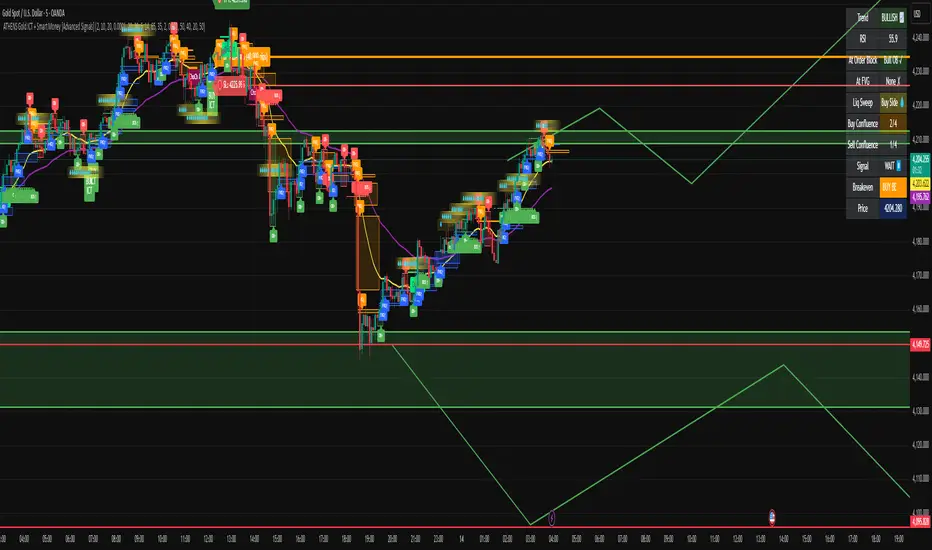
ATHENS Gold ICT + Smart Money [Advanced Signals]🎯 ADVANCED ICT + SMART MONEY CONFLUENCE INDICATOR This indicator combines Inner Circle Trader (ICT) concepts with Smart Money theory to deliver high-probability trading signals based on institutional order flow and market structure. ━━━━━━━━━━━━━━━━━━━━━━━━━━━━━━━━━━━━━━━━ ⚡ KEY FEATURES: ✅ ICT CONFLUENCE SYSTEM (0-4 Score) • Order Blocks (Institutional Entry Zones) • Fair Value Gaps (Price Imbalances) • Liquidity Sweeps (Stop Hunt Detection) • Market Structure (BOS & ChoCh) ✅ SMART SIGNALS • Signals only trigger with minimum confluence • Customizable requirements (OB/FVG/Liquidity) • Filters out low-quality setups • Higher win rate potential (65-85%) ✅ VISUAL COMPONENTS • Order Blocks (OB+ / OB-) • Fair Value Gaps (FVG↑ / FVG↓) • Liquidity Zones (💧 markers) • Break of Structure (BOS) • Change of Character (ChoCh) ✅ PERSISTENT TP/SL LINES • Entry, Stop Loss, TP1, TP2 • Automatically calculated from OB levels • Lines extend across chart canvas • Clear risk:reward visualization ✅ SMART DASHBOARD • Real-time confluence score • Component status (OB/FVG/Liquidity) • Trend direction & RSI • Signal strength indicator ━━━━━━━━━━━━━━━━━━━━━━━━━━━━━━━━━━━━━━━━ 🎯 HOW IT WORKS: The indicator scores each setup based on 4 key components: 1️⃣ ORDER BLOCK PRESENCE • Bullish OB = Last bearish candle before strong move up • Bearish OB = Last bullish candle before strong move down • Price must be in OB zone 2️⃣ FAIR VALUE GAP (FVG) • Gap between 3 candles indicating imbalance • Price tends to fill these gaps • Bounce from FVG = high probability entry 3️⃣ LIQUIDITY SWEEP • Price sweeps recent high/low • Retail stop losses triggered • Smart money enters opposite direction 4️⃣ MARKET STRUCTURE • Bullish = HH + HL • Bearish = LH + LL • Confirms trend direction CONFLUENCE SCORE: - 4/4 = Excellent (75-85% win rate) - 3/4 = Good (65-75% win rate) - 2/4 = Moderate (55-65% win rate) - 1/4 = Weak (avoid) ━━━━━━━━━━━━━━━━━━━━━━━━━━━━━━━━━━━━━━━━ ⚙️ CUSTOMIZABLE SETTINGS: SIGNAL REQUIREMENTS: - Require Order Block (ON/OFF) - Require FVG (ON/OFF) - Require Liquidity Sweep (ON/OFF) - Minimum Confluence (1-4) VISUAL SETTINGS: - Show/Hide OB, FVG, BOS, ChoCh - Adjustable lookback periods - Customizable colors - Line extension length RISK MANAGEMENT: - Risk:Reward ratio (1:1 to 5:1) - Stop Loss buffer (%) - Auto TP/SL calculation - Clear old lines option ━━━━━━━━━━━━━━━━━━━━━━━━━━━━━━━━━━━━━━━━ 📈 RECOMMENDED SETTINGS: CONSERVATIVE (High Quality): - Require OB: ON - Require FVG: ON - Min Confluence: 3/4 - Result: 1-2 signals/day, 70-80% win rate BALANCED (Recommended): - Require OB: ON - Require FVG: OFF - Min Confluence: 2/4 - Result: 2-4 signals/day, 60-70% win rate AGGRESSIVE (More Signals): - Require OB: OFF - Require FVG: OFF - Min Confluence: 2/4 - Result: 3-6 signals/day, 55-65% win rate ━━━━━━━━━━━━━━━━━━━━━━━━━━━━━━━━━━━━━━━━ 🎯 BEST PRACTICES: ✅ Trade 3/4 or 4/4 confluence signals only ✅ Confirm with higher timeframe (H4/Daily) ✅ Trade during kill zones (London/NY open) ✅ Use proper position sizing (1-2% risk) ✅ Wait for all components to align ✅ Respect stop losses ✅ Take partial profits at TP1 ❌ Don't trade 1/4 confluence signals ❌ Don't ignore liquidity sweeps ❌ Don't trade against higher TF trend ❌ Don't overtrade (quality > quantity) ━━━━━━━━━━━━━━━━━━━━━━━━━━━━━━━━━━━━━━━━ ⚡ SIGNAL TYPES: 🟢 BUY SIGNAL (Green Triangle) - Appears when bullish confluence met - Label shows "BUY ICT" - Blue entry line + Red SL + Green/Lime TPs - Long opportunity 🔴 SELL SIGNAL (Red Triangle) - Appears when bearish confluence met - Label shows "SELL ICT" - Blue entry line + Red SL + Green/Lime TPs - Short opportunity ━━━━━━━━━━━━━━━━━━━━━━━━━━━━━━━━━━━━━━━━ 📊 SUITABLE FOR: - Gold (XAUUSD) - Optimized - Forex pairs (Major pairs) - Indices (US30, NAS100, SPX500) - Crypto (BTC, ETH - adjust settings) Recommended Timeframes: - 15M - Primary for scalping - 5M - Entry refinement - 1H - Swing trading - H4/Daily - Trend confirmation ━━━━━━━━━━━━━━━━━━━━━━━━━━━━━━━━━━━━━━━━ ⚠️ DISCLAIMER: This indicator is for educational purposes only. Past performance does not guarantee future results. Always: - Practice on demo account first - Use proper risk management - Never risk more than you can afford to lose - Seek professional financial advice - Understand that trading carries risk ━━━━━━━━━━━━━━━━━━━━━━━━━━━━━━━━━━━━━━━━ 🎓 BASED ON: - ICT (Inner Circle Trader) Concepts - Smart Money Theory - Order Flow Analysis - Institutional Trading Zones - Market Structure Theory ━━━━━━━━━━━━━━━━━━━━━━━━━━━━━━━━━━━━━━━━ 📢 FEATURES SUMMARY: ✅ Confluence-based signals (not random) ✅ Order Blocks + FVG + Liquidity integration ✅ Persistent TP/SL lines (scroll-friendly) ✅ Smart dashboard (real-time info) ✅ Customizable requirements ✅ High-probability setups ✅ Professional trading approach ✅ Works on multiple assets ✅ Clean visual presentation ✅ Beginner to advanced friendly ━━━━━━━━━━━━━━━━━━━━━━━━━━━━━━━━━━━━━━━━ Trade smart. Trade with confluence. 🎯 #ICT #SmartMoney #OrderBlocks #FVG #Gold #Forex #TradingStrategy #ConfluenceIndikator Pine Script®oleh AthensBySahanDiupdate 22714
Gap & Crap Detector V1Gap & Crap Detector (5% Gap Detector + % Labels) This indicator automatically detects stocks that gap up ≥ 5% (adjustable) from the previous day’s close and tracks whether the move holds or fails over the next three candles. 🔍 How It Works Yellow % Label → Appears on every candle that gaps up ≥ 5%, showing the exact percentage gap. Gap & Go (Green Label) → Triggers when the next 3 candles close above the gap-day low, signaling momentum continuation. Gap & Crap (Red Label) → Triggers immediately if any of the next 3 candles close below the gap-day low, signaling momentum failure. ⚙️ Inputs & Customization Gap % Threshold – Default 5% (adjustable) Label Size – Tiny / Small / Normal / Large / Huge Opacity Controls – Independently set transparency for yellow, red, and green labels Gap & Go Offset – Adjust how high above the candle the green label appears 🧠 Usage Use this tool to identify breakout gaps and verify whether price action confirms (Gap & Go) or fails (Gap & Crap). Ideal for momentum traders, swing traders, Ovtlyr Plan M, and gap strategy backtesting.Indikator Pine Script®oleh MechArt_25
Whale HunterThis script searches for gaps (above selected price gap percent), and mark it with a box (that can be extend right) also it takes the buy price of Gap-Up and sell price of a Gap-Down and tries to cluster them into price ranges in a table (the space between price clusters is configurable), so you can see what are the most likely price range that the whales are buying and selling that makes the price move in a way that causes a X% gap, so this indicator will show you where the whales are buying and sellingIndikator Pine Script®oleh shay_privateDiupdate 10
Session Gap Fill [LuxAlgo]The Session Gap Fill tool detects and highlights filled and unfilled price gaps between regular sessions. It features a dashboard with key statistics about the detected gaps. The tool is highly customizable, allowing users to filter by different types of gaps and customize how they are displayed on the chart. 🔶 USAGE By default, the tool detects all price gaps between sessions. A price gap is defined as a difference between the opening price of one session and the closing price of the previous session. In this case, the tool uses the opening price of the first bar of the session against the closing price of the previous bar. A bullish gap is detected when the session open price is higher than the last close, and a bearish gap is detected when the session open price is lower than the last close. Gaps represent a change in market sentiment, a difference in what market participants think between the close of one trading session and the open of the next. What is useful to traders is not the gap itself, but how the market reacts to it. Unfilled gaps occur when prices do not return to the previous session's closing price. Filled gaps occur when prices come back to the previous session's close price. By analyzing how markets react to gaps, traders can understand market sentiment, whether different prices are accepted or rejected, and take advantage of this information to position themselves in favor of bullish or bearish market sentiment. Next, we will cover the Gap Type Filter and Statistics Dashboard. 🔹 Gap Type Filter Traders can choose from three options: display all gaps, display only overlapping gaps, or display only non-overlapping gaps. All gaps are displayed by default. An overlapping gap is defined when the first bar of the session has any price in common with the previous bar. No overlapping gap is defined when the two bars do not share any price levels. As we will see in the next section, there are clear differences in market behavior around these types of gaps. 🔹 Statistics Dashboard The Statistics Dashboard displays key metrics that help traders understand market behavior around each type of gap. Gaps: The percentage of bullish and bearish gaps. Filled: The percentage of filled bullish and bearish gaps. Reversed: The percentage of filled gaps that move in favor of the gap Bars Avg.: The average number of bars for a gap to be filled. Now, let's analyze the chart on the left of the image to understand those stats. These are the stats for all gaps, both overlapping and non-overlapping. Of the total, bullish gaps represent 55%, and bearish ones represent 44%. The gap bias is pretty balanced in this market. The second statistic, Filled, shows that 63% of gaps are filled, both bullish and bearish. Therefore, there is a higher probability that a gap will be filled than not. The third statistic is reversed. This is the percentage of filled gaps where prices move in favor of the gap. This applies to filled bullish gaps when the close of the session is above the open, and to filled bearish gaps when the close of the session is below the open. In other words, first there is a gap, then it fills, and finally it reverses. As we can see in the chart, this only happens 35% of the time for bullish gaps and 29% of the time for bearish gaps. The last statistic is Bars Avg., which is the average number of bars for a gap to be filled. On average, it takes between one and two bars for both bullish and bearish gaps. On average, gaps fill quickly. As we can see on the chart, selecting different types of gaps yields different statistics and market behavior. For example, overlapping gaps have a greater than 90% chance of being filled, whereas non-overlapping gaps have a less than 40% chance. 🔶 SETTINGS Gap Type: Select the type of gap to display. 🔹 Dashboard Dashboard: Enable or disable the dashboard. Position: Select the location of the dashboard. Size: Select the dashboard size. 🔹 Style Filled Bullish Gap: Enable or disable this gap and choose the color. Filled Bearish Gap: Enable or disable this gap and choose the color. Unfilled Gap: Enable or disable this gap and choose the color. Max Deviation Level: Enable or disable this level and choose the color. Open Price Level: Enable or disable this level and choose the color. Indikator Pine Script®oleh LuxAlgo99 2.3 K
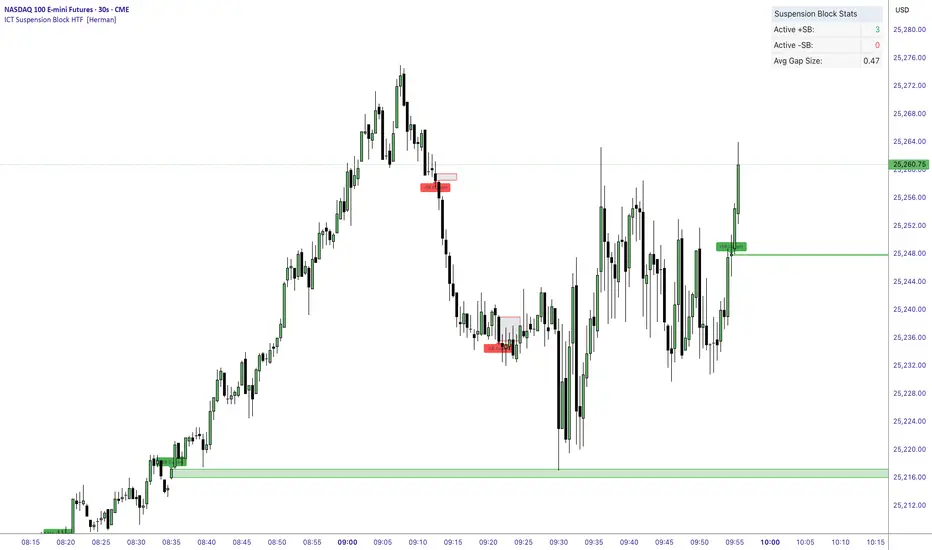
ICT Suspension Block HTF [Herman]ICT Suspension Block HTF — auto-marking +SB / –SB with MTF ICT Suspension Block HTF automatically detects and plots Suspension Blocks (SB ) on your chart and optionally pulls them from higher timeframes. It’s built for traders who want precise, visual SB zones with mitigation/entry alerts and a compact stats panel. What’s a Suspension Block (SB) ? -A Suspension Block is a body-to-body price imbalance formed by three consecutive candles in the same direction where the bodies create sequential “gaps” (a brief pause in price efficiency). -Bullish +SB: three bullish candles with body-to-body gaps stepping up. -Bearish –SB: three bearish candles with body-to-body gaps stepping down. This script highlights the actionable block zone (between the body levels of the middle candle) and lets you extend it forward for reaction tests. Note: This tool implements a widely discussed definition of Suspension Blocks for educational/analytical use. Key features -Auto detection: Plots +SB/–SB the moment a valid 3-candle structure forms. -Multi-Timeframe (MTF): -Current timeframe detection (toggle). -MTF1 & MTF2 pulls (e.g., 5m and 15m by default) to show HTF SBs directly on your LTF chart. -Smart de-duplication: Avoids drawing near-identical blocks (tick-aware tolerance). -Midpoint line (optional): Draws the 50% of the block for refined confluence. -Forward extension: Choose how far to extend the zone in bars. Alerts: -New +SB/–SB formed -Price enters a block -Block mitigated -Stats table: Lightweight panel showing active +SB / –SB counts and average detected gap size. Theme aware : Light/Dark table themes matched to Herman Trading visuals. Inputs (quick guide) -Multi-Timeframe -Enable Current Timeframe -Enable MTF1 (timeframe input) -Enable MTF2 (timeframe input) Core -Show Bullish / Bearish -Show Labels -Show 50% Midpoint -Min Gap Size (% of candle body) — filters out weak structures -Extension Length (bars) — how far to project the zone -Max Number of Blocks — auto-prunes oldest drawings -Label Size & Colors -Alerts -New Block Formation -Price Entered Block -Block Mitigation -Table -Show / Position -Theme (Light / Dark) How mitigation & entry work -Entry alert: Fires when price crosses into a block (from outside). -Mitigation: When price tags the block boundaries (top/bottom), the zone is marked mitigated (faded, no further extension). -The stats panel updates counts in real time. Practical tips -Use HTF SBs (e.g., 15m/1h) on your execution timeframe for higher-quality reaction zones. -Combine with your existing framework (session timing, liquidity sweeps, iFVG/MSS, etc.). -Tighten/loosen Min Gap Size to match instrument volatility. -Keep Max Blocks reasonable for performance on very low timeframes. Disclaimer This indicator is for education and analysis. It does not constitute financial advice. Trading involves risk; always do your own research and manage risk appropriately.Indikator Pine Script®oleh helmans1333235
Fair Value Gap / iVFG / Imbalance / MTF SuiteDescription This indicator detects Fair Value Gaps (FVGs) and Imbalances across up to 10 user-selected timeframes and manages them with precise retest handling and clean visualization options. What’s unique 3-candle FVG detection per timeframe (no lookahead). Retest handling: on the first touch the touched edge snaps to the retest wick and the zone recolors (fresh → retested). Right-side projection limits to avoid endless extensions. Deterministic multi-TF overlay: HTF zones are computed independently (lookahead off) and drawn in a stable, priority-based order. iFVG / parked zones: optionally convert a filled gap into an iFVG (parked/blue) instead of deleting/greying it. Optional Imbalance Add-on (3-candle), with split halves + 50% midline. How it works (technical) FVG logic (3 candles): Bullish when low > high (gap up); Bearish when high < low (gap down). The created box spans the untraded range of candle B and starts at time . Retest behavior: On the first wick-touch, the nearest boundary adapts to the wick extreme. If enabled, the box recolors to a “retested” palette. Projection: Boxes extend to the right; optional bar limit constrains length. Display limits: FIFO pruning per direction keeps only the newest N boxes; iFVG/grey pools can share or use separate limits. Imbalance Add-on (optional): Classic 3-candle imbalance; draws upper/lower halves and an optional 50% midline. No lookahead / confirmation: Calculations run with barmerge.lookahead_off; detection finalizes on bar close (repaint-free on close). How to use Treat fresh gaps as potential reaction zones or confluence with liquidity / structure. Use retested gaps for continuation or rejection logic. Limit right-projection and visible count to keep charts readable on lower TFs. Combine with your own execution rules (entries, stops, partials). Key settings General: adjust/recolor on retest, right-side limit (bars). Display Limits: max visible per direction; separate iFVG cap if desired. Visuals: filled vs. outline, transparency, TF labels (auto or custom), label alignment. Theme: presets (Pegasus Classic, Icefire, Solarized, Heatmap, Pastel, Monochrome) or Custom colors. Timeframes: enable up to 10 TF slots (e.g., M1/M5/M15/H1/H4/D1…). Add-on — Imbalance: enable/disable, midline on/off, filled/outline, colors. Alerts New Bullish FVG New Bearish FVG Add-on: New Bullish Imbalance Add-on: New Bearish Imbalance Notes & limitations FVG detection is confirmed on bar close; intrabar retest recolor can occur as price interacts. Historical rendering depends on chart history & session settings. Many TFs + large box counts can be heavy; use projection limits and display caps for performance. This tool does not generate trade signals; it visualizes inefficiencies for discretionary or rules-based workflows. Disclaimer For educational and informational purposes only. Not financial advice. Access / Support: Invite-only. For access or assistance, please DM.Indikator Pine Script®oleh Project_Pegasus27