ASFX EMAs, ADR, Asian Range, and Pivot PointsThis indicator combines the essential indicators that ASFX traders use, including the EMAs (8, 21, 50, 200, 800), the Average Daily Range, the Asian Range, and the Pivot Points.
The EMAs should be used as dynamic supports and resistances. We could use it to find entries like when there is a bullish engulfing coming off the 21 EMA.
The Average Daily Range tells us the how many pips the pair moves on average. We could use it to measure risk/reward ratios or see it as another resistance.
The Asian Range is displayed as two lines indicating the Asian Session's High and Low. This could help us to determine whether the pair is ready for a breakout. We might avoid setups that are still in the Asian Range as the pair might still be indecisive.
The Pivot Points are also another form of support and resistance which are calculated using the previous day's data. The Pivot Points displayed in this indicator only include the Pivot, R1, R2, R3, S1, S2, S3. (R4, R5, S4, S5 are not included)
All of these indicators should give us a read of the trend. If the EMAs are beautifully fanned out with the 8 EMA on the top and the 800 EMA on the bottom and the price is above the Asian Range and the Pivot, we might keep an eye for a long entry.
Cari skrip untuk "range"

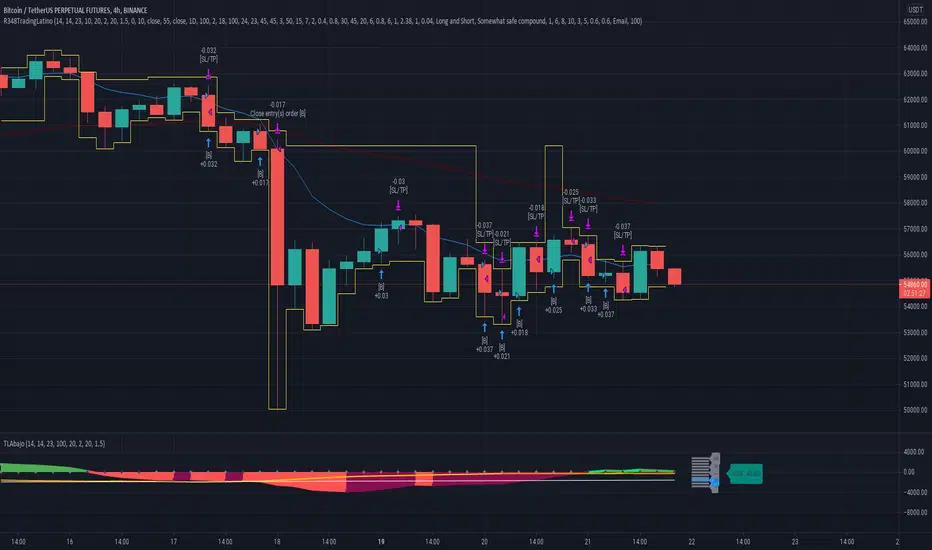
Ruckard TradingLatinoThis strategy tries to mimic TradingLatino strategy.
The current implementation is beta.
Si hablas castellano o espanyol por favor consulta MENSAJE EN CASTELLANO más abajo.
It's aimed at BTCUSDT pair and 4h timeframe.
STRATEGY DEFAULT SETTINGS EXPLANATION
max_bars_back=5000 : This is a random number of bars so that the strategy test lasts for one or two years
calc_on_order_fills=false : To wait for the 4h closing is too much. Try to check if it's worth entering a position after closing one. I finally decided not to recheck if it's worth entering after an order is closed. So it is false.
calc_on_every_tick=false
pyramiding=0 : We only want one entry allowed in the same direction. And we don't want the order to scale by error.
initial_capital=1000 : These are 1000 USDT. By using 1% maximum loss per trade and 7% as a default stop loss by using 1000 USDT at 12000 USDT per BTC price you would entry with around 142 USDT which are converted into: 0.010 BTC . The maximum number of decimal for contracts on this BTCUSDT market is 3 decimals. E.g. the minimum might be: 0.001 BTC . So, this minimal 1000 amount ensures us not to entry with less than 0.001 entries which might have happened when using 100 USDT as an initial capital.
slippage=1 : Binance BTCUSDT mintick is: 0.01. Binance slippage: 0.1 % (Let's assume). TV has an integer slippage. It does not have a percentage based slippage. If we assume a 1000 initial capital, the recommended equity is 142 which at 11996 USDT per BTC price means: 0.011 BTC. The 0.1% slippage of: 0.011 BTC would be: 0.000011 . This is way smaller than the mintick. So our slippage is going to be 1. E.g. 1 (slippage) * 0.01 (mintick)
commission_type=strategy.commission.percent and commission_value=0.1 : According to: binance . com / en / fee / schedule in VIP 0 level both maker and taker fees are: 0.1 %.
BACKGROUND
Jaime Merino is a well known Youtuber focused on crypto trading
His channel TradingLatino
features monday to friday videos where he explains his strategy.
JAIME MERINO STANCE ON BOTS
Jaime Merino stance on bots (taken from memory out of a 2020 June video from him):
'~
You know. They can program you a bot and it might work.
But, there are some special situations that the bot would not be able to handle.
And, I, as a human, I would handle it. And the bot wouldn't do it.
~'
My long term target with this strategy script is add as many
special situations as I can to the script
so that it can match Jaime Merino behaviour even in non normal circumstances.
My alternate target is learn Pine script
and enjoy programming with it.
WARNING
This script might be bigger than other TradingView scripts.
However, please, do not be confused because the current status is beta.
This script has not been tested with real money.
This is NOT an official strategy from Jaime Merino.
This is NOT an official strategy from TradingLatino . net .
HOW IT WORKS
It basically uses ADX slope and LazyBear's Squeeze Momentum Indicator
to make its buy and sell decisions.
Fast paced EMA being bigger than slow paced EMA
(on higher timeframe) advices going long.
Fast paced EMA being smaller than slow paced EMA
(on higher timeframe) advices going short.
It finally add many substrats that TradingLatino uses.
SETTINGS
__ SETTINGS - Basics
____ SETTINGS - Basics - ADX
(ADX) Smoothing {14}
(ADX) DI Length {14}
(ADX) key level {23}
____ SETTINGS - Basics - LazyBear Squeeze Momentum
(SQZMOM) BB Length {20}
(SQZMOM) BB MultFactor {2.0}
(SQZMOM) KC Length {20}
(SQZMOM) KC MultFactor {1.5}
(SQZMOM) Use TrueRange (KC) {True}
____ SETTINGS - Basics - EMAs
(EMAS) EMA10 - Length {10}
(EMAS) EMA10 - Source {close}
(EMAS) EMA55 - Length {55}
(EMAS) EMA55 - Source {close}
____ SETTINGS - Volume Profile
Lowest and highest VPoC from last three days
is used to know if an entry has a support
VPVR of last 100 4h bars
is also taken into account
(VP) Use number of bars (not VP timeframe): Uses 'Number of bars {100}' setting instead of 'Volume Profile timeframe' setting for calculating session VPoC
(VP) Show tick difference from current price {False}: BETA . Might be useful for actions some day.
(VP) Number of bars {100}: If 'Use number of bars (not VP timeframe)' is turned on this setting is used to calculate session VPoC.
(VP) Volume Profile timeframe {1 day}: If 'Use number of bars (not VP timeframe)' is turned off this setting is used to calculate session VPoC.
(VP) Row width multiplier {0.6}: Adjust how the extra Volume Profile bars are shown in the chart.
(VP) Resistances prices number of decimal digits : Round Volume Profile bars label numbers so that they don't have so many decimals.
(VP) Number of bars for bottom VPOC {18}: 18 bars equals 3 days in suggested timeframe of 4 hours. It's used to calculate lowest session VPoC from previous three days. It's also used as a top VPOC for sells.
(VP) Ignore VPOC bottom advice on long {False}: If turned on it ignores bottom VPOC (or top VPOC on sells) when evaluating if a buy entry is worth it.
(VP) Number of bars for VPVR VPOC {100}: Number of bars to calculate the VPVR VPoC. We use 100 as Jaime once used. When the price bounces back to the EMA55 it might just bounce to this VPVR VPoC if its price it's lower than the EMA55 (Sells have inverse algorithm).
____ SETTINGS - ADX Slope
ADX Slope
help us to understand if ADX
has a positive slope, negative slope
or it is rather still.
(ADXSLOPE) ADX cut {23}: If ADX value is greater than this cut (23) then ADX has strength
(ADXSLOPE) ADX minimum steepness entry {45}: ADX slope needs to be 45 degrees to be considered as a positive one.
(ADXSLOPE) ADX minimum steepness exit {45}: ADX slope needs to be -45 degrees to be considered as a negative one.
(ADXSLOPE) ADX steepness periods {3}: In order to avoid false detection the slope is calculated along 3 periods.
____ SETTINGS - Next to EMA55
(NEXTEMA55) EMA10 to EMA55 bounce back percentage {80}: EMA10 might bounce back to EMA55 or maybe to 80% of its complete way to EMA55
(NEXTEMA55) Next to EMA55 percentage {15}: How much next to the EMA55 you need to be to consider it's going to bounce back upwards again.
____ SETTINGS - Stop Loss and Take Profit
You can set a default stop loss or a default take profit.
(STOPTAKE) Stop Loss % {7.0}
(STOPTAKE) Take Profit % {2.0}
____ SETTINGS - Trailing Take Profit
You can customize the default trailing take profit values
(TRAILING) Trailing Take Profit (%) {1.0}: Trailing take profit offset in percentage
(TRAILING) Trailing Take Profit Trigger (%) {2.0}: When 2.0% of benefit is reached then activate the trailing take profit.
____ SETTINGS - MAIN TURN ON/OFF OPTIONS
(EMAS) Ignore advice based on emas {false}.
(EMAS) Ignore advice based on emas (On closing long signal) {False}: Ignore advice based on emas but only when deciding to close a buy entry.
(SQZMOM) Ignore advice based on SQZMOM {false}: Ignores advice based on SQZMOM indicator.
(ADXSLOPE) Ignore advice based on ADX positive slope {false}
(ADXSLOPE) Ignore advice based on ADX cut (23) {true}
(STOPTAKE) Take Profit? {false}: Enables simple Take Profit.
(STOPTAKE) Stop Loss? {True}: Enables simple Stop Loss.
(TRAILING) Enable Trailing Take Profit (%) {True}: Enables Trailing Take Profit.
____ SETTINGS - Strategy mode
(STRAT) Type Strategy: 'Long and Short', 'Long Only' or 'Short Only'. Default: 'Long and Short'.
____ SETTINGS - Risk Management
(RISKM) Risk Management Type: 'Safe', 'Somewhat safe compound' or 'Unsafe compound'. ' Safe ': Calculations are always done with the initial capital (1000) in mind. The maximum losses per trade/day/week/month are taken into account. ' Somewhat safe compound ': Calculations are done with initial capital (1000) or a higher capital if it increases. The maximum losses per trade/day/week/month are taken into account. ' Unsafe compound ': In each order all the current capital is gambled and only the default stop loss per order is taken into account. That means that the maximum losses per trade/day/week/month are not taken into account. Default : 'Somewhat safe compound'.
(RISKM) Maximum loss per trade % {1.0}.
(RISKM) Maximum loss per day % {6.0}.
(RISKM) Maximum loss per week % {8.0}.
(RISKM) Maximum loss per month % {10.0}.
____ SETTINGS - Decimals
(DECIMAL) Maximum number of decimal for contracts {3}: How small (3 decimals means 0.001) an entry position might be in your exchange.
EXTRA 1 - PRICE IS IN RANGE indicator
(PRANGE) Print price is in range {False}: Enable a bottom label that indicates if the price is in range or not.
(PRANGE) Price range periods {5}: How many previous periods are used to calculate the medians
(PRANGE) Price range maximum desviation (%) {0.6} ( > 0 ): Maximum positive desviation for range detection
(PRANGE) Price range minimum desviation (%) {0.6} ( > 0 ): Mininum negative desviation for range detection
EXTRA 2 - SQUEEZE MOMENTUM Desviation indicator
(SQZDIVER) Show degrees {False}: Show degrees of each Squeeze Momentum Divergence lines to the x-axis.
(SQZDIVER) Show desviation labels {False}: Whether to show or not desviation labels for the Squeeze Momentum Divergences.
(SQZDIVER) Show desviation lines {False}: Whether to show or not desviation lines for the Squeeze Momentum Divergences.
EXTRA 3 - VOLUME PROFILE indicator
WARNING: This indicator works not on current bar but on previous bar. So in the worst case it might be VP from 4 hours ago. Don't worry, inside the strategy calculus the correct values are used. It's just that I cannot show the most recent one in the chart.
(VP) Print recent profile {False}: Show Volume Profile indicator
(VP) Avoid label price overlaps {False}: Avoid label prices to overlap on the chart.
EXTRA 4 - ZIGNALY SUPPORT
(ZIG) Zignaly Alert Type {Email}: 'Email', 'Webhook'. ' Email ': Prepare alert_message variable content to be compatible with zignaly expected email content format. ' Webhook ': Prepare alert_message variable content to be compatible with zignaly expected json content format.
EXTRA 5 - DEBUG
(DEBUG) Enable debug on order comments {False}: If set to true it prepares the order message to match the alert_message variable. It makes easier to debug what would have been sent by email or webhook on each of the times an order is triggered.
HOW TO USE THIS STRATEGY
BOT MODE: This is the default setting.
PROPER VOLUME PROFILE VIEWING: Click on this strategy settings. Properties tab. Make sure Recalculate 'each time the order was run' is turned off.
NEWBIE USER: (Check PROPER VOLUME PROFILE VIEWING above!) You might want to turn on the 'Print recent profile {False}' setting. Alternatively you can use my alternate realtime study: 'Resistances and supports based on simplified Volume Profile' but, be aware, it might consume one indicator.
ADVANCED USER 1: Turn on the 'Print price is in range {False}' setting and help us to debug this subindicator. Also help us to figure out how to include this value in the strategy.
ADVANCED USER 2: Turn on the all the (SQZDIVER) settings and help us to figure out how to include this value in the strategy.
ADVANCED USER 3: (Check PROPER VOLUME PROFILE VIEWING above!) Turn on the 'Print recent profile {False}' setting and report any problem with it.
JAIME MERINO: Just use the indicator as it comes by default. It should only show BUY signals, SELL signals and their associated closing signals. From time to time you might want to check 'ADVANCED USER 2' instructions to check that there's actually a divergence. Check also 'ADVANCED USER 1' instructions for your amusement.
EXTRA ADVICE
It's advised that you use this strategy in addition to these two other indicators:
* Squeeze Momentum Indicator
* ADX
so that your chart matches as close as possible to TradingLatino chart.
ZIGNALY INTEGRATION
This strategy supports Zignaly email integration by default. It also supports Zignaly Webhook integration.
ZIGNALY INTEGRATION - Email integration example
What you would write in your alert message:
||{{strategy.order.alert_message}}||key=MYSECRETKEY||
ZIGNALY INTEGRATION - Webhook integration example
What you would write in your alert message:
{ {{strategy.order.alert_message}} , "key" : "MYSECRETKEY" }
CREDITS
I have reused and adapted some code from
'Directional Movement Index + ADX & Keylevel Support' study
which it's from TradingView console user.
I have reused and adapted some code from
'3ema' study
which it's from TradingView hunganhnguyen1193 user.
I have reused and adapted some code from
'Squeeze Momentum Indicator ' study
which it's from TradingView LazyBear user.
I have reused and adapted some code from
'Strategy Tester EMA-SMA-RSI-MACD' study
which it's from TradingView fikira user.
I have reused and adapted some code from
'Support Resistance MTF' study
which it's from TradingView LonesomeTheBlue user.
I have reused and adapted some code from
'TF Segmented Linear Regression' study
which it's from TradingView alexgrover user.
I have reused and adapted some code from
"Poor man's volume profile" study
which it's from TradingView IldarAkhmetgaleev user.
FEEDBACK
Please check the strategy source code for more detailed information
where, among others, I explain all of the substrats
and if they are implemented or not.
Q1. Did I understand wrong any of the Jaime substrats (which I have implemented)?
Q2. The strategy yields quite profit when we should long (EMA10 from 1d timeframe is higher than EMA55 from 1d timeframe.
Why the strategy yields much less profit when we should short (EMA10 from 1d timeframe is lower than EMA55 from 1d timeframe)?
Any idea if you need to do something else rather than just reverse what Jaime does when longing?
FREQUENTLY ASKED QUESTIONS
FAQ1. Why are you giving this strategy for free?
TradingLatino and his fellow enthusiasts taught me this strategy. Now I'm giving back to them.
FAQ2. Seriously! Why are you giving this strategy for free?
I'm confident his strategy might be improved a lot. By keeping it to myself I would avoid other people contributions to improve it.
Now that everyone can contribute this is a win-win.
FAQ3. How can I connect this strategy to my Exchange account?
It seems that you can attach alerts to strategies.
You might want to combine it with a paying account which enable Webhook URLs to work.
I don't know how all of this works right now so I cannot give you advice on it.
You will have to do your own research on this subject. But, be careful. Automating trades, if not done properly,
might end on you automating losses.
FAQ4. I have just found that this strategy by default gives more than 3.97% of 'maximum series of losses'. That's unacceptable according to my risk management policy.
You might want to reduce default stop loss setting from 7% to something like 5% till you are ok with the 'maximum series of losses'.
FAQ5. Where can I learn more about your work on this strategy?
Check the source code. You might find unused strategies. Either because there's not a substantial increases on earnings. Or maybe because they have not been implemented yet.
FAQ6. How much leverage is applied in this strategy?
No leverage.
FAQ7. Any difference with original Jaime Merino strategy?
Most of the times Jaime defines an stop loss at the price entry. That's not the case here. The default stop loss is 7% (but, don't be confused it only means losing 1% of your investment thanks to risk management). There's also a trailing take profit that triggers at 2% profit with a 1% trailing.
FAQ8. Why this strategy return is so small?
The strategy should be improved a lot. And, well, backtesting in this platform is not guaranteed to return theoric results comparable to real-life returns. That's why I'm personally forward testing this strategy to verify it.
MENSAJE EN CASTELLANO
En primer lugar se agradece feedback para mejorar la estrategia.
Si eres un usuario avanzado y quieres colaborar en mejorar el script no dudes en comentar abajo.
Ten en cuenta que aunque toda esta descripción tenga que estar en inglés no es obligatorio que el comentario esté en inglés.
CHISTE - CASTELLANO
¡Pero Jaime!
¡400.000!
¡Tu da mun!
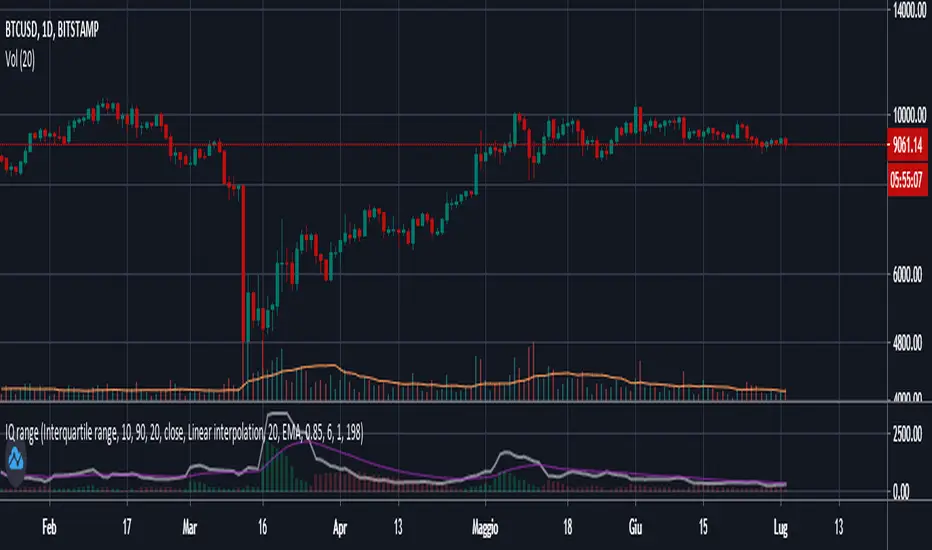
Interquartile rangeThis script plots the Interquartile range (difference between 3rd and 1st quartile), providing useful infos about price distribution and volatility . It is designed to work paired with my other script "Moving percentiles channel", but you can also use it alone.
Features:
- You can compute the percentiles using Linear interpolation or Nearest Rank methods
- You can plot not only the Interquartile range, but also the range (difference between 100th and 0 percentiles) or a User defined range (you have to select which percentiles you want to use from the settings)
- The script also plots a signal line that you can use to obtain signals when the Range line crosses the signal line itself. You can plot the signal line using many different MAs ( SMA , EMA , DEMA , TEMA , WMA , VWMA , HMA , ALMA , LSMA , FRAMA ).
- It also plots an histogram that represents the difference between the Range and the Signal line. It will be green colored when positive, and red colored when negative.
Please show me your support and follow me if you like my scripts. Many more of them are coming in the future.
@ Bezzus
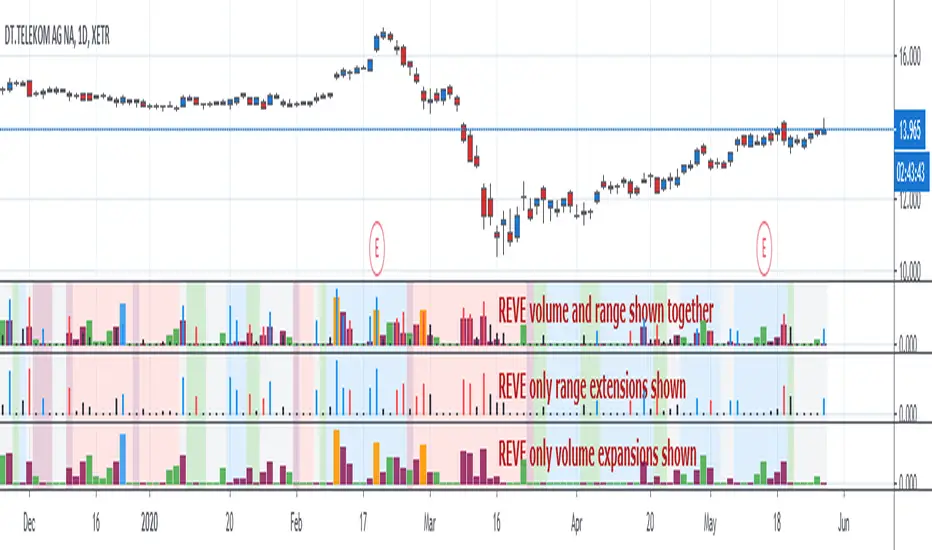
REVEREVE is abbreviation from Range Extension Volume Expansion. This indicator shows these against a background of momentum. The histogram and columns for the range and volume rises ara calculated with the same algorithm as I use in the Volume Range Events indicator, which I published before. Because this algorithm uses the same special function to assess 'normal' levels for volume and range and uses the same calculation for depicting the rises on a scale of zero through 100, it becomes possible to compare volume and range rises in the same chart panel and come to meaningful conclusions. Different from VolumeRangeEvents is that I don't attempt to show direction of the bars and columns by actually pointing up or down. However I did color the bars for range events according to direction if Close jumps more than 20 percent of ATR up or down either blue or red. If the wider range leads to nothing, i.e. a smaller jump than 20 percent, the color is black. You can teak this in the inputs. The volume colums ar colored according to two criteria, resulting in four colors (orange, blue, maroon, green). The first criterium is whether the expansion is climactic (orange, blue) or moderate (maroon, green). I assume that climactic (i.e. more than twice as much) volume marks the beginning or end of a trend. The second criterium looks at the range event that goes together with the volume event. If lots of volume lead to little change in range (blue, green), I assume that this volume originates from institutional traders who are accumulating or distributing. If wild price jumps occur with comparatively little volume (orange, maroon, or even no volume event) I assume that opportunistic are active, some times attributing to more volume.
For the background I use the same colors calculated with the same algorithm as in the Hull Agreement Indicator, which I published before. This way I try to predict trend changes by observation of REVE.
EZ Range MACD + DASH - ELECTZA**EZ Range MACD + DASH – ELECTZA**
A streamlined MACD momentum indicator built to reduce false signals in choppy markets. It combines a classic **MACD + Signal + Histogram** display with an **ATR-based range detector** that identifies low-volatility compression zones. When the market is ranging, momentum is muted and the script prioritizes “WAIT” conditions to help you avoid noise. Clear **BUY/SELL arrows** print only when MACD crossovers occur outside of detected range conditions. The built-in **dashboard** (bottom-right) gives a quick at-a-glance read of the **Overall Market State** (Bullish / Bearish / Ranging) plus the current **trade recommendation** (Buy / Sell / Wait), making it easy to track momentum and market quality without clutter.
**Disclaimer:**
This indicator/script is provided for **educational and informational purposes only** and does **not** constitute financial, investment, or trading advice. Trading and investing involve **significant risk**, and you may lose some or all of your capital. Past performance is **not** indicative of future results. Always do your own research, use proper risk management, and consider consulting a qualified financial professional. By using this script, you agree that you are solely responsible for any trading decisions and outcomes.

ADR% - Average Daily Range % by TrinhDuongSMWThe ADR% (Average Daily Range Percentage) is a volatility measurement tool designed to help traders understand the typical price movement of a stock over a specific period. Unlike the standard ATR (Average True Range) which uses absolute price points, ADR% expresses volatility as a percentage of the stock's price, making it easier to compare volatility across different tickers regardless of their share price.

ADR**Overview**
This indicator displays the **Average Daily Range (ADR)** and **ADR Percentage** in a customizable table on your chart.
While the standard ATR (Average True Range) is a popular metric for volatility, it accounts for price gaps (e.g., overnight moves). **ADR**, on the other hand, strictly measures the average distance between the **High** and **Low** of price bars, completely ignoring gaps.
**Why use ADR instead of ATR?**
* **Day Trading:** For intraday traders (Forex, Crypto, Futures), ADR is often preferred because it calculates the "tradable" range of the day. It answers the question: *"On average, how much does this asset move from High to Low?"*
* **Target Setting:** ADR is excellent for projecting daily highs and lows. If price has already moved 100% of its ADR, the statistical probability of further extension decreases.
* **Pure Volatility:** It filters out the noise of overnight gaps to show pure intraday volatility.
**Calculation Logic**
* **ADR:** Calculated using a Simple Moving Average (SMA) of the `High - Low` range over the specified length.
* Formula: `SMA(High - Low, Length)`
* **ADR%:** Shows the ADR relative to the current price.
* Formula: `(ADR / Current Close) * 100`
**Features**
* **Clean Dashboard:** A minimalist table displays the ADR value and the ADR %.
* **Customizable:** You can change the calculation length (default is 14) and move the table to any corner of the chart (Top/Bottom, Left/Right) to fit your workspace.
**Settings**
* **ADR Length:** The lookback period for the average (Default: 14).
* **Display Position:** Choose where the table appears on your screen.

Trading Checklist (BUY / SELL + Asia/London/NY + Prev 4H Range)Trading Checklist (BUY / SELL + Asia / London / NY + Prev 4H Range)
This indicator provides a rule-based trading checklist designed to keep execution aligned with session timing, higher-timeframe context, and directional bias.
Features
BUY / SELL Checklist Logic
Visual conditions help confirm whether market structure supports long or short execution.
Session Awareness
Automatically highlights the active trading session:
Asia
London
New York
Previous 4H Range Framework
Plots the last closed 4-hour candle high and low to define:
Premium / Discount context
Key reaction zones
HTF directional bias reference
Session-Aligned Execution
Helps traders focus on taking setups only during valid sessions, reducing overtrading.
Non-Repainting Design
All higher-timeframe levels are based on completed candles only, making the checklist reliable in live markets.

Last 4H Range + Fibs + Bias Last Closed 4H Range + Fibs + Bias
This indicator displays the last fully closed 4-hour (4H) candle range and projects it forward as a higher-timeframe framework for intraday trading.
Features
Last Closed 4H Range Box
Plots the high and low of the most recent completed 4H candle (non-repainting).
4H Fibonacci Levels
Automatically draws key internal levels (25%, 50% EQ, 75%, 61.8%, 78.6%).
4H Bias Detection
Bias is determined using the 4H close relative to the 50% equilibrium:
Above EQ → Bullish Bias
Below EQ → Bearish Bias
Bias Flip Alerts
Alerts trigger only when the 4H candle closes and bias changes.
Execution-Friendly Design
No candle colouring. Clean structure for use on lower timeframes.

Last 4H Range + Fibs + Bias Last Closed 4H Range + Fibs + Bias
This indicator displays the last fully closed 4-hour (4H) candle range and projects it forward as a higher-timeframe framework for intraday trading.
Features
Last Closed 4H Range Box
Plots the high and low of the most recent completed 4H candle (non-repainting).
4H Fibonacci Levels
Automatically draws key internal levels (25%, 50% EQ, 75%, 61.8%, 78.6%).
4H Bias Detection
Bias is determined using the 4H close relative to the 50% equilibrium:
Above EQ → Bullish Bias
Below EQ → Bearish Bias
Bias Flip Alerts
Alerts trigger only when the 4H candle closes and bias changes.
Execution-Friendly Design
No candle colouring. Clean structure for use on lower timeframes.

Last Candle + Previous Day + Pre-Market- RangeV2 of the Indicator (Test)
Last Candle + Previous Day + Pre-Market Script – Features
Last Candle Levels (Current Timeframe)
Draws horizontal lines at the high and low of the last confirmed candle.
Optional display of the candle range in percentage.
Lines automatically update and move correctly when zooming or changing the timeframe.
Previous Day High / Low
Shows the high and low of the previous trading day as dashed lines.
Lines are automatically updated and extend to the right, following the price scale.
Works on any timeframe chart.
Pre-Market High / Low
Highlights the pre-market session (default 04:00–09:30) with dotted lines.
Only calculated during intraday charts.
Lines behave exactly like the daily range lines: zoomable, shiftable, and extendable.
Optional toggle to enable or disable.
Customization Options
Colors for TF candle, daily range, and pre-market range lines.
Length of line extension to the right can be adjusted.
Toggle which levels to show: current TF, previous day, pre-market.
Stable & Safe in Pine Script v6
No repaint issues.
Works reliably on all intraday and daily charts.
Compatible with zooming and chart shifting.
If you want, I can also create a very short “user guide” with screenshots / labels in the chart, so it’s immediately clear what each toggle and line represents.
Do you want me to do that next?

Apex Wallet - Opening Range Breakout (ORB) & Session LevelsOverview The Apex Wallet Opening Range Breakout (ORB) is a professional intraday tool designed to capture the volatility of the first minutes of the trading session. By defining a clear range at the market open, this indicator provides traders with high-probability breakout levels and psychological targets based on mathematical extensions of the initial move.
Core Mechanics
Customizable Session: Easily define your preferred opening range duration (e.g., first 5, 15, or 30 minutes) and session start time.
Dynamic Timezone Adjustment: Includes a built-in UTC offset feature to ensure session times align perfectly with your local market, regardless of where you are trading from.
Automated Level Tracking: The script automatically identifies and locks the high and low of the specified opening period.
Key Features:
Psychological Mid-Lines: Calculates the 50% median of the range (ORB Mid) as a pivot point for trend strength.
Advanced Volatility Extensions: Plots internal and external targets (High+Mid, Low+Mid) to identify potential exhaustion zones or secondary breakout levels.
Intraday Optimization: Designed specifically for low-timeframe traders (1m to 15m) looking for clear execution zones at the bell.
How to use: Wait for the opening range to be established. A breakout above the ORB High often indicates bullish dominance, while a break below the ORB Low suggests bearish momentum. Use the internal extension lines as take-profit targets or areas to move your stop-loss to breakeven.

15 Zaman Kutusu ve 10 Zaman Acilisi15 Range Boxes & 10 Open Lines
This indicator is a comprehensive technical analysis tool designed to track specific time intervals (Sessions, Killzones) and critical opening prices on your chart.
Key Features:
15 Custom Range Boxes: Individual settings for color, time, and labels.
10 Open Price Lines: Track daily, weekly, or session opens.
Smart History Limit: "Son X Kutuyu Goster" feature preventing lag and flickering.
Pips Display: Automatically calculates and displays the range width in pips.
Minimalist Mode: Hides details when "Cok Kucuk" label size is selected.
Language: Fully Turkish menu settings.
Note: Inspired by Nephew Sam's concept, coded from scratch with performance optimizations and additional features.
DISCLAIMER This indicator is for educational purposes only. It does not constitute financial advice or trading signals. Use at your own risk.

MTF Session Range FibonacciMTF Session Range Fibonacci is a multi-timeframe indicator designed to map high-probability price reaction levels using a fixed intraday session range and Fibonacci projections.
The indicator first identifies a user-defined session window and records the session high and low. Once the session completes, it builds a complete Fibonacci structure from that range, including retracements and extensions above and below the session boundaries. These levels act as support, resistance, targets, and extreme reaction zones, commonly used for intraday and swing trading.
All calculations can be sourced from a higher or custom timeframe, allowing traders to project higher-timeframe structure onto lower-timeframe charts. This helps align entries with broader market context rather than relying on isolated chart data.
To provide trend confirmation, the indicator includes:
A Parabolic Weighted Moving Average (PWMA) to highlight directional bias and momentum strength.
A 50 / 200 EMA crossover system to identify potential trend shifts and dominant market direction.
Visual elements such as color-coded Fibonacci levels, informative tooltips, crossover markers, and optional fills between price and PWMA improve readability while keeping the chart structured.
This indicator is best suited for traders who rely on session-based structure, Fibonacci reactions, and multi-timeframe trend alignment, particularly in indices, forex, and futures markets.

PDH/PDL/PMH/PML Dashboard (Key-Levels Style PM Range)🟩 1. SHORT DESCRIPTION
Multi-ticker PDH/PDL/PMH/PML dashboard for intraday traders. Shows premarket range, PDH/PDL breaks, % change and trend classification.
🟩 2. FULL DESCRIPTION (for main body)
Use this for the Description section:
📘 Overview
This indicator provides a real-time dashboard for monitoring multiple tickers relative to key intraday levels including:
Previous Day High (PDH)
Previous Day Low (PDL)
Premarket High (PMH)
Premarket Low (PML)
% Change vs Yesterday Close
Breakout Signals
Trend Classification
Designed for intraday traders who monitor multiple names at once, this tool consolidates market-structure levels into one unified display without switching charts.
🧩 Key Features
✔ 14-symbol dashboard
✔ PDH / PDL / PMH / PML levels
✔ Break signal markers (▲ / ▼ / ●)
✔ % change column
✔ Trend direction column
✔ Extended hours premarket logic
✔ Automatic light/dark theme adaptation
✔ Built for U.S. equities
✔ Zero chart clutter — dashboard only
🧠 Level Logic
Previous Day Levels
PDH = yesterday high
PDL = yesterday low
Premarket Levels
Calculated from extended-hours session before 09:30 (New York time):
PMH = highest premarket price
PML = lowest premarket price
Levels reset daily.
📈 Signals
Break conditions:
Event Signal
Price > PDH ▲ (bullish breakout)
Price < PDL ▼ (bearish breakdown)
Price > PMH ● (premarket breakout)
Price < PML ● (premarket breakdown)
🔎 Trend Classification
Trend column simplifies direction:
Bullish: price > PDH AND price > PMH
Bearish: price < PDL AND price < PML
Neutral: otherwise
🧰 Use Cases
Useful for:
Opening drive monitoring
Liquidity sweeps / stop hunts
Reversal fades vs PDH/PDL
Sector rotation scanning
News trader watchlists
Options flow targeting
Premarket level validation
Great for prop/desk traders watching multiple names intraday.
📖 Usage Guide
Setup:
Enable extended hours for underlying symbols
Use timeframes ≥1m (1m–5m recommended)
Premarket values display once premarket prints
Recommended Workflow
Look for leaders clearing PDH/PMH
Watch laggards holding below PDL/PML
Use % change for rotation confirmation
Combine with volume/tape for execution
⚙ Data Requirements
Works with U.S. equities with extended hours feeds
Premarket not guaranteed for non-US symbols
PMH/PML will show “-” until premarket exists
📌 Limitations
Pine Script engine limits:
Request functions limited (40 calls)
Dashboard max 14 symbols (optimized for stability)
📂 Category
Suggested categories:
Indicators → Volume/Volatility
Indicators → Trend Analysis
Indicators → Market Structure
Tools → Dashboard/Scanner
🟩 3. TAGS (SEO optimized)
Paste these in tags:
PDH, PDL, PMH, PML, premarket, dashboard, scanner, intraday, breakout, liquidity, trend, stocks, equities, scanner, levels, key levels, extended hours, open drive, day trading, order flow, structure, range, opening drive, watchlist
🟩 4. LICENSE LINE (Required)
TradingView requires attribution for open licensing:
This script is published under the Mozilla Public License 2.0 (MPL 2.0).
🟩 5. SCREENSHOT GUIDE
TV moderators care a lot about screenshots.
Suggested screenshots:
✔ Dashboard visible on chart
✔ Both Light & Dark themes (shows UI adaptability)
✔ Example of premarket and PDH/PDL breaks
✔ Watchlist-style layout (multiple tickers)
Optional but increases engagement:
Opening drive examples (9:30–10:00)
Sector rotation examples
Breakout + Fade comparison
🟩 6. MODERATOR COMPLIANCE NOTES
This script:
✔ Does NOT generate buy/sell signals
✔ Does NOT imply future returns
✔ Does NOT perform risk/portfolio management
✔ Does NOT give financial advice
✔ Does NOT require broker data
✔ Does NOT violate the “commercial intent” rule
✔ Does NOT reference external paid services
✔ Does NOT plot protected labels on chart
✔ Is fully transparent and readable
This will help it pass without revision.
🟩 7. DISCLAIMER (Required for public scripts)
Add at bottom:
This indicator is for informational and educational purposes only and should not be considered financial advice. Trading involves risk.
🟩 8. OPTIONAL — “WHY IT WAS BUILT” SECTION
Adding this boosts publishing engagement & saves moderator time:
This indicator was built to solve a real workflow problem for intraday traders who monitor multiple symbols against structural levels like PDH/PDL/PMH/PML. Instead of switching charts repeatedly, the dashboard consolidates all levels and break conditions into a single view for faster execution and better decision-making.
🟩 9. OPTIONAL — TRADER PAIN POINTS (Marketing section)
Useful for retail publishing:
Many day traders struggle to track multiple tickers for opening drive setups, PDH/PDL sweeps, and premarket levels. This dashboard removes that friction by visualizing the levels and break signals across a watchlist in real time.

Previous Day Range MarkerThis indicator highlights the high and low of the last confirmed candle on the current timeframe and optionally displays the range of the previous trading day (Daily) on lower timeframes.
It also calculates and shows the candle range in percent, helping traders quickly assess volatility and higher-timeframe context.
All levels are plotted forward into the future and can be individually enabled or disabled.

TradeSkull Opening Candle Box range of your choiceopening candle range box....pick your time and you will have the high/low and extended range box that you can edit

Daily maximum price range for Credit SpreadsVolatility & Momentum for Credit Spreads
It is a specialized mean-reversion tool designed primarily for options traders focusing on Credit Spreads (specifically 0DTE on SPX) and intraday reversals. By combining Volume Weighted Average Price (VWAP) with VIX-adjusted volatility bands, this indicator identifies statistical extremes where price is likely to revert.
Unlike standard Bollinger Bands or Keltner Channels, TITAN adapts its width based on real-time implied volatility (VIX), ensuring that your "overextended" zones are accurate whether the market is calm or chaotic.
🎯 Core Concept
The indicator relies on the principle that price moves within a definable "Daily Range" relative to the VWAP. When price pushes to the outer limits of this range while simultaneously hitting RSI extremes; it signals a high-probability reversal setup ideal for selling premium.
🛠 How It Works
The engine is built on three pillars:
Volatility-Adaptive Bands: The bands are calculated using a 14-day Average Daily Range (ADR), which is then dynamically scaled by the current VIX relative to a baseline. If VIX spikes, the bands widen instantly to keep you safe from premature entries.
Momentum Triggers: Signals are generated only when the RSI (14) hits extreme Overbought (>70) or Oversold (<30) levels.
"Golden Hour" Filtering: To avoid market open noise or late-day chop, the indicator includes a customizable time filter (Default: 10:15 – 11:30 AM EST). Signals outside this window are suppressed to enforce trading discipline.
🚀 Key Features
Visual Strategy Simulation: The indicator now includes a built-in "Strike Simulator." Upon the first valid signal of the session, it automatically plots a horizontal "Strike Line" at the Outer Band ± a user-defined buffer (e.g., 10 points). This helps you visualize your theoretical strike price for the rest of the day.
Bull & Bear Zones: Color-coded fills (Green for Bullish Buy Zones, Red for Bearish Sell Zones) make it easy to see market context at a glance.
Live Dashboard: A Heads-Up Display (HUD) in the bottom right shows real-time RSI values, Golden Hour status, and current signal state.
Unified Alert System: A single master alert condition triggers if price hits an RSI extreme OR touches a volatility band during your active trading window.
📉 How to Trade It (Example Strategy)
Wait for the Window: Ensure the "Golden Hour" on the dashboard reads ACTIVE (Default 10:15 AM EST).
Identify the Zone: Short Setup (Call Credit Spread): Price pushes into the Red Zone (Outer High). Long Setup (Put Credit Spread): Price pushes into the Green Zone (Outer Low).
Confirm the Signal: Look for the Diamond Icon. This confirms RSI has hit the extreme threshold.
Check the "Strike Line": Use the simulated horizontal line to identify where your short strike would be (Outer Band + Buffer) to verify it is at a safe distance from current price.
⚙️ Settings
ADR Length: Lookback period for daily range calculation (Default: 10).
Baseline VIX:* The standard VIX level used for normalization (Default: 15.0).
Inner/Outer Multipliers: Controls the width of the bands.
Golden Hour: The specific time window for valid signals.
Strike Buffer: Points added to the outer band to simulate your option strike price.
⚠️ Disclaimer
This tool is for informational purposes only. Trading options, especially 0DTE credit spreads, involves significant risk. Always backtest strategies and manage risk accordingly.

NY First 4H Range Breakout Strategy (1PM Close)Strategy builds the high and low of the first four hours of the New York session (9:00 AM–1:00 PM ET), locks that range after the 1:00 PM candle closes, and then trades breakouts based strictly on candle closes (wicks ignored).
The strategy allows multiple breakouts per day, entering long when price closes above the NY range and short when it closes below, with configurable position sizing and risk-reward targets; stops can be set at the opposite side of the range or dynamically calculated.
It works both for historical back testing in the Strategy Tester and for live trading/alerts, making it suitable for intraday markets on lower timeframes such as 5- to 15-minute charts.

ATR RangeATR Range is a minimal, clean volatility context indicator designed to show how much of the Daily and Weekly ATR has already been used — without cluttering your chart.
Instead of plotting multiple lines or tables, this indicator displays two simple, highly-informative lines:
• Day Range (X) is Y% of ATR (Z)
• Week Range (X) is Y% of ATR (Z)
These lines update intraday and give you immediate awareness of whether price has already made an average move or still has room to expand.
⸻
🔍 What It Shows
• Daily range vs Daily ATR
• Weekly range vs Weekly ATR
• Percentage of ATR already consumed
⸻
🎯 Why This Is Useful
• Helps avoid chasing extended moves
• Adds volatility context to entries and exits
• Ideal for futures, options, and index trading

Crypto Session Range 📄 INDICATOR DESCRIPTION (ENGLISH)
Crypto Session Range (Custom Timezone) is a lightweight and accurate session-based indicator designed specifically for cryptocurrency markets (24/7).
This indicator allows traders to define custom trading time windows using any global timezone, solving common issues found in traditional session indicators that are built for stock markets.
🔹 Key Features
Custom timezone support (e.g. America/Puerto_Rico, America/New_York, UTC)
Up to 3 configurable trading sessions
Visual background highlighting during active sessions
Automatic High & Low range tracking for each session
Optional range extension after the session ends
Works on all crypto pairs and timeframes
🔹 Who Is This For?
Crypto traders who want precise session control
Day traders, scalpers, and session-based strategies
Traders who operate during specific market windows (London / NY / custom)
🔹 Notes
This indicator is not restricted to exchange trading hours and is fully compatible with 24/7 markets like crypto, unlike many default session tools.

ORB | Feng FuturesThe ORB | Feng Futures indicator automatically detects the Opening Range Breakout (ORB) for each trading session, plotting the High, Low, and Midline in real time. This tool is built for futures traders who rely on ORB structure to confirm trends, identify breakout zones, and recognize reversal areas early in the session.
Features:
• Auto-calculated ORB High, Low, and Midline
• Multi-timezone session support (NY, Chicago, London, Tokyo, etc.)
• Customize ORB time range and time window for display
• Real-time updating lines that freeze at session close
• Optional labels with customizable size, color, and offset
• Save and view multiple previous ORB sessions
• Full color customization for all levels
• Automatically hides on higher timeframes (Daily+) to reduce clutter
• Works on ES, NQ, and all intraday futures charts
• Works on stocks, crypto, forex, and other tradeable assets where ORB is applicable
Disclaimer: This indicator is for educational purposes only and does not constitute financial advice. Trading futures involves significant risk and may not be suitable for all investors. Always do your own research and use proper risk management.

YTD % / Visible Range % TableAUTHOR: Brandon Gum
DATE: 2026-01-03
// PURPOSE:
// Calculates price-range metrics based on the *currently visible*
// portion of the chart. Intended for table-based UI display where
// values must be stable and evaluated only on the last bar.
//
// Originally based on Jeff Sun's ADR price data table.
//
// METRICS RETURNED:
// - Visible High
// - Visible Low
// - Visible % Range = (Visible High - Visible Low) / Visible Low
// - Visible ATRs = (Visible High - Visible Low) / ATR
//
// IMPLEMENTATION NOTES:
// - Logic executes ONLY on barstate.islast to avoid state corruption.
// - Visible range is recomputed atomically using a backward loop
// bounded by chart.left_visible_bar_time.
// - Avoids var-based accumulation and bar-by-bar resets, which are
// unreliable when visible window changes.
// - ATR is evaluated at the current bar (not averaged over range).
//
// ASSUMPTIONS / LIMITATIONS:
// - Uses chart-visible time boundaries supplied by TradingView.
// - Loop upper bound must be sufficiently large to cover max
// expected visible bars.
// - Intended for display purposes, not signal generation.
//
// SIDE EFFECTS:
// - None. No plots, no drawings, no state persistence.
