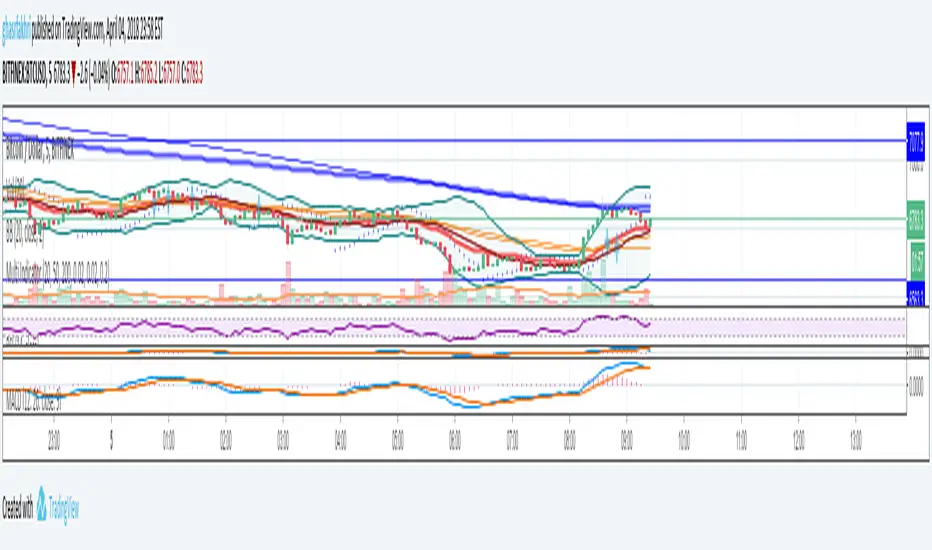
Multi Indicators- MA, EMA, MA Cross, Parabolic SarMulti Indicators
- 3 Simple Moving Average
- 3 Exp Moving Average
- Cross of Moving Averages
- Parabolic SAR
Cari skrip untuk "indicators"
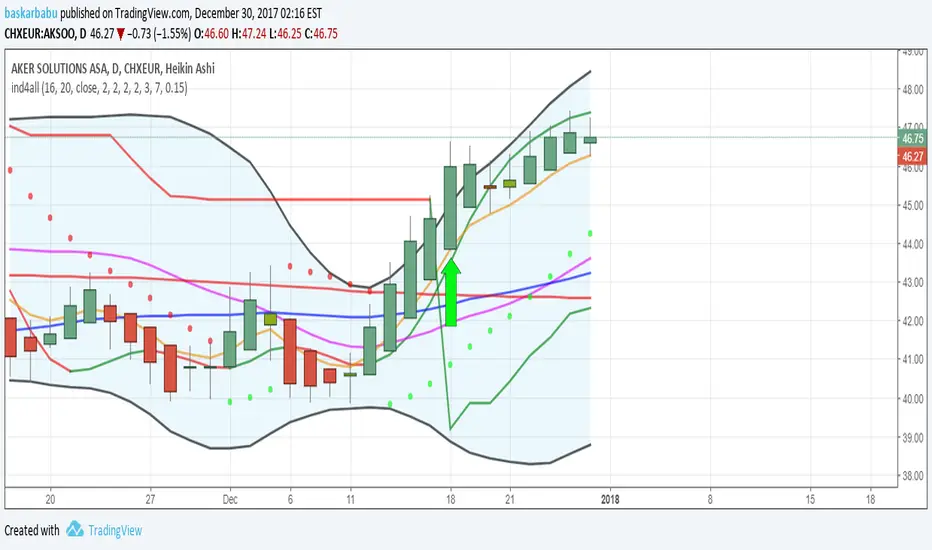
All indicators in one!All indicators in one!
Hull MA (2 colors) + Bollinger Bands + 6 EMA + 50 SMA + 200 SMA + Parabolic SAR + SUPER TREND (2 colors) + Doji signals (yellow)
EMA Indicators with BUY sell SignalCombine 3 EMA indicators into 1. Buy and Sell signal is based on
- Buy signal based on 20 Days Highest High resistance
- Sell signal based on 10 Days Lowest Low support
Input :-
1 - Short EMA (20), Mid EMA (50) and Long EMA (200)
2 - Resistance (20) = 20 Days Highest High line
3 - Support (10) = 10 Days Lowest Low line

Volume Flow Indicator [LazyBear]VFI,introduced by Markos Katsanos, is based on the popular On Balance Volume (OBV) but with three very important modifications:
* Unlike the OBV, indicator values are no longer meaningless. Positive readings are bullish and negative bearish.
* The calculation is based on the day's median (typical price) instead of the closing price.
* A volatility threshold takes into account minimal price changes and another threshold eliminates excessive volume.
A simplified interpretation of the VFI is:
* Values above zero indicate a bullish state and the crossing of the zero line is the trigger or buy signal.
* The strongest signal with all money flow indicators is of course divergence.
I have exposed options to plot a signal EMA. All parameters are configurable.
Markos suggests using 0.2 coeff for day trading and 0.1 for intra-day.
More info:
www.precisiontradingsystems.com

Indicator: Relative Volume Indicator & Freedom Of MovementRelative Volume Indicator
------------------------------
RVI is a support-resistance technical indicator developed by Melvin E. Dickover. Unlike many conventional support and resistance indicators, the Relative Volume Indicator takes into account price-volume behavior in order to detect the supply and demand pools. These pools are marked by "Defended Price Lines" (DPLs), also introduced by the author.
RVI is usually plotted as a histogram; its bars are highlighted (black, by default) when the volume is unusually large. According to the author, this happens if the indicator value exceeds 2.0, thus signifying that a possible DPL is present.
DPLs are horizontal lines that run across the chart at levels defined by following conditions:
* Overlapping bars: If the indicator spike (i.e., indicator is above 2.0 or a custom value)
corresponds to a price bar overlapping the previous one, the previous close can be used as the
DPL value.
* Very large bars: If the indicator spike corresponds to a price bar of a large size, use its
close price as the DPL value.
* Gapping bars: If the indicator spike corresponds to a price bar gapping from the previous bar,
the DPL value will depend on the gap size. Small gaps can be ignored: the author suggests using
the previous close as the DPL value. When the gap is big, the close of the latter bar is used
instead.
* Clustering spikes: If the indicator spikes come in clusters, use the extreme close or open
price of the bar corresponding to the last or next to last spike in cluster.
DPLs can be used as support and resistance levels. In order confirm and refine them, RVI is used along with the FreedomOfMovement indicator discussed next.
Freedom of Movement Indicator
------------------------------
FOM is a support-resistance technical indicator, also by Melvin E. Dickover. FOM is the ratio of relative effect (relative price change) to the relative effort (normalized volume), expressed in standard deviations. This value is plotted as a histogram; its bars are highlighted (black, by default( when this ratio is unusually high. These highlighted bars, or "spikes", define the positioning of the DPLs.
Suggestions for placing DPLs are the same as for the Relative Volume Indicator discussed above.
Note that clustering spikes provide the strongest DPLs while isolated spikes can be used to confirm and refine those provided by the Relative Volume Indicator. Coincidence of spikes of the two indicator can be considered a sign of greater strength of the DPL.
More info:
S&C magazine, April 2014.
I am still trying these on various instruments to understand the workings more. Don't forget to share what you learn -- any use cases / ideal scenarios / gotchas, would love to hear them all.

3 new Indicators - PGO / RAVI / TIIMy "to-publish" list is getting too big, so decided to push out 3 indicators in the same chart
Feel free to "make mine" and use :) Leave a comment on what you think.
Pretty Good Oscillator
----------------------------------------
This indicator, by Mark Johnson, measures the distance of the current close from its N-day simple moving average, expressed in terms of an average true range (see Average True Range) over a similar period. So for instance a PGO value of +2.5 would mean the current close is 2.5 average days' range above the SMA.
Johnson's approach was to use it as a breakout system for longer term trades. If the PGO rises above 3.0 then go long, or below -3.0 then go short, and in both cases exit on returning to zero (which is a close back at the SMA). Indicator marks all these areas (3/-3/0)
Rapid Adaptive Variance Indicator
---------------------------------------------------------
RAVI is a simple indicator, by Tushar Chande, to show whether a stock is trending or not. Unlike ADX, RAVI measures only the trend intensity, it doesn't distinguish which way the trend is going. Rising RAVI shows the beginning of a trend or an increase in trend intensity, a decreasing slope signifies decreasing intensity. Also, RAVI often reacts more quickly and exhibits a more pronounced curve than ADX.
The standard values for daily charts are 7 and 65. For hourly charts, the most common averaging periods are 12 and 72 or 24 and 120.
The signal lines suggested are from +/- 0.3% to +/-1%. I haven't added any markings as these signals are instrument-specific. I suggest doing some back testing and adding these accordingly.
Trend Intensity Index
--------------------------------------
TII, by M. H. Pee, measures the strength of a trend, by looking at what proportion of the past "n" days prices have been above or below the level of today's "x"-day simple moving average. You can configure "n" via options page. "x" is calculated as "2 times n".
TII moves between 0 and 100. A strong uptrend is indicated when TII is above 80. A strong downtrend is indicated when TII is below 20.
Pee recommended entering trades when levels of 80 on the upside or 20 on the downside are reached. Indicator marks these lines for easy reference.


[2022]Volume Flow v3 with alertsIndicators are an essential part of technical analysis of cryptocurrency. Their main function is to predict market direction based on historic price, cryptocurrency volume and other information. There are several types of crypto indicators illustrating various parameters (trend, volatility, volume, momentum, etc.) but in this article we will look at volume indicators.
Volume indicators demonstrate changing of trading volume over time. This information is very useful as crypto trading volume displays how strong the current trend is. For example, if the price goes up and the volume is high then the trend is strong and will more likely last longer. There are various volume indicators, but we’ll talk about the most popular ones, such as:
On Balance Volume
Accumulation/Distribution Line
Money Flow Index
Chaikin Oscillator
Chaikin Money Flow
Ease of Movement

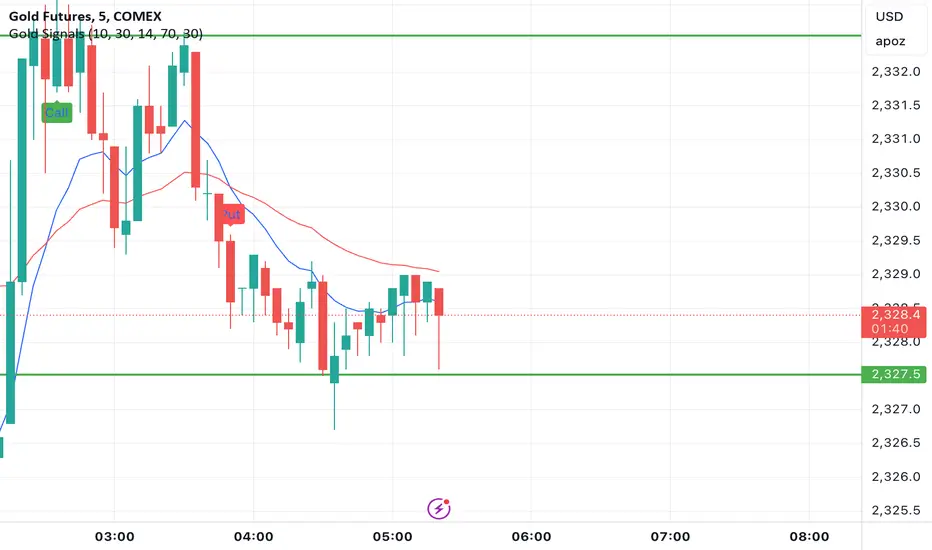
Gold Option Signals with EMA and RSIIndicators:
Exponential Moving Averages (EMAs): Faster to respond to recent price changes compared to simple moving averages.
RSI: Measures the magnitude of recent price changes to evaluate overbought or oversold conditions.
Signal Generation:
Buy Call Signal: Generated when the short EMA crosses above the long EMA and the RSI is not overbought (below 70).
Buy Put Signal: Generated when the short EMA crosses below the long EMA and the RSI is not oversold (above 30).
Plotting:
EMAs: Plotted on the chart to visualize trend directions.
Signals: Plotted as shapes on the chart where conditions are met.
RSI Background Color: Changes to red for overbought and green for oversold conditions.
Steps to Use:
Add the Script to TradingView:
Open TradingView, go to the Pine Script editor, paste the script, save it, and add it to your chart.
Interpret the Signals:
Buy Call Signal: Look for green labels below the price bars.
Buy Put Signal: Look for red labels above the price bars.
Customize Parameters:
Adjust the input parameters (e.g., lengths of EMAs, RSI levels) to better fit your trading strategy and market conditions.
Testing and Validation
To ensure that the script works as expected, you can test it on historical data and validate the signals against known price movements. Adjust the parameters if necessary to improve the accuracy of the signals.
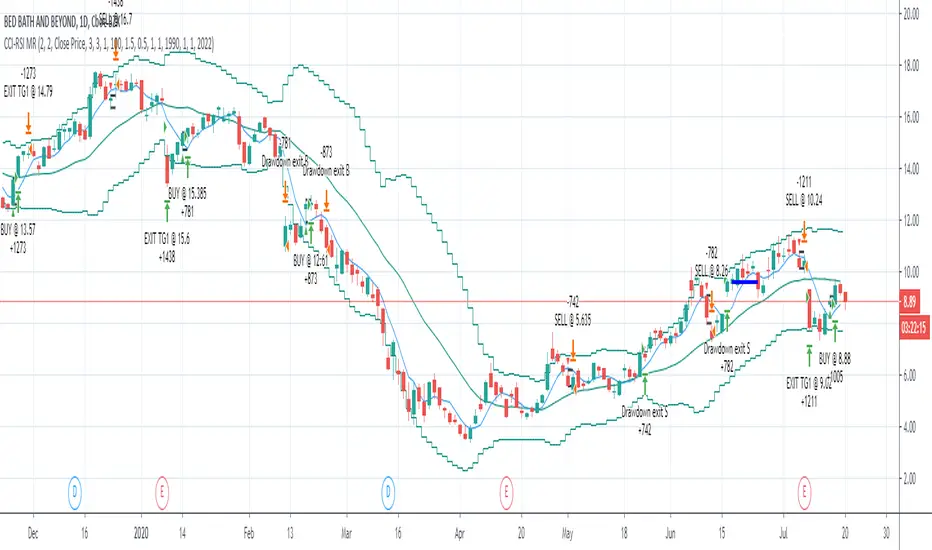
CCI-RSI MR Indicators:
Bollinger Bands (20 period, 2σ)
RSI (14 period) and Simple moving average of RSI (5 period)
CCI (20 period)
SMA (5 period)
Entry Conditions:
Buy when:
Swing low (5) should be lower than the highest of lower BB (3 periods)
Both RSI crossover RSI_5 and CCI crossover -100 should have happened within last 3 candles (including the current candle)
Once all the above conditions are met, the close should be higher than SMA (5) within the next 3 candles
After condition 3 is satisfied, we enter the trade at next candle’s open
Stop loss will be at 1 tick lower than previous swing low
Sell when:
Swing high (5) should be higher than the lowest of upper BB (3 periods)
Both RSI crossunder RSI_5 and CCI crossunder 100 should have happened within last 3 candles (including the current candle)
Once all the above conditions are met, the close should be lower than SMA (5) within the next 3 candles
After condition 3 is satisfied, we enter the trade at next candle’s open
Stop loss will be at 1 tick higher than previous swing high
Exit Conditions:
Since it’s mean reversion strategy we’ll be having only 2 target exits with a trailing stop loss after target price 1 is achieved.
Target exit price 1 & 2 are decided based on the risk ‘R’ for each trade
Depending on the instrument and time frame a trailing stop loss of 0.5R or 1R has opted.
A stop limit is placed @Entry_price +- 2*ATR(20) to offset the risk of losing significantly more than 1xR in a trade
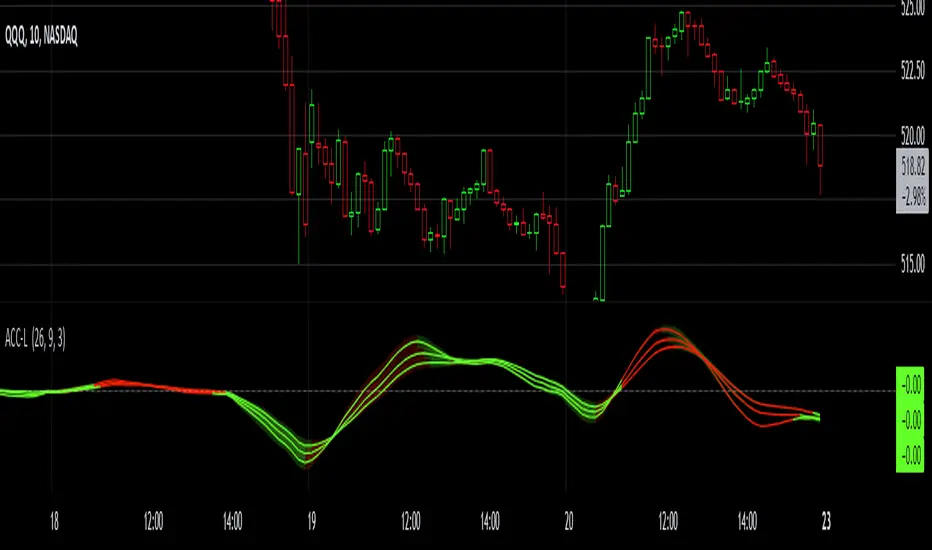
Gaussian Acceleration ArrayIndicators play a role in analyzing price action, trends, and potential reversals. Among many of these, velocity and acceleration have held a significant place due to their ability to provide insight into momentum and rate of change. This indicator takes the old calculation and tweaks it with gaussian smoothing and logarithmic function to ensure proper scaling.
A Brief on Velocity and Acceleration: The concept of velocity in trading refers to the speed at which price changes over time, while acceleration is the rate of change(ROC) of velocity. Early momentum indicators like the RSI and MACD laid foundation for understanding price velocity. However, as markets evolve so do we as technical analysts, we seek the most advanced tools.
The Acceleration/Deceleration Oscillator, introduced by Bill Williams, was one of the early attempts to measure acceleration. It helped gauge whether the market was gaining or losing momentum. Over time more specific tools like the "Awesome Oscillator"(AO) emerged, which has a set length on the datasets measured.
Gaussian Functions: Named after the mathematician Carl Friedrich Gauss, the Gaussian function describes a bell-shaped curve, often referred to as the "normal distribution." In trading these functions are applied to smooth data and reduce noise, focusing on underlying patterns.
The Gaussian Acceleration Array leverages this function to create a smoothed representation of market acceleration.
How does it work?
This indicator calculates acceleration based the highs and lows of each dataset
Once the weighted average for velocity is determined, its rate of change essentially becomes the acceleration
It then plots multiple lines with customizable variance from the primary selected length
Practical Tips:
The Gaussian Acceleration Array offers various customizable parameters, including the sample period, smoothing function, and array variance. Experiment with these settings to tailor it to preferred timeframes and styles.
The color-coded lines and background zones make it easier to interpret the indicator at a glance. The backgrounds indicate increasing or decreasing momentum simply as a visual aid while the lines state how the velocity average is performing. Combining this with other tools can signal shifts in market dynamics.
Parabolic Scalp Take Profit[ChartPrime]Indicators can be a great way to signal when the optimal time is for taking profits. However, many indicators are lagging in nature and will get market participants out of their trades at less than optimal price points. This take profit indicator uses the concept of slope and exponential gain to calculate when the optimal time is to take profits on your trades, thus making this a leading indicator.
Usage:
In essence the indicator will draw a parabolic line that starts from the market participants entry point and exponentially grows the slope of the line eventually intersecting with the price action. When price intersects with the parabolic line a take profit signal will appear in the form of an x. We have found that this take profit indicator is especially useful for scalp trades on lower timeframes.
How To Use:
Add the indicator to the chart. Click on the candle which the trade is on. Click on either the price which the trade will be at, or at the bottom of the candle in a long, or the top of a candle in a short. Select long or short. Open the settings of the indicator and adjust the aggressiveness to the desired value.
Settings:
- Start Time -- This is the bar in which your entry will be at, or occured at and the script will ask you to click on the bar with your mouse upon first adding the script.
- Start Price -- This is the price in which the entry will be at, or was at and the script will ask you to click on the price with your mouse upon first adding the script.
- Long/Short -- This is a setting which lets the script know if it is a long or a short trade, and the script will ask you to confirm this upon first adding it to the chart.
- Aggressiveness -- This directly affects how aggressive the exponential curve is. A value of 101 is the lowest possible setting, indicating a very non-aggressive exponential buildup. A value of 200 is the highest and most aggressive setting, indicating a doubling effect per bar on the slope.

Pre-Market PillarsIndicators that displays where to enter and exit on pre market and low cap stocks.
Inspired by Ross Cameron strategy.

Alson Chew PAM EXE and Mother BarIndicators for strategies taught by Alson Chew's Price Action Manipulation (PAM) course
Two functions.
First it identifies EXE bars (Pin, Mark, Icecream bars).
Second it identifies Mother bars and draws an extension line for 6 bars.
Applicable to all time frames and can customise how many signals to show.
To be used in conjunction with trading strategies like
- 20 SMA, 50 SMA, 200 SMA FS formation
- Force Bottom, Force Top FS formation
- UR1 and DR1 using EXE Bar

Indicators OverviewThis Indicator help you to see whether the price is above or below vwap, supertrend. Also you can see realtime RSI value.
You can add upto 15 stock of your choice.

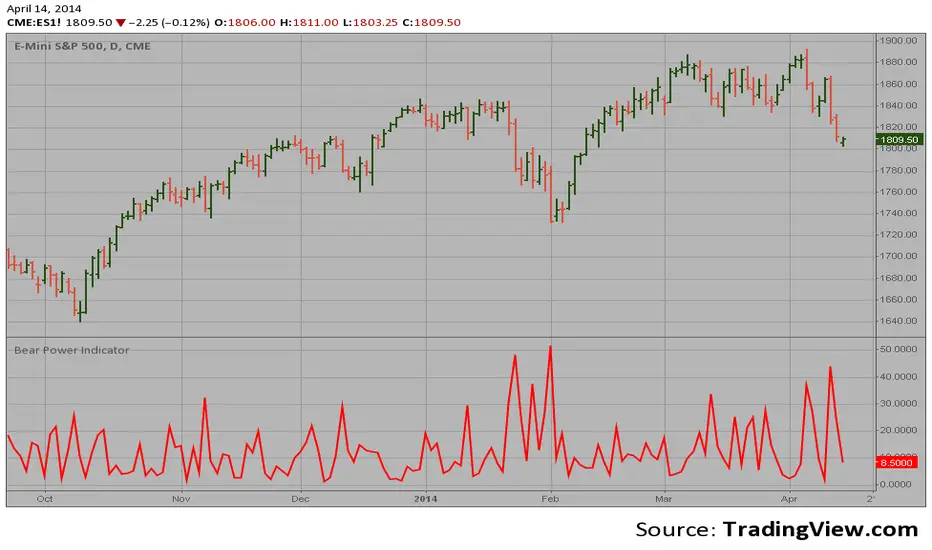
Bear Power Indicator Hi
Let me introduce my Bear Power Indicator script.
To get more information please see "Bull And Bear Balance Indicator"
by Vadim Gimelfarb.
Universal Strategy Adapter - Connect Anything, Backtest EverythiDescription The Universal Strategy Adapter is a powerful utility that allows you to turn ANY indicator into a backtestable strategy without writing a single line of code. Whether you want to trade based on a simple crossover, a specific threshold, or complex multi-indicator confluence, this adapter handles the logic, execution, and risk management for you.
Key Features
Connect Up To 8 Indicators Plug in up to 8 different data sources using the input.source dropdowns. Mix and match indicators (e.g., RSI + MACD + Moving Average).
Advanced Logic Engine Mandatory vs. Optional : Distinct "Must Have" signals vs. "Nice to Have" confluence. Min Optionals Required : Require at least X optional indicators to fire before taking a trade. Lookback Persistence : Solves the "Sync" problem. If Indicator A fires on candle 1 and Indicator B fires on candle 3, the Lookback window ensures they still count as a confluence setup.
Flexible Conditions For each slot, choose how the signal is interpreted: Signal (!= 0) : Best for "Event" indicators like Golden Dots or Alerts. Price > Source : Trend Filters (e.g., Price above EMA 200). Source > Threshold : Value filters (e.g., RSI > 50). Rising / Falling : Momentum filters (e.g., RSI is trending up compared to 12 bars ago).
Risk Management & Cooldown Built-in Stop Loss and Take Profit (%) settings. Trade Cooldown : Prevent "Machine Gun" trades by enforcing a wait period after each entry.
How To Use Add your favorite indicators to the chart (e.g., "VuManChu Cipher B" and "EMA 200"). Add Universal Strategy Adapter to the chart. Open Settings > Inputs. Slot 1 (Trigger) : Source : Select the "Buy Signal" or "Golden Dot" plot from the first indicator. Condition : Signal (!= 0) Role : Mandatory Slot 2 (Filter) : Source : Select the "EMA 200" plot. Condition : Price > Source (Trades only taken when price is above EMA). Role : Mandatory Adjust SL/TP and Backtest Range as needed.
Why Use This? TradingView strategies are often hardcoded to specific indicators. This script breaks that barrier, giving you a universal "Container" to drop any logic into and see the raw backtest results immediately.

Neeson Volatility Adaptive Tracker ProVolatility Adaptive Tracker Pro: A Comprehensive Multi-Method Trading System
Executive Summary
The Volatility Adaptive Tracker Pro (VAT Pro) represents a sophisticated fusion of proven technical analysis methodologies with innovative adaptations, creating a unique multi-signal trading system. Unlike single-purpose indicators, VAT Pro combines multiple analytical approaches into a unified framework that addresses the complex realities of modern financial markets. This system is designed for traders who recognize that no single method consistently outperforms, and that market conditions require adaptive, multi-faceted approaches.
Original Innovations: What Sets VAT Pro Apart
1. Hybrid Volatility Measurement System
Most volatility indicators fall into two categories: those based on standard deviation (like Bollinger Bands) or those based on average true range (ATR). VAT Pro introduces a third approach: a weighted volatility measurement system that gives greater importance to recent price movements while maintaining sensitivity to overall market conditions. This creates a dynamic volatility assessment that adapts more responsively to changing market environments than conventional methods.
2. Dual-Layer Signal Architecture
While most indicators generate single-type signals, VAT Pro implements a tiered signaling system that distinguishes between:
Primary trend-following signals (based on price crossing adaptive volatility bands)
Secondary volume-confirmed signals (requiring both price movement and exceptional volume)
This dual-layer approach recognizes that not all market moves have equal significance, and that volume confirmation often signals more substantial moves worthy of special attention.
3. State-Based Logic with Memory
Conventional indicators typically generate signals independently on each bar. VAT Pro introduces persistent state tracking that maintains awareness of whether the market is currently in a bullish, bearish, or neutral condition. This prevents signal redundancy, reduces false signals, and provides valuable context for interpreting current market conditions.
What VAT Pro Does: Comprehensive Market Analysis
Primary Functions
Trend Identification: Detects transitions between bullish and bearish market conditions using multiple confirmation criteria.
Volume Analysis: Identifies exceptional trading activity that often precedes or confirms significant price movements.
Volatility Assessment: Continuously measures market volatility and adjusts sensitivity parameters accordingly.
Visual Context Provision: Uses color-coded price bars, trend lines, and clear signal markers to provide immediate visual feedback.
Multi-Timeframe Compatibility: Functions effectively across various trading timeframes from intraday to positional trading.
Implementation Methodology: The Technical Framework
Core Analytical Approaches
Among the hundreds of available technical analysis methods, VAT Pro specifically implements and integrates:
A. Adaptive Volatility Channel System
This approach modifies the traditional volatility channel concept by:
Using weighted moving averages for volatility calculation rather than simple or exponential averages
Implementing asymmetric response to upward versus downward volatility
Maintaining dynamic channel width that adjusts based on recent market conditions
The system falls within the broader category of volatility-adjusted trend following but introduces unique adaptations that improve responsiveness while maintaining stability.
B. Volume-Price Confirmation Method
Within volume analysis, VAT Pro specifically employs:
Threshold-based volume spike detection (volume exceeding moving average by specified multiples)
Price-direction confirmation (requiring price movement in the expected direction)
Contextual filtering (only considering volume signals in specific market conditions)
This represents a specific implementation within the volume confirmation family of methods, distinguished by its customizable thresholds and filtering logic.
C. Trailing Stop with Adaptive Positioning
The system implements a specific variant of trailing stop methodology characterized by:
State-dependent positioning (different logic for trending versus ranging markets)
Volatility-adjusted distance (stop levels adapt to current market conditions)
Memory of previous positions (the system "remembers" previous trend states)
This approach represents an advanced form of trailing stop placement that combines elements of volatility adjustment with trend state awareness.
Calculation Philosophy: The Core Principles
1. Weighted Response Philosophy
VAT Pro operates on the principle that recent market action should have greater influence than distant history, but not to the exclusion of broader context. This is implemented through custom weighting algorithms that balance responsiveness with stability.
2. Multi-Factor Confirmation Principle
The system is built on the premise that multiple confirming factors (price action, volume, volatility) provide more reliable signals than single-factor approaches. This represents a practical implementation of convergence/divergence analysis across different market dimensions.
3. State Transition Logic
Rather than viewing each bar in isolation, VAT Pro analyzes sequences of price action to determine market states and state transitions. This recognizes that markets often move through identifiable phases (accumulation, trending, distribution, ranging) that require different analytical approaches.
4. Adaptive Sensitivity
The system automatically adjusts its sensitivity based on current market volatility, becoming more responsive in low-volatility conditions and more stable in high-volatility environments. This represents a practical implementation of volatility-adjusted trading logic.
Practical Application: How to Use VAT Pro
Initial Setup and Configuration
Parameter Customization: Begin with default settings, then adjust based on:
Your trading instrument's typical volatility characteristics
Your preferred trading timeframe
Your risk tolerance and trading style
Visual Configuration: Customize colors and display settings to match your charting preferences while maintaining clear signal visibility.
Trading Methodology Integration
VAT Pro supports multiple trading approaches:
For Trend Following:
Use primary signals when confirmed by overall market direction
Employ the adaptive line as a dynamic trailing stop
Monitor state transitions for trend continuation or reversal clues
For Breakout Trading:
Watch for high-volume signals at key price levels
Use volatility bands to identify potential breakout ranges
Employ volume confirmation to distinguish genuine breakouts from false moves
For Position Management:
Utilize the color-coded bar system for immediate trend awareness
Monitor multiple signal types for confirmation or warning signs
Adjust position sizes based on signal strength and market state
Signal Interpretation Framework
Primary Signal Interpretation:
Bullish signals suggest potential long opportunities
Bearish signals indicate potential short opportunities
Signal clustering often indicates stronger moves
Volume Signal Significance:
High-volume buy signals often precede sustained upward moves
High-volume sell signals frequently indicate distribution or panic selling
Volume signals without price confirmation require caution
Contextual Analysis:
Consider market state when interpreting signals
Evaluate signal strength based on recent volatility
Monitor multiple timeframes for confirmation
Performance Characteristics and Best Practices
Optimal Market Conditions
VAT Pro performs best in markets exhibiting:
Clear trending characteristics (for trend-following signals)
Occasional volatility expansions (for volume signals)
Reasonable liquidity (for accurate volume analysis)
Risk Management Integration
Use signal strength to adjust position sizing
Employ the adaptive line for stop-loss placement
Consider market state when determining risk levels
Complementary Tools
For best results, combine VAT Pro with:
Support and resistance analysis
Longer-term trend assessment
Fundamental analysis (for longer timeframes)
Market structure analysis
Conclusion: A Modern Multi-Method Approach
The Volatility Adaptive Tracker Pro represents a significant advancement in technical analysis tools by intelligently combining multiple proven methodologies into a coherent, adaptive system. Its original innovations in weighted volatility measurement, dual-layer signaling, and state-based logic address common limitations of conventional indicators while maintaining practical usability.
By specifically implementing adaptive volatility channels, volume-price confirmation, and state-aware trailing stops, VAT Pro provides traders with a comprehensive toolkit that adapts to changing market conditions while maintaining methodological rigor. This multi-method approach recognizes the complex reality of financial markets while providing clear, actionable signals based on sound technical principles.
Whether used as a primary trading system or as a confirming component within a broader strategy, VAT Pro offers sophisticated analytical capabilities in an accessible, visually intuitive format that supports informed trading decisions across various market conditions and timeframes.

SuperTrend - With Exits & Trade ZonesSuperTrend - With Exits & Trade Zones
Overview
An advanced trend-following indicator that combines pivot points with the SuperTrend methodology to create a complete trading system with entry signals, exit signals, and visual trade zones. This indicator adapts to market structure rather than just price action, providing more reliable trend identification.
What Makes This Unique
Unlike standard SuperTrend indicators that use moving averages, this version:
Uses actual pivot points to calculate a dynamic center line
Provides multiple entry mode options for different trading styles
Shows clear exit signals (both trailing stop and take profit)
Color-codes the entire chart into trade zones (Long, Short, No Trade)
Eliminates guesswork about when to enter, exit, and stay out
Features
📊 Core Indicator Components
Pivot Point Detection: Identifies local highs and lows in price structure
Dynamic Center Line: Weighted calculation using detected pivot points
ATR-Based Bands: Volatility-adjusted upper and lower bands
Trailing Stop Line: Adaptive stop-loss that follows the trend
🎯 Entry Signals
Four entry modes to match your trading style:
Immediate Mode ⚡
Signals right when the trailing stop breaks
Fastest entries for aggressive traders
Best for strong trending markets
Aggressive Mode 🔥 (Recommended)
Signals when price closes beyond break candle OR opens beyond it
Balanced speed and confirmation
Good for most market conditions
Balanced Mode ⚖️
Requires entire candle to close beyond break level
Moderate confirmation
Reduces false breakouts
Conservative Mode 🛡️
Waits for candle to open AND stay completely beyond break level
Highest confirmation, slowest entries
Best for choppy markets
🚪 Exit Signals
Three exit strategies:
Trailing Stop
Exits when price crosses back through the trailing stop line
Lets profits run in trending markets
Protects gains when trend weakens
Take Profit %
Exits at predetermined profit target
Locks in gains at specific percentage
Good for range-bound markets
Both
Uses whichever exit comes first
Combines profit protection with trend following
Recommended for most traders
🎨 Visual Trade Zones
Color-coded backgrounds eliminate confusion:
🟢 Light Green: Active LONG position
🔴 Light Red: Active SHORT position
⚫ Gray: NO TRADE ZONE (between exit and next signal)
📍 Additional Visual Elements
Diamond markers: Show when trailing stop is first broken
BUY/SELL labels: Clear entry signals in green/red
EXIT markers: Gray X for stop loss, Orange X (TP) for take profit
Pivot points: Optional display of detected highs/lows (H/L markers)
Support/Resistance: Optional circles at pivot levels
Settings & Parameters
Basic Settings
Pivot Point Period (default: 2)
Controls sensitivity of pivot detection
Lower = more pivots detected (more responsive)
Higher = fewer pivots (more stable)
ATR Factor (default: 3)
Distance multiplier for trailing stop bands
Lower = tighter stops (more signals, earlier exits)
Higher = wider stops (fewer signals, longer trades)
ATR Period (default: 10)
Lookback period for volatility calculation
Affects how quickly bands adapt to volatility changes
Entry Configuration
Entry Mode: Select from Immediate/Aggressive/Balanced/Conservative
Determines how quickly the indicator generates signals after a trend break
Exit Configuration
Exit Method: Choose Trailing Stop, Take Profit %, or Both
Take Profit % (default: 2%)
Set your profit target as percentage of entry price
Adjust based on volatility and timeframe
Display Options
Show Buy/Sell Labels: Toggle entry signal labels
Show Exit Signals: Toggle exit markers
Show Break Candles: Toggle diamond markers on trend breaks
Show Pivot Points: Display H/L markers at pivot points
Show PP Center Line: Display the dynamic center line
Show Support/Resistance: Display circles at S/R levels
How to Use
For Swing Traders
Set Entry Mode to "Balanced" or "Conservative"
Use "Both" exit method with 3-5% take profit
Enable all visual elements for complete market picture
Trade only in direction of colored zones
For Day Traders
Set Entry Mode to "Aggressive" or "Immediate"
Use "Trailing Stop" exit method to catch intraday trends
Lower ATR Factor to 2-2.5 for tighter stops
Watch for quick signals in the first 2 hours of trading
For Position Traders
Use higher timeframes (Daily/Weekly)
Set Entry Mode to "Conservative"
Increase Take Profit % to 5-10%
Use larger ATR Factor (4-5) for wider stops
General Trading Rules
✅ DO: Enter on BUY/SELL signals (green/red backgrounds)
✅ DO: Exit on EXIT/TP markers
❌ DON'T: Enter during gray NO TRADE ZONE
❌ DON'T: Counter-trend trade against the colored zone
Alerts
Set up the following alerts for automated trading notifications:
Buy Signal: Triggers when long entry conditions are met
Sell Signal: Triggers when short entry conditions are met
Exit Long: Triggers when long position should be closed
Exit Short: Triggers when short position should be closed
Trailing Stop Broken: Triggers on initial trend change
Best Practices
Timeframe Selection
1-5 min: Scalping (use Immediate/Aggressive mode)
15-60 min: Day trading (use Aggressive/Balanced mode)
4H-Daily: Swing trading (use Balanced/Conservative mode)
Weekly: Position trading (use Conservative mode)
Risk Management
Always use the EXIT signals - don't hold through gray zones
Position size based on distance to trailing stop
Never risk more than 1-2% per trade
Consider wider stops on higher timeframes
Market Conditions
Trending markets: Use Aggressive mode, Trailing Stop exits
Ranging markets: Use Conservative mode, Take Profit exits
High volatility: Increase ATR Factor, use Both exits
Low volatility: Decrease ATR Factor for tighter stops
Technical Details
Calculation Method
Detect pivot highs and lows using specified period
Calculate weighted center line: (previous_center × 2 + new_pivot) / 3
Calculate bands: Upper = Center - (ATR Factor × ATR), Lower = Center + (ATR Factor × ATR)
Determine trend based on price position relative to bands
Trail stop line follows the active trend direction
Signal Logic
Entry signals generated based on selected confirmation mode
Position tracking maintains state from entry to exit
Exit signals calculated from both trailing stop and take profit levels
Trade zones update in real-time based on position state
Limitations & Considerations
Works best in trending markets; may generate false signals in tight ranges
Not a holy grail - should be used with proper risk management
Past performance does not guarantee future results
Recommended to backtest on your specific instrument and timeframe
Consider combining with volume analysis or other indicators for confirmation
Version History
v1.0: Initial release with entry signals and confirmation modes
v1.1: Added exit signals (trailing stop and take profit)
v1.2: Added color-coded trade zones (Long/Short/No Trade)
Credits
Original Pivot Point SuperTrend concept by LonesomeTheBlue
Modified with exit signals and trade zone visualization
License
Mozilla Public License 2.0
Example Setups
Conservative Swing Trading
Pivot Point Period: 2
ATR Factor: 3
ATR Period: 10
Entry Mode: Conservative
Exit Method: Both
Take Profit %: 4%
Aggressive Day Trading
Pivot Point Period: 2
ATR Factor: 2.5
ATR Period: 10
Entry Mode: Aggressive
Exit Method: Trailing Stop
Position Trading
Pivot Point Period: 3
ATR Factor: 4
ATR Period: 14
Entry Mode: Balanced
Exit Method: Both
Take Profit %: 8%
Disclaimer: This indicator is for educational purposes only. Trading involves substantial risk. Always do your own research and never trade with money you cannot afford to lose.

Lanovyx# Lanovyx
A comprehensive day trading indicator that generates **Pullback**, **Reversal**, and **Breakout** signals using the confluence of Stochastic oscillator lanes, VWAP standard deviation bands, and a unique Setup Window system.
---
## 🎯 Three Signal Families
| Signal | Label | Best For |
|--------|-------|----------|
| **Pullback (P)** | Blue | Trend continuation days |
| **Reversal (R)** | Green/Red | Range-bound markets |
| **Breakout (B)** | Orange | Compression breakouts |
**Strong signals (★)** appear when multiple confluence factors align—these are your highest probability setups.
---
## 📊 How It Works
**1. Regime Detection**
Lanovyx identifies market regime (Bull Trend, Bear Trend, Ranging, Coiling) using EMA alignment, market structure, and VWAP position.
**2. Setup Windows**
Unlike traditional indicators requiring all conditions on the same bar, Lanovyx uses Setup Windows. When a context event occurs (VWAP band touch, S/R level, divergence), a setup activates and stays valid for N bars, allowing the trigger to fire within that window.
**3. Signal Generation**
When regime, VWAP zone, stochastic position, and setup all align—a signal appears on your chart.
---
## 📋 Clean Info Table
The top-right table shows 6 essential rows for quick decision-making:
- **Regime** — Market direction (Bull/Bear Trend, Ranging, Coiling)
- **VWAP Zone** — Price location (Discount for buys, Premium for sells)
- **Stoch %D** — Oscillator position for timing
- **Session** — Market hours status
- **Last Signal** — Most recent signal type
- **Trade** — Current position status
Enable **Debug Mode** for additional diagnostic information.
---
## ✅ Entry Rules
**LONG Setup:**
✓ Regime = BULL TREND (or RANGING for reversal)
✓ VWAP Zone = Discount (-1, -2, -3)
✓ Stoch %D = 20-50 rising
✓ Session = ACTIVE
✓ Signal = P, R, or B below candle
**SHORT Setup:**
✓ Regime = BEAR TREND (or RANGING for reversal)
✓ VWAP Zone = Premium (+1, +2, +3)
✓ Stoch %D = 50-80 falling
✓ Session = ACTIVE
✓ Signal = P, R, or B above candle
---
## ⚙️ Key Features
- **3 Stochastic Lanes** — Fast (14), Mid (21), Slow (55) for multi-timeframe momentum
- **VWAP + Bands** — Session-anchored with ±1σ, ±2σ, ±3σ bands
- **Market Structure** — Higher High/Low, Lower High/Low detection
- **HTF Bias Filter** — Optional higher timeframe trend alignment
- **Volume Analysis** — Spike, dry-up, and climax detection
- **ATR Momentum** — Strong/Moderate/Weak classification
- **Trade Management** — ATR-based stop loss and profit targets
- **Signal Statistics** — Win rate and R-multiple tracking
- **Non-Repainting** — Strict mode enabled by default
- **Per-Direction Cooldown** — Prevents signal spam
---
## 🎛️ Recommended Settings
| Timeframe | Setup Window | Cooldown |
|-----------|--------------|----------|
| 5-minute | 10 bars | 5 bars |
| 15-minute | 10 bars | 5 bars |
---
## 📈 Best On
- **ETFs**: SPY, QQQ, IWM
- **Tech**: TSLA, NVDA, AMD, META, GOOG, AAPL
- **Futures**: MNQ, MES, NQ, ES
---
## ⚠️ Disclaimer
This indicator is for educational purposes only. It is not financial advice. Past performance does not guarantee future results. Always use proper risk management and never risk more than you can afford to lose.
---
## 📝 Version
v3.0
---
**Questions or feedback?** Drop a comment below!

Short-Term Weekly Refuges (Shelters)## // Introduction // (Spanish Texts Below)
═══════════════════════════
Short-Term Weekly Refuges (Shelters) (WR or RS) is a structural analysis indicator designed to track price action during the current week. It combines a configurable ZigZag with Fibonacci retracements anchored to recent phases, using the Weekly Opening Price (W.O.P.) as a key reference level.
This indicator is optimized for 4H timeframe but also works on 1H and 15min charts.
## // Theoretical Foundation of the Indicator //
═════════════════════════════════════════════════
The WR (RS) indicator provides a structural framework for following price action during the current trading week.
The core concept: Recent ZigZag phases, combined with the Weekly Opening Price, create dynamic support and resistance levels that institutional traders often monitor and use for intraweek positioning. The indicator allows you to select which recent phase (1-10) serves as the Fibonacci anchor.
## // Indicator Objectives //
═════════════════════════════
1) Display a configurable ZigZag showing recent price structure with numbered phases (1 = most recent). Users should configure the ZigZag parameters based on whether they are analyzing a Major Degree Pattern (larger swings, less noise) or a Minor Degree Pattern (smaller swings, more detail), following standard Elliott Wave terminology. Configure the ZigZag to match the degree of your analysis: use higher Depth values for Major Degree Patterns, or lower values for Minor Degree Patterns.
2) Draw Fibonacci retracements on a user-selected phase, with two modes:
• "On ZigZag": Traditional Fibonacci on the selected phase.
• "Relative to W.O.P.": Fibonacci from phase anchor (i0) to Weekly Opening Price.
3) Show Weekly Opening Price lines as horizontal references, with the current week's line extended into the future.
4) Provide Pivot Up/Down markers for additional confirmation of local highs and lows.
5) Support multiple simultaneous indicator loads with visual identifier labels to distinguish between different analysis degrees (e.g., "Major Degree Pattern" vs "Minor Degree Pattern").
6) Optional Embedded Indicator: Enable Intraday Shelters (RID) - percentage-based support/resistance levels calculated from the Daily Opening Price, useful for 1H and 15min trading.
## // Key Features //
═════════════════════
• **Flexible ZigZag**: Adjustable Depth, Deviation, and Backstep parameters to adapt to any asset's volatility and degree pattern.
• **Phase Selection**: Choose from the 10 most recent phases for Fibonacci anchoring.
• **Dual Fibonacci Modes**: Trace on the ZigZag phase itself, or relative to the Weekly Opening Price.
• **New Age Color Palette**: Professional Fibonacci color scheme used by old school experienced traders.
• **Weekly Opening Price (W.O.P.)**: Historical weekly opens plus current week projection.
• **"Show Only W.O.P." Mode**: Isolate just the Weekly Opening Price line for cleaner charts on non-4H timeframes.
• **Optional Intraday Shelters (RID)**: 11 percentage levels (±0.382%, ±1%, ±1.5%, ±2%, ±2.5%) based on Daily Opening Price.
• **Multi-Load Support**: Visual identifier tags and Large Label for running multiple indicator instances simultaneously.
## // Recommended Workflow //
═════════════════════════════
1) Load the indicator on a 4H chart.
2) Adjust ZigZag parameters (Depth, Deviation) until the phases match your visual analysis of recent price structure.
3) Select the phase you want to use as Fibonacci anchor (typically Phase 2, 3 or higher).
4) Choose Fibonacci mode: "On ZigZag" for phase analysis, or "Relative to W.O.P." for analysis based on weekly opening price context.
5) Monitor how price interacts with the Fibonacci levels and Weekly Opening Price throughout the week.
6) Optionally enable RID for intraday high precision order placements on 1H or 15min charts.
## // Integration with Other Refuge Indicators //
═════════════════════════════════════════════════
This indicator WR (RS) is part of our complete refuge-based analysis ecosystem:
• LTR (RLP) (Long-Term Refuges): For automatic determination of the predominant phase of a ZigZag, which institutional investors choose as the basis for a Fibo whose levels calculate the projection for order placement over the following months and years.
• LTRS (RLPS) (Simple Long-Term Refuges): Simplified version of LTR in which the known coordinates of the predominant phases (obtained with the LTR indicator) of up to five assets are easily captured for permanent long-term operation.
• WR (RS) (Short-Term Weekly Refuges): For short-term tactical analysis (4H, 1H) based on chosen phases of a ZigZag that define Fibo levels effective during the near past week(s).
• IDR (RID) (Intra-Day Refuges): For daily operations relying on intraday levels on timeframes of 1H or less. Ideal for scalping traders.
By combining LTR, LTRS, WR and IDR, you obtain a multi-level framework that allows you to operate with clarity at any time horizon, from intraday positions to investments spanning months and years.
## // Additional Notes //
═════════════════════════
1) Default parameters are optimized for volatile assets (crypto, tech stocks). For forex or less volatile instruments, consider reducing Deviation to 3-8%.
2) The "Phase in Development" (dashed line) shows the tentative current ZigZag segment that may still change as new bars form.
3) Due to TradingView's English-only publication rules, the complete Spanish version of this indicator with all tooltips and documentation will be available soon in our GitHub repository: aj-poolom-maasewal.
4) Bug reports, improvement proposals for the ZigZag generator, pattern determination, or Fibo composition, etc., will be greatly appreciated and taken into account for a future version. Best regards and happy hunting.
════════════════════════════════════════════════════
════════════════════════════════════════════════════
TEXTO EN ESPANIOL (Sin acentos ni enies para compatibilidad con TradingView)
════════════════════════════════════════════════════
## // Introduccion //
═════════════════════
Refugios Semanales (RS o WR) es un indicador de analisis estructural diseniado para seguir la accion del precio durante la semana en curso. Combina un ZigZag configurable con retrocesos de Fibonacci anclados a fases recientes, utilizando el Precio de Apertura Semanal (P.A.S.) como nivel de referencia clave.
Este indicador esta optimizado para temporalidad de 4H pero tambien funciona en graficos de 1H y 15min.
## // Fundamento Teorico del Indicador //
═════════════════════════════════════════
El indicador RS (WR) proporciona un marco estructural para seguir la accion del precio durante la semana de operacion actual.
El concepto central: Las fases recientes del ZigZag, combinadas con el Precio de Apertura Semanal, crean niveles dinamicos de soporte y resistencia que los operadores institucionales frecuentemente monitorean para su posicionamiento intrasemanal. El indicador permite seleccionar cual fase reciente (1-10) sirve como ancla del Fibonacci.
## // Objetivos del Indicador //
════════════════════════════════
1) Mostrar un ZigZag configurable con la estructura de precios reciente y fases numeradas (1 = mas reciente). Los usuarios deben configurar los parametros del ZigZag segun esten analizando una Pauta de Grado Mayor (oscilaciones mas amplias, menos ruido) o una Pauta de Grado Menor (oscilaciones mas pequenias, mas detalle), siguiendo la terminologia estandar de Ondas de Elliott. Configure el ZigZag para que coincida con el grado de su analisis: use valores de Profundidad mas altos para Pautas de Grado Mayor, o valores mas bajos para Pautas de Grado Menor.
2) Dibujar retrocesos de Fibonacci en una fase seleccionada por el usuario, con dos modos:
• "En el ZigZag": Fibonacci tradicional sobre la fase seleccionada.
• "Respecto al P.A.S.": Fibonacci desde el ancla de la fase (i0) hasta el Precio de Apertura Semanal.
3) Mostrar lineas del Precio de Apertura Semanal como referencias horizontales, con la linea de la semana actual extendida hacia el futuro.
4) Proporcionar marcadores de Pivote Arriba/Abajo para confirmacion adicional de maximos y minimos locales.
5) Soportar multiples cargas simultaneas del indicador con etiquetas identificadoras visuales para distinguir entre diferentes grados de analisis (ej: "Pauta de Grado Mayor" vs "Pauta de Grado Menor").
6) Indicador Integrado Opcional: Habilitar Refugios Intra-Diarios (RID) - niveles de soporte/resistencia basados en porcentajes calculados desde el Precio de Apertura Diaria, util para operacion en 1H y 15min.
## // Caracteristicas Principales //
════════════════════════════════════
• **ZigZag Flexible**: Parametros ajustables de Profundidad, Desviacion y Retroceso para adaptarse a la volatilidad y grado de pauta de cualquier activo.
• **Seleccion de Fase**: Elija entre las 10 fases mas recientes para el anclaje del Fibonacci.
• **Modos Duales de Fibonacci**: Trace sobre la fase del ZigZag, o relativo al Precio de Apertura Semanal.
• **Paleta de Colores New Age**: Esquema de colores profesional de Fibonacci usado por operadores institucionales de la vieja escuela.
• **Precio de Apertura Semanal (P.A.S.)**: Aperturas semanales historicas mas proyeccion de la semana actual.
• **Modo "Solo P.A.S."**: Aisla unicamente la linea del Precio de Apertura Semanal para graficos mas limpios en temporalidades distintas a 4H.
• **Refugios Intra-Diarios Opcionales (RID)**: 11 niveles porcentuales (±0.382%, ±1%, ±1.5%, ±2%, ±2.5%) basados en el Precio de Apertura Diaria.
• **Soporte Multi-Carga**: Etiquetas identificadoras visuales y Rotulo Grande para ejecutar multiples instancias del indicador simultaneamente.
## // Flujo de Trabajo Recomendado //
═════════════════════════════════════
1) Cargue el indicador en un grafico de 4H.
2) Ajuste los parametros del ZigZag (Profundidad, Desviacion) hasta que las fases coincidan con su analisis visual de la estructura de precios reciente.
3) Seleccione la fase que desea usar como ancla del Fibonacci (tipicamente Fase 2, 3 o superior).
4) Elija el modo de Fibonacci: "En el ZigZag" para analisis de fase, o "Respecto al P.A.S." para analisis basado en el contexto del precio de apertura semanal.
5) Monitoree como el precio interactua con los niveles de Fibonacci y el Precio de Apertura Semanal durante la semana.
6) Opcionalmente habilite RID para precision intradiaria en graficos de 1H o 15min.
## // Integracion con Otros Indicadores de Refugios //
══════════════════════════════════════════
RS (WR) es parte de nuestro ecosistema completo de analisis basado en refugios:
• RLP (LTR) (Refugios de Largo Plazo): Para determinacion automatica de la fase preponderante de un ZigZag, que los inversionistas institucionales eligen como base para un Fibo cuyos niveles calculan la proyeccion para colocacion de ordenes durante los meses y anios siguientes.
• RLPS (LTRS) (Refugios de Largo Plazo Simplificado): Version simplificada de RLP en la cual las coordenadas conocidas de las fases preponderantes (obtenidas con el indicador RLP) de uno o hasta cinco activos se capturan facilmente para operacion permanente de largo plazo.
• RS (WR) (Refugios Semanales de Corto Plazo): Para analisis tactico de corto plazo (4H, 1H) basado en fases elegidas de un ZigZag que definen niveles Fibo efectivos durante la(s) semana(s) pasada(s) reciente(s).
• RID (IDR) (Refugios Intra-Diarios): Para operaciones diarias basadas en niveles intradiarios en temporalidades de 1H o menos. Ideal para operadores de scalping.
Al combinar RLP, RLPS, RS y RID, obtiene un marco multinivel que le permite operar con claridad en cualquier horizonte temporal, desde posiciones intradiarias hasta inversiones que abarcan meses y anios.
## // Notas Adicionales //
══════════════════════════
1) Los parametros por defecto estan optimizados para activos volatiles (cripto, acciones tecnologicas). Para forex o instrumentos menos volatiles, considere reducir la Desviacion a 3-8%.
2) La "Fase en Desarrollo" (linea discontinua) muestra el segmento tentativo actual del ZigZag que aun puede cambiar conforme se formen nuevas barras.
3) Debido a las reglas de publicacion de TradingView (solo ingles), la version completa en espaniol de este indicador con todos los tooltips y documentacion estara disponible proximamente en nuestro repositorio de GitHub: aj-poolom-maasewal.
4) El reporte de cualquier error encontrado, propuestas de mejoras al generador de Zigzags, determinacion de pautas, o composicion del Fibo, etc., seran ampliamente agradecidas y tomadas en cuenta para una proxima version. Saludos y buena caceria.
══════════════════════════════════════════════════

Advanced Petroleum Market Model (APMM)Advanced Petroleum Market Model (APMM): A Multi-Factor Fundamental Analysis Framework for Oil Market Assessment
## 1. Introduction
The petroleum market represents one of the most complex and globally significant commodity markets, characterized by intricate supply-demand dynamics, geopolitical influences, and substantial price volatility (Hamilton, 2009). Traditional fundamental analysis approaches often struggle to synthesize the multitude of relevant indicators into actionable insights due to data heterogeneity, temporal misalignment, and subjective weighting schemes (Baumeister & Kilian, 2016).
The Advanced Petroleum Market Model addresses these limitations through a systematic, quantitative approach that integrates 16 verified fundamental indicators across five critical market dimensions. The model builds upon established financial engineering principles while incorporating petroleum-specific market dynamics and adaptive learning mechanisms.
## 2. Theoretical Framework
### 2.1 Market Efficiency and Information Integration
The model operates under the assumption of semi-strong market efficiency, where fundamental information is gradually incorporated into prices with varying degrees of lag (Fama, 1970). The petroleum market's unique characteristics, including storage costs, transportation constraints, and geopolitical risk premiums, create opportunities for fundamental analysis to provide predictive value (Kilian, 2009).
### 2.2 Multi-Factor Asset Pricing Theory
Drawing from Ross's (1976) Arbitrage Pricing Theory, the model treats petroleum prices as driven by multiple systematic risk factors. The five-factor decomposition (Supply, Inventory, Demand, Trade, Sentiment) represents economically meaningful sources of systematic risk in petroleum markets (Chen et al., 1986).
## 3. Methodology
### 3.1 Data Sources and Quality Framework
The model integrates 16 fundamental indicators sourced from verified TradingView economic data feeds:
Supply Indicators:
- US Oil Production (ECONOMICS:USCOP)
- US Oil Rigs Count (ECONOMICS:USCOR)
- API Crude Runs (ECONOMICS:USACR)
Inventory Indicators:
- US Crude Stock Changes (ECONOMICS:USCOSC)
- Cushing Stocks (ECONOMICS:USCCOS)
- API Crude Stocks (ECONOMICS:USCSC)
- API Gasoline Stocks (ECONOMICS:USGS)
- API Distillate Stocks (ECONOMICS:USDS)
Demand Indicators:
- Refinery Crude Runs (ECONOMICS:USRCR)
- Gasoline Production (ECONOMICS:USGPRO)
- Distillate Production (ECONOMICS:USDFP)
- Industrial Production Index (FRED:INDPRO)
Trade Indicators:
- US Crude Imports (ECONOMICS:USCOI)
- US Oil Exports (ECONOMICS:USOE)
- API Crude Imports (ECONOMICS:USCI)
- Dollar Index (TVC:DXY)
Sentiment Indicators:
- Oil Volatility Index (CBOE:OVX)
### 3.2 Data Quality Monitoring System
Following best practices in quantitative finance (Lopez de Prado, 2018), the model implements comprehensive data quality monitoring:
Data Quality Score = Σ(Individual Indicator Validity) / Total Indicators
Where validity is determined by:
- Non-null data availability
- Positive value validation
- Temporal consistency checks
### 3.3 Statistical Normalization Framework
#### 3.3.1 Z-Score Normalization
The model employs robust Z-score normalization as established by Sharpe (1994) for cross-indicator comparability:
Z_i,t = (X_i,t - μ_i) / σ_i
Where:
- X_i,t = Raw value of indicator i at time t
- μ_i = Sample mean of indicator i
- σ_i = Sample standard deviation of indicator i
Z-scores are capped at ±3 to mitigate outlier influence (Tukey, 1977).
#### 3.3.2 Percentile Rank Transformation
For intuitive interpretation, Z-scores are converted to percentile ranks following the methodology of Conover (1999):
Percentile_Rank = (Number of values < current_value) / Total_observations × 100
### 3.4 Exponential Smoothing Framework
Signal smoothing employs exponential weighted moving averages (Brown, 1963) with adaptive alpha parameter:
S_t = α × X_t + (1-α) × S_{t-1}
Where α = 2/(N+1) and N represents the smoothing period.
### 3.5 Dynamic Threshold Optimization
The model implements adaptive thresholds using Bollinger Band methodology (Bollinger, 1992):
Dynamic_Threshold = μ ± (k × σ)
Where k is the threshold multiplier adjusted for market volatility regime.
### 3.6 Composite Score Calculation
The fundamental score integrates component scores through weighted averaging:
Fundamental_Score = Σ(w_i × Score_i × Quality_i)
Where:
- w_i = Normalized component weight
- Score_i = Component fundamental score
- Quality_i = Data quality adjustment factor
## 4. Implementation Architecture
### 4.1 Adaptive Parameter Framework
The model incorporates regime-specific adjustments based on market volatility:
Volatility_Regime = σ_price / μ_price × 100
High volatility regimes (>25%) trigger enhanced weighting for inventory and sentiment components, reflecting increased market sensitivity to supply disruptions and psychological factors.
### 4.2 Data Synchronization Protocol
Given varying publication frequencies (daily, weekly, monthly), the model employs forward-fill synchronization to maintain temporal alignment across all indicators.
### 4.3 Quality-Adjusted Scoring
Component scores are adjusted for data quality to prevent degraded inputs from contaminating the composite signal:
Adjusted_Score = Raw_Score × Quality_Factor + 50 × (1 - Quality_Factor)
This formulation ensures that poor-quality data reverts toward neutral (50) rather than contributing noise.
## 5. Usage Guidelines and Best Practices
### 5.1 Configuration Recommendations
For Short-term Analysis (1-4 weeks):
- Lookback Period: 26 weeks
- Smoothing Length: 3-5 periods
- Confidence Period: 13 weeks
- Increase inventory and sentiment weights
For Medium-term Analysis (1-3 months):
- Lookback Period: 52 weeks
- Smoothing Length: 5-8 periods
- Confidence Period: 26 weeks
- Balanced component weights
For Long-term Analysis (3+ months):
- Lookback Period: 104 weeks
- Smoothing Length: 8-12 periods
- Confidence Period: 52 weeks
- Increase supply and demand weights
### 5.2 Signal Interpretation Framework
Bullish Signals (Score > 70):
- Fundamental conditions favor price appreciation
- Consider long positions or reduced short exposure
- Monitor for trend confirmation across multiple timeframes
Bearish Signals (Score < 30):
- Fundamental conditions suggest price weakness
- Consider short positions or reduced long exposure
- Evaluate downside protection strategies
Neutral Range (30-70):
- Mixed fundamental environment
- Favor range-bound or volatility strategies
- Wait for clearer directional signals
### 5.3 Risk Management Considerations
1. Data Quality Monitoring: Continuously monitor the data quality dashboard. Scores below 75% warrant increased caution.
2. Regime Awareness: Adjust position sizing based on volatility regime indicators. High volatility periods require reduced exposure.
3. Correlation Analysis: Monitor correlation with crude oil prices to validate model effectiveness.
4. Fundamental-Technical Divergence: Pay attention when fundamental signals diverge from technical indicators, as this may signal regime changes.
### 5.4 Alert System Optimization
Configure alerts conservatively to avoid false signals:
- Set alert threshold at 75+ for high-confidence signals
- Enable data quality warnings to maintain system integrity
- Use trend reversal alerts for early regime change detection
## 6. Model Validation and Performance Metrics
### 6.1 Statistical Validation
The model's statistical robustness is ensured through:
- Out-of-sample testing protocols
- Rolling window validation
- Bootstrap confidence intervals
- Regime-specific performance analysis
### 6.2 Economic Validation
Fundamental accuracy is validated against:
- Energy Information Administration (EIA) official reports
- International Energy Agency (IEA) market assessments
- Commercial inventory data verification
## 7. Limitations and Considerations
### 7.1 Model Limitations
1. Data Dependency: Model performance is contingent on data availability and quality from external sources.
2. US Market Focus: Primary data sources are US-centric, potentially limiting global applicability.
3. Lag Effects: Some fundamental indicators exhibit publication lags that may delay signal generation.
4. Regime Shifts: Structural market changes may require model recalibration.
### 7.2 Market Environment Considerations
The model is optimized for normal market conditions. During extreme events (e.g., geopolitical crises, pandemics), additional qualitative factors should be considered alongside quantitative signals.
## References
Baumeister, C., & Kilian, L. (2016). Forty years of oil price fluctuations: Why the price of oil may still surprise us. *Journal of Economic Perspectives*, 30(1), 139-160.
Bollinger, J. (1992). *Bollinger on Bollinger Bands*. McGraw-Hill.
Brown, R. G. (1963). *Smoothing, Forecasting and Prediction of Discrete Time Series*. Prentice-Hall.
Chen, N. F., Roll, R., & Ross, S. A. (1986). Economic forces and the stock market. *Journal of Business*, 59(3), 383-403.
Conover, W. J. (1999). *Practical Nonparametric Statistics* (3rd ed.). John Wiley & Sons.
Fama, E. F. (1970). Efficient capital markets: A review of theory and empirical work. *Journal of Finance*, 25(2), 383-417.
Hamilton, J. D. (2009). Understanding crude oil prices. *Energy Journal*, 30(2), 179-206.
Kilian, L. (2009). Not all oil price shocks are alike: Disentangling demand and supply shocks in the crude oil market. *American Economic Review*, 99(3), 1053-1069.
Lopez de Prado, M. (2018). *Advances in Financial Machine Learning*. John Wiley & Sons.
Ross, S. A. (1976). The arbitrage theory of capital asset pricing. *Journal of Economic Theory*, 13(3), 341-360.
Sharpe, W. F. (1994). The Sharpe ratio. *Journal of Portfolio Management*, 21(1), 49-58.
Tukey, J. W. (1977). *Exploratory Data Analysis*. Addison-Wesley.

Divergences RefurbishedJust as "a butterfly can flap its wings over a flower in China and cause a hurricane in the Caribbean" (Edward Lorenz), small divergences in markets can signal big trading opportunities.
█Introduction
This is a script forked from LonesomeTheBlue's Divergence for Many Indicators v4.
It is a script that checks for divergence between price and many indicators.
In this version, I added more indicators and also added 40 symbols to check for divergences.
More info on the original script can be found here:
█ Improvements
The following improvements have been implemented over v4:
1. Added parameters to customize indicators.
2. Added new indicators:
- Stoch RSI
- Volume Oscillator
- PVT (Price Volume Trend)
- Ultimate Oscillator
- Fisher Transform
- Z-Score/T-Score
3. Now there is the possibility of using 2 external indicators.
4. New option to show tooltips inside labels.
This allows you to save space on the screen if you choose the option to only show the number of divergences or just the abbreviations.
5. New option to show additional text next to the indicator name.
This allows for grouping of indicators and symbols and better visualization, whether through emojis, for example.
6. Added 40 customizable symbols to check for divergences.
7. Option "show only the first letter" of the indicator replaced by: "show the abbreviation of the indicator".
Reason: the indicator abbreviation is more informative and easier to read.
8. Script converted to PineScript version 5.
█ CONCEPTS
Below I present a brief description of the available indicators.
1. Moving Average Convergence/Divergence (MACD):
Shows the difference between short-term and long-term exponential moving averages.
2. MACD Histogram:
Shows the difference between MACD and its signal line.
3. Relative Strength Index (RSI):
Measures the relative strength of recent price gains to recent price losses of an asset.
4. Stochastic Oscillator (Stoch):
Compares the current price of an asset to its price range over a specified time period.
5. Stoch RSI:
Stochastic of RSI.
6. Commodity Channel Index (CCI):
Measures the relationship between an asset's current price and its moving average.
7. Momentum: Shows the difference between the current price and the price a few periods ago.
Shows the difference between the current price and the price of a certain period in the past.
8. Chaikin Money Flow (CMF):
A variation of A/D that takes into account the daily price variation and weighs trading volume accordingly. Accumulation/Distribution (A/D) identifies buying and selling pressure by tracking the flow of money into and out of an asset based on volume patterns.
9. On-Balance Volume (OBV):
Identify divergences between trading volume and an asset's price.
Sum of trading volume when the price rises and subtracts volume when the price falls.
10. Money Flow Index (MFI):
Measures volume pressure in a range of 0 to 100.
Calculates the ratio of volume when the price goes up and when the price goes down.
11. Volume Oscillator (VO):
Identify divergences between trading volume and an asset's price. Ratio of change of volume, from a fast period in relation to a long period.
12. Price-Volume Trend (PVT):
Identify the strength of an asset's price trend based on its trading volume. Cumulative change in price with volume factor. The PVT calculation is similar to the OBV calculation, but it takes into account the percentage price change multiplied by the current volume, plus the previous PVT value.
13. Ultimate Oscillator (UO):
Combines three different time periods to help identify possible reversal points.
14. Fisher Transform (FT):
Normalize prices into a Gaussian normal distribution.
15. Z-Score/T-Score: Shows the difference between the current price and the price a few periods ago. I is a statistical measurement that indicates how many standard deviations a data point is from the mean of a data set.
When to use t-score instead of z-score? When the sample size is small (length < 30).
Here, the use of z-score or t-score is chosen automatically based on the length parameter.
█ What to look for
The operation is simple. The script checks for divergences between the price and the selected indicators.
Now with the possibility of using multiple symbols, it is possible to check divergences between different assets.
A well-described view on divergences can be found in this cheat sheet:
◈ Examples with SPY ETF versus indicators:
1. Regular bullish divergence with external indicator:
1. Regular bearish divergence with Fisher Transform:
1. Positive hidden divergence with Momentum indicator:
1. Negative hidden divergence with RSI:
◈ Examples with SPY ETF versus other symbols:
1. Regular bearish divergence with European Stoch Market:
2. Regular bearish divergence with DXY inverted:
3. Regular bullish divergence with Taiwan Dollar:
4. Regular bearish divergence with US10Y (10-Year US Treasury Note):
5. Regular bullish divergence with QQQ ETF (Nasdaq 100):
6. Regular bullish divergence with ARKK ETF (ARK Innovation):
7.Positive hidden divergence with RSP ETF (S&P 500 Equal Weight):
8. Negative hidden divergence with EWZ ETF (Brazil):
◈ Examples with BTCUSD versus other symbols:
1. Regular bearish divergence with BTCUSDLONGS from Bitfinex:
2. Regular bearish divergence with BLOK ETF (Amplify Transformational Data Sharing):
3. Negative hidden divergence with NATGAS (Natural Gas):
4. Positive hidden divergence with TOTALDEFI (Total DeFi Market Cap):
█ Conclusion
The symbols available to check divergences were chosen in such a way as to cover the main markets, in the most generic way possible.
You can adjust them according to your needs.
A trader in the American market, for example, could add more ETFs, American stocks, and sectoral indices, such as the XLF (Financial Select Sector SPDR Fund), the XLK (Technology Select Sector SPDR), etc.
On the other hand, a cryptocurrency trader could add more currency pairs and sector indicators, such as BTCUSDSHORTS (Bitfinex), USDT.D (Tether Dominance), etc.
If the chart becomes too cluttered, you can use the option to show only the number of divergences or only the indicator abbreviations.
Or even disable certain indicators and symbols, if they are not of interest to you.
I hope this script is useful.
Don't forget to support LonesomeTheBlue's work too.
