PROTECTED SOURCE SCRIPT
Precision Trade Manager
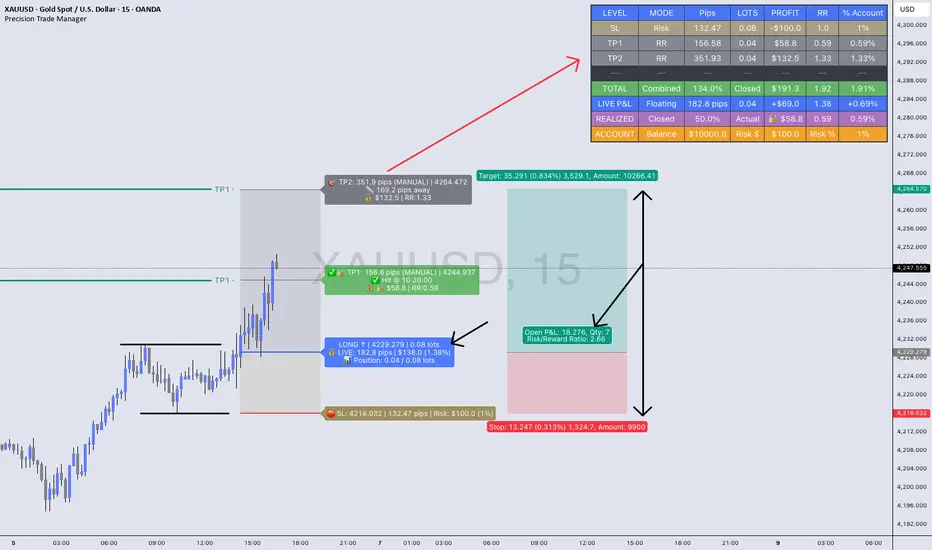
🔥Precision Trade Manager is a complete execution - planning and trade-management system for TradingView.
It gives you full control over entry, stop-loss, position sizing, risk %, multi-TP planning (1–5), live tracking, realized profit, floating P&L, RR, and account % change — all directly on your chart.
Because this tool has many features and workflows, the TradingView description is too short to explain everything properly.
For that reason, please read the two PDF guides below before using the indicator.
They explain exactly how the tool works, how to set it up correctly, and how to avoid mistakes when planning or managing trades.
📘 PDF 1 — Quick Start Guide (Read First)
drive.google.com/file/d/1cFMp3eZICr8uXQKZrDojGUuP6UNlfC6b/view?usp=sharing
This guide explains the core workflow step-by-step:
✔ How to add the tool to the chart
✔ How to configure assets, contract size, account balance, and trading costs
✔ How to set Entry, SL, and your risk %
✔ How to set TP1–TP5 using RR mode or manual mode
✔ How partials work
✔ How LIVE TRACKING mode works
✔ How to reset and prepare your next trade
This PDF teaches you the correct operational flow, so you understand how Precision Trade Manager behaves on the chart and why certain features exist.
Reading this first prevents confusion and ensures you use the tool correctly.
📙 PDF 2 — Feature Overview & Visual Examples
drive.google.com/file/d/18tgBJQZoRm1Ch2t9_lyEhbGgVW3fr7MD/view?usp=sharing
This PDF gives a full breakdown of everything the tool is capable of:
✔ Real-time dashboard metrics (pips, lots, RR, profit, % account)
✔ Partial TP tracking with green checkmarks and locked profit
✔ Floating vs. locked mode
✔ Pip/point/currency conversions across Gold, Forex, Indices, and Crypto
✔ Example charts for US30, EURUSD, and XAUUSD
✔ A direct comparison against the TradingView Long/Short tool
This document is visual. It shows real examples of the tool in action so you understand what to expect once you’re using it live on your chart.

It is highly recommended to look through this PDF before your first trade. It will help you understand the dashboard, interpret every metric, and recognize the benefits versus the default TradingView tools.
(The tool has many (!) tooltips, hower mouse over each. To get a clear description of what each function/button/box do)
It gives you full control over entry, stop-loss, position sizing, risk %, multi-TP planning (1–5), live tracking, realized profit, floating P&L, RR, and account % change — all directly on your chart.
Because this tool has many features and workflows, the TradingView description is too short to explain everything properly.
For that reason, please read the two PDF guides below before using the indicator.
They explain exactly how the tool works, how to set it up correctly, and how to avoid mistakes when planning or managing trades.
📘 PDF 1 — Quick Start Guide (Read First)
drive.google.com/file/d/1cFMp3eZICr8uXQKZrDojGUuP6UNlfC6b/view?usp=sharing
This guide explains the core workflow step-by-step:
✔ How to add the tool to the chart
✔ How to configure assets, contract size, account balance, and trading costs
✔ How to set Entry, SL, and your risk %
✔ How to set TP1–TP5 using RR mode or manual mode
✔ How partials work
✔ How LIVE TRACKING mode works
✔ How to reset and prepare your next trade
This PDF teaches you the correct operational flow, so you understand how Precision Trade Manager behaves on the chart and why certain features exist.
Reading this first prevents confusion and ensures you use the tool correctly.
📙 PDF 2 — Feature Overview & Visual Examples
drive.google.com/file/d/18tgBJQZoRm1Ch2t9_lyEhbGgVW3fr7MD/view?usp=sharing
This PDF gives a full breakdown of everything the tool is capable of:
✔ Real-time dashboard metrics (pips, lots, RR, profit, % account)
✔ Partial TP tracking with green checkmarks and locked profit
✔ Floating vs. locked mode
✔ Pip/point/currency conversions across Gold, Forex, Indices, and Crypto
✔ Example charts for US30, EURUSD, and XAUUSD
✔ A direct comparison against the TradingView Long/Short tool
This document is visual. It shows real examples of the tool in action so you understand what to expect once you’re using it live on your chart.

It is highly recommended to look through this PDF before your first trade. It will help you understand the dashboard, interpret every metric, and recognize the benefits versus the default TradingView tools.
(The tool has many (!) tooltips, hower mouse over each. To get a clear description of what each function/button/box do)
Skrip terproteksi
Skrip ini diterbitkan sebagai sumber tertutup. Namun, Anda dapat menggunakannya dengan bebas dan tanpa batasan apa pun – pelajari lebih lanjut di sini.

Pernyataan Penyangkalan
Informasi dan publikasi ini tidak dimaksudkan, dan bukan merupakan, saran atau rekomendasi keuangan, investasi, trading, atau jenis lainnya yang diberikan atau didukung oleh TradingView. Baca selengkapnya di Ketentuan Penggunaan.
Skrip terproteksi
Skrip ini diterbitkan sebagai sumber tertutup. Namun, Anda dapat menggunakannya dengan bebas dan tanpa batasan apa pun – pelajari lebih lanjut di sini.
Pernyataan Penyangkalan
Informasi dan publikasi ini tidak dimaksudkan, dan bukan merupakan, saran atau rekomendasi keuangan, investasi, trading, atau jenis lainnya yang diberikan atau didukung oleh TradingView. Baca selengkapnya di Ketentuan Penggunaan.